

Minecraft enthusiasts and fast-food lovers have a delightful opportunity to combine their passions, thanks to a collaboration between McDonald’s and the creators of Minecraft. This partnership introduces exclusive in-game skins inspired by McDonald’s iconic characters and menu items, available through special promotions. If you’re eager to personalize your Minecraft avatar with these unique skins, follow this comprehensive guide to redeem your McDonald’s-themed Minecraft skin.
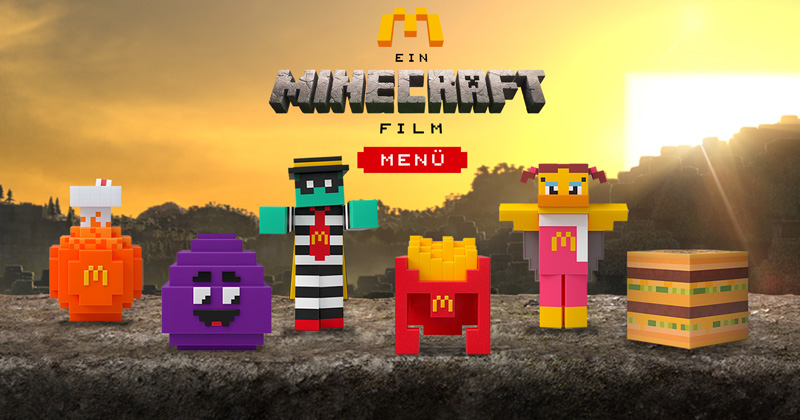
Starting April 1, 2025, McDonald’s launched “A Minecraft Movie Meal” in anticipation of the upcoming “A Minecraft Movie” set to premiere on April 4, 2025. This limited-time meal offers customers a choice between a Big Mac or a 10-piece Chicken McNuggets, accompanied by medium fries, a drink, and a collectible item. Notably, the Chicken McNuggets meal includes the exclusive Nether Flame Sauce, a spicy condiment inspired by Minecraft’s fiery Nether realm. citeturn0search1
Each collectible item in the meal is designed with Minecraft’s signature blocky aesthetic and represents McDonald’s beloved characters or menu items. The six unique collectibles are:
- Big Mac Crystal
- Birdie Wings
- Fry Helmet
- Grimace Egg
- Soda Potion
- Zombie Hamburglar
Each of these collectibles comes with a card containing a unique code that unlocks a corresponding exclusive skin in the Minecraft Marketplace. citeturn0search1
Steps to Redeem Your McDonald’s Minecraft Skin
To add the McDonald’s-themed skin to your Minecraft character, follow these detailed steps:
- Obtain a Code: Purchase “A Minecraft Movie Meal” from a participating McDonald’s outlet. Inside, you’ll find one of the six collectibles, each accompanied by a card with a unique 5×5 redemption code.
- Access the Redemption Portal: Navigate to the official Minecraft redemption page by visiting minecraft.net/redeem.
- Log into Your Microsoft Account: Click on the “Sign In” button located at the top-right corner of the page. Enter the credentials associated with your Microsoft account. Ensure this is the same account linked to your Minecraft game.
- Enter the Redemption Code: Once logged in, you’ll be prompted to input your unique 5×5 code. Carefully type in the code exactly as it appears on your collectible card.
- Confirm and Redeem: After entering the code, click on the “Redeem” button. A confirmation message will appear, indicating that the skin has been successfully added to your account.
- Access the Skin in Minecraft: Launch Minecraft and navigate to the character customization section. Your newly redeemed McDonald’s-themed skin should now be available among your skin options. Select it to apply to your character.
Important Details to Note
- Redemption Deadline: All McDonald’s skin codes must be redeemed by December 31, 2025. Ensure you redeem your code before this date to avoid missing out. citeturn0search3
- One-Time Use Codes: Each code is unique and can only be used once. Attempting to reuse a code will result in an error message.
- Regional Availability: This promotion is available at participating McDonald’s locations. It’s advisable to check with your local McDonald’s to confirm their participation.
- Digital Add-On Pack: Customers who order “A Minecraft Movie Meal” through the McDonald’s App will receive an additional in-game bonus. This includes a one-time redeemable code for the McDonald’s Add-On pack in Minecraft, featuring McDonaldland characters, builds, and tools. citeturn0search1
Troubleshooting Common Issues
If you encounter any problems during the redemption process, consider the following solutions:
- Invalid Code Error: Double-check the code for any typographical errors. Ensure you’re entering all characters correctly, paying close attention to similar-looking characters such as ‘0’ (zero) and ‘O’ (capital letter O).
- Code Already Redeemed: If you receive a message stating the code has already been used, verify that you haven’t previously redeemed it. If you’re certain it’s unused and still face issues, contact Minecraft’s customer support for assistance.
- Skin Not Appearing: After successful redemption, if the skin doesn’t appear in your Minecraft account, try restarting the game. Ensure you’re logged into the correct Microsoft account linked to your Minecraft profile.
Enhancing Your Minecraft Experience
Beyond the McDonald’s skins, there are numerous ways to personalize and enhance your Minecraft gameplay:
- Explore the Minecraft Marketplace: Discover a vast array of skins, texture packs, and worlds created by the community. Many of these are free or available for purchase using Minecoins.
- Participate in Community Events: Engage with the Minecraft community through events and challenges. These often offer exclusive rewards and provide opportunities to showcase your creativity.
- Stay Updated on Collaborations: Keep an eye out for future collaborations between Minecraft and other brands. These partnerships often introduce unique content and collectibles that can enrich your gaming experience.



