Generative AI can create striking images and videos in seconds, but the results are still difficult to control. A model may change the shape of an object, alter the camera position, modify character details, or depict the same scene differently from one frame to the next. One way to make generation more predictable is to use a 3D scene as its foundation.
We spoke with Vladyslav Nazymok, a computer graphics expert with many years of experience in computer graphics, game development, and visual production. He explained how this approach works, what problems it solves, and why combining 3D with artificial intelligence can be useful in architecture, advertising, film, animation, and game development.
What is the main problem with generating images from text prompts alone?
It is easy to ask an AI model to create “a modern living room,” “a car engine,” or “a cutscene featuring a moonwalk.” It is much harder to describe exactly where the camera should be placed, how far apart the objects should be, how a specific product is constructed, or what pose a character should take.
A generative model creates an image that looks plausible, but not necessarily one that is accurate. It may change the shape of an object, rearrange its components, distort the perspective, or interpret the same subject differently across multiple frames. These are precisely the problems that currently slow down AI-based production workflows.
How does 3D help solve this problem?
A 3D scene defines the elements that generative models usually struggle with most: space, scale, perspective, composition, and movement. The artist determines the camera position, the dimensions of the objects, and their placement relative to one another in advance. The AI no longer has to invent the entire scene from scratch. Instead, it works on top of an established structure. In simple terms, 3D is responsible for the framework and staging, while the generative model handles materials, lighting, atmosphere, detail, and visual style.
Do you need to create fully detailed 3D models?
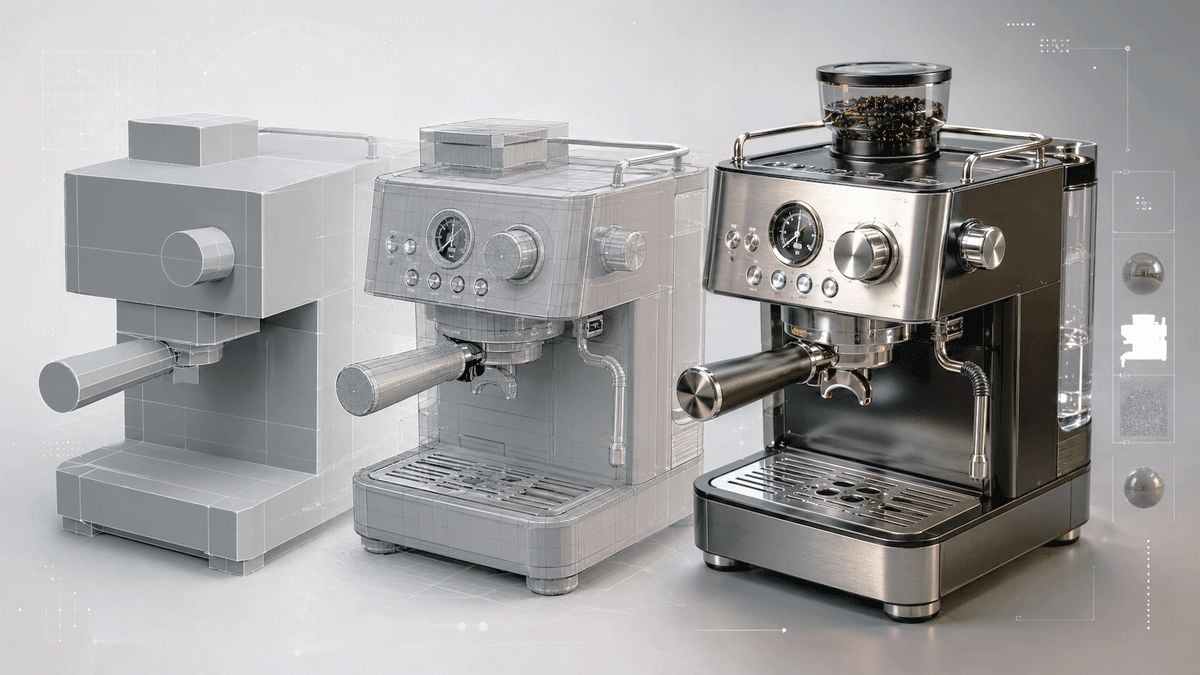
A simple scene made from cubes, cylinders, planes, and standard digital characters is often enough. It may look like a rough grey mock-up without polished materials or complex lighting.
At this stage, it is more important to establish the correct proportions, camera lens, composition, and placement of the major elements. For video, the camera movement, duration of the action, and character animation are also defined.
How is movement added to the process?
A standard 3D character can be given a ready-made animation or motion-capture data. This might include walking, running, gesturing, or interacting with objects. The result is a digital blueprint of the future scene. Before generation even begins, you can see where the character is positioned, how they move, what appears in the foreground, and which objects overlap. If the staging does not work, it can be corrected directly in 3D before running the generation again.
What exactly does the AI receive from the 3D scene?
In addition to a basic preview render, the scene can provide several types of technical images. A depth map shows which objects are closer to or farther from the camera. An edge map records silhouettes. A normal map helps preserve the shape and orientation of surfaces. Masks separate the character, walls, furniture, or product from one another. A pose map transfers the position of the body.
Together, these inputs act as a system of constraints. They help the model understand which elements can be freely stylized and which ones need to remain unchanged.
What happens next?
The technical maps are loaded into a generative system together with a text description and visual references. The user can specify the materials, time of day, mood, lighting, and artistic style.
As a result, the grey blockout is transformed into a finished image featuring metal, glass, fabric, leather, vegetation, clothing, and sophisticated lighting. At the same time, the original composition, perspective, and placement of objects are preserved far more reliably than they would be with text-only generation.
Where can this approach be used?
It can be applied in almost any field that involves creating images or video. In architecture, the same model can quickly be presented in daytime, nighttime, futuristic, or premium visual styles without changing the layout or camera position.
In product advertising, 3D preserves the exact form of furniture, appliances, or packaging, while AI helps vary the environment, lighting, and overall mood of the campaign. In game development, a grey level blockout can be turned into a location concept. In film and animation, the camera movement, character action, and overall visual direction can be tested before expensive production begins.
What is the main advantage of this pipeline?
The main advantages are faster iteration and greater predictability. The same 3D blockout can be used to explore dozens of visual directions. At the same time, the artist keeps control of the foundation and can move the camera, adjust a pose, enlarge an object, or change a movement path. This is far more reliable than repeatedly trying to describe spatial changes in words and hoping the model interprets them in the same way every time.
Can this already replace traditional 3D rendering?
Not in every case. AI may still alter small details, deform hands, mechanical components, staircases, or text. In video, you may see flickering or changes in a character’s face, clothing, or object design from one frame to another.
Particular care is required when advertising real products. A model may generate something that looks very similar to the original product while changing its buttons, proportions, or the construction of individual parts. For this reason, the exact product is often retained from a traditional 3D render, while AI is used for the environment, atmosphere, and post-production.
What is the best way to think about this technology?
It should not be seen as a replacement for 3D or for the artist, but as a new production layer. 3D defines space, form, and movement. The human makes the artistic and directorial decisions. AI accelerates look development, variation, and final processing.
In this combination, the generative model stops being a source of random attractive images and becomes a tool that can be genuinely controlled.