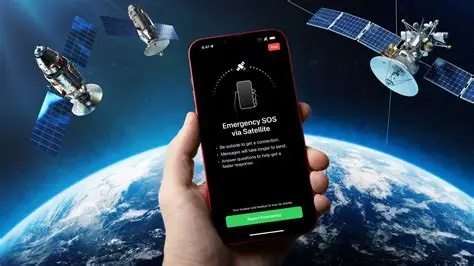
Ever wondered how satellite messaging works? Follow the guide to know how you can understand this work and how complex it is. So, let’s get started and see how it’s done!
What is satellite messaging?
If you want to understand what it is, imagine you are hiking deep in the backcountry, and there is no nearby cell tower, and your phone screen shows a “No Service” icon. Ordinarily, you are completely cut off from the world, and the network completely goes off. This is where satellite messaging steps in to bridge the gap.
The working of satellite messaging, instead of relying on the traditional network of ground-based cell towers, allows your device to beam text messages directly up to a network of satellites orbiting hundreds of miles above Earth. Those satellites then relay your message back down to a ground station, which routes it directly to your recipient’s phone or to emergency services. This is a longer route, but it helps when you lose cellular network.
But it wasn’t as smooth! For a long time, this technology required heavy, specialized satellite phones or dedicated emergency beacons used mainly by wilderness explorers and maritime workers. However, recent breakthroughs have integrated this capability directly into everyday smartphones that everyone uses. If you are stranded without a cellular connection, your phone can guide you to point the device toward an active satellite overhead to send a short text that would help you communicate.
Because of the vast distances the signals must travel, it comes with certain limitations. It is not meant for scrolling social media or even sending someone high-resolution videos. It can work for very little or very small data. It is primarily used for sharing your location coordinates, sending a quick check-in text to family to say you are safe, or even triggering an SOS distress signal during a critical emergency. It is a global safety net that helps you stay connected and at least let your message reach where you want it to, especially when there’s no network under dire circumstances.
Process of the working of satellite messaging
Let us dive into it and understand how satellite messaging actually works!
- So, when you send a satellite message, your phone manages to pull off this, transforming a device in your hand into a transceiver that talks directly to space. As cool as it sounds, it is very intricate. The entire sequence happens in a matter of seconds, moving from your tips, up through the atmosphere, and back down to Earth. Here is exactly how that process rolls out from the beginning and then starts everything.
- It all starts naturally when your smartphone realizes it has no connection to the standard grid. Normally, your phone is constantly listening for radio signals from terrestrial cell towers, which are usually within a few miles of you. When you wander out of range, those signals vanish. If you try to send a message, the phone recognizes the lack of cellular and Wi-Fi networks and automatically triggers its specialized satellite chip and software protocol.
- Before a single bit of data can leave your device, you have to establish a clear line of sight with a satellite. This is important, and thus the next things proceed. Since satellite antennas inside standard smartphones are incredibly compact compared to the giant dishes on a roof, they require precise aiming. Your phone will prompt you to stand in an open area away from heavy tree canopies, steep canyon walls, or tall buildings. An on-screen guide, often resembling a radar or a compass, will visually direct you to turn your body and point the top of your phone directly at the nearest active satellite moving across the sky so that the network or the connection can be established well.
- Once you are properly aligned, you type out a highly compressed text. Because bandwidth across space is limited and expensive, the software strips away all unnecessary data. It shrinks your text, packages it with your exact GPS coordinates, and then changes it into a tiny packet of data specifically designed for long-distance travel. It does work like that.
- Once it triggers or happens, the phone then fires a radio wave burst directly up through the atmosphere. This signal must travel a massive distance, and that is how it departs. Depending on the network your phone uses, it is either reaching out to a Low Earth Orbit constellation just a few hundred miles above you or a Geostationary satellite parked more than twenty thousand miles away. Either way, if the connection is established, it ultimately works.
- The satellite overhead catches this weak radio signal using its high-gain antennas. Because the satellite is moving quickly relative to your position, or because the signal has degraded slightly on its trip through the clouds, the satellite uses onboard processors to clean up the data packet, amplify it, and figure out where it needs to go next. It has multiple steps, but it doesn’t take long if the connection is kept set up.
- Almost instantly, the satellite beams amplified the signal back down to Earth. It targets a massive ground station that is scattered across the globe and features enormous satellite dishes designed to maintain constant, high-speed data links with the satellite networks above them.
- When this is done, the ground station receives the data and hands it over to the terrestrial internet. The gateway decodes the compressed packet, separating your message from the tracking data, and identifies the final destination.
- If you are sending a standard text to a loved one, the ground station routes the message into the traditional commercial cellular networks. From there, it lands in the recipient’s messaging app as a standard SMS, looking just like any other text message, though it often includes a link showing your exact location on a map. Yes, sharing the coordinates helps the recipient know where you are, as it may also be an SOS message.
- If you have triggered an emergency SOS instead of a casual text, the ground station routes the data to a specialized emergency response monitoring center. Human dispatchers at this center read your distress message, view your GPS coordinates, look up any medical info you preloaded into your phone, and contact the local search and rescue teams closest to your location. This is the best idea if you are in an unknown location and want to let someone know.
- The process then works in reverse to send a confirmation back to your hand. The ground station sends a receipt back up to the satellite, which sends it down to your phone, updating your screen to let you know the message went through successfully. If the recipient replies, their text goes to the ground station, up to space, and back down to your screen, keeping you connected even when you are completely off the grid.
How can I utilize satellite messaging?
It doesn’t take much, but it is complex. To use satellite messaging, you need a compatible smartphone, like any of the recent iPhones or premium Android models, or a dedicated satellite communicator. When you are completely outside cellular or Wi-Fi coverage, step into an open area with a clear view of the sky. Your phone will automatically offer a satellite option. Follow the on-screen prompts that come up next to aim your device directly at a satellite overhead. Once aligned, you can type and send short emergency alerts, location updates, or text messages.