• Send Us A Tip
  • Calling all Tech Writers
  • Advertise
Wednesday, July 29, 2026
  • Login
TechStory
  • News
  • Crypto
  • Gadgets
  • Memes
  • Gaming
  • Cars
  • AI
  • Startups
  • Markets
  • How to
No Result
View All Result
  • News
  • Crypto
  • Gadgets
  • Memes
  • Gaming
  • Cars
  • AI
  • Startups
  • Markets
  • How to
No Result
View All Result
TechStory
No Result
View All Result
Home How to

How to get Discord ID on mobile?

by Afeefa Ansari
July 28, 2026
in How to
Reading Time: 2 mins read
0
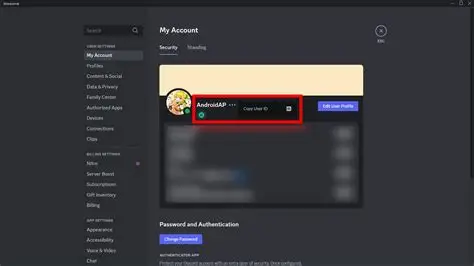
Discord ID

Credits - neveropen.tech

TwitterWhatsappLinkedin

Do you want to get your Discord ID on mobile? Here is how you can figure it out yourself. Find your answers inside this guide, and we’ll get our Discord ID on the phone. So, let’s get started.

You might also like

How to activate skulls in Halo Campaign Evolved?

How to unprivate a Twitter/X account?

How To Get & Use Message In A Bottle In Path Of Exile

Steps to get Discord ID on mobile

If you want your Discord ID to be visible on your mobile, then these are the steps you need to follow.

  • To begin, you can simply open the Discord app on your mobile phone and tap on your profile picture at the bottom right corner of the screen.
  • On the app itself, you have to go to the control room. For that, scroll down through the settings menu until you locate the App Settings section, then tap on Advanced.
  • Here you have to turn on the switch for Developer Mode, which enables special options like copying unique IDs across the app.
  • After you have done this, return to your main screen and tap on your profile picture again, or you can also simply tap on your name inside any chat to open your full profile card.
  • Look for the three dots icon in the top right corner of your profile card and tap on it.
  • This is the exact place where we have to look. So, select Copy User ID from the menu options that pop up at the bottom of your screen.
  • Open the keyboard and check. Your unique numeric Discord ID is now saved to your clipboard, so you can paste it wherever you need.
  • If you ever need to find someone else’s Discord ID on mobile, you have to make sure Developer Mode is already turned on in your advanced settings. After this, you must tap on the other person’s avatar or username in any chat or server, and you will have it there! You can select Copy User ID from the menu, and that’s it!

How does a Discord ID work?

Discord ID is an individual set of numbers that serves as your identity on the platform. While your display name can be changed anytime and shared with thousands of other users, your Discord ID is a unique set of 17 to 19 numbers assigned the moment an account, server, channel, or message is created.

Behind the scenes, Discord uses a system called Snowflakes to generate these IDs. The numbers are not assigned at random, and they actually encode the exact timestamp of when that item was created, along with internal tracking details that are unique to every person. Because these IDs never change, developers and automated bots use them to recognize specific users, manage server permissions, and keep track of data accurately.


Tags: #howtoDiscordDiscord IDDiscord ID on mobileHow to get Discord ID on mobile?
Tweet54SendShare15
Previous Post

Capital Efficiency Wins Apple Vaults Past Nvidia as Market Cap Nears $5 Trillion

Next Post

How to unprivate a Twitter/X account?

Afeefa Ansari

Recommended For You

How to activate skulls in Halo Campaign Evolved?

by Afeefa Ansari
July 28, 2026
0
Skulls in Halo

Do you wish to activate skulls in Halo Campaign Evolved? Follow the guide to trigger the activation of the skull in Halo and learn what it does in...

Read more

How to unprivate a Twitter/X account?

by Afeefa Ansari
July 28, 2026
0
X account logo

Having a private account on Twitter is fine. But what if you want a public account and gain some reach? Follow the guide to learn how you can...

Read more

How To Get & Use Message In A Bottle In Path Of Exile

by Khilav Jadav
July 28, 2026
0
How to Find a Corrupted Nexus in Path of Exile 2

Message in a Bottle is one of the newest and most exciting reward items added to Path of Exile. Introduced alongside the Curse of the Allflame league content,...

Read more
Next Post
X account logo

How to unprivate a Twitter/X account?

Please login to join discussion

Techstory

Tech and Business News from around the world. Follow along for latest in the world of Tech, AI, Crypto, EVs, Business Personalities and more.
reach us at info@techstory.in

Advertise With Us

Reach out at - info@techstory.in

Aviator Game India 2026

BROWSE BY TAG

#Crypto #howto 2024 acquisition AI amazon Apple Artificial Intelligence bitcoin Business China cryptocurrency e-commerce electric vehicles Elon Musk Ethereum facebook funding Gaming Google India Instagram Investment ios iPhone IPO Market Markets Meta Microsoft News OpenAI samsung Social Media SpaceX startup startups tech technology Tesla TikTok trend trending twitter US

© 2025 Techstory.in

No Result
View All Result
  • News
  • Crypto
  • Gadgets
  • Memes
  • Gaming
  • Cars
  • AI
  • Startups
  • Markets
  • How to

© 2025 Techstory.in

Welcome Back!

Login to your account below

Forgotten Password?

Retrieve your password

Please enter your username or email address to reset your password.

Log In
Are you sure want to unlock this post?
Unlock left : 0
Are you sure want to cancel subscription?