Quick Answer: A Pokémon GO 100 IV finder helps players locate perfect-IV Pokémon, also called hundos, and identify their coordinates before they disappear. You can use community coordinate maps, Discord channels, or an integrated Pokémon GO radar to search for these spawns.
One important rule: Trainers must be Level 30 or higher to reliably share the same wild Pokémon IVs. Players below Level 30 may encounter different IV values at the same location.
For a more convenient approach, Fonelora Location Changer and its mobile companion, Fonelora Go, offer Pokémon GO Resource Radar and Pokémon Search features with an IV 100 filter. These tools help you find available hundo coordinates and load locations directly into their GPS movement controls.
1. What Is a Pokémon GO 100 IV Finder?
A Pokémon GO 100 IV finder is a tool that searches for Pokémon with perfect Individual Values (IVs).
Every Pokémon has three IV stats:
- Attack: 0–15
- Defense: 0–15
- HP: 0–15
A Pokémon with 15/15/15 IVs has a perfect 100% IV rating, also known as a 4-star Pokémon or hundo.
Without weather boosts, the probability of encountering a perfect-IV Pokémon in a normal wild spawn is approximately 1 in 4,096. For weather-boosted wild Pokémon, the probability improves to approximately 1 in 1,728.
Can You Find 100 IV Pokémon in the Game?
Pokémon GO allows players to type 4* into the Pokémon storage search bar to find perfect-IV Pokémon they have already caught.
However, this feature cannot locate wild 100 IV Pokémon before you catch them.
To discover available wild hundos and their coordinates, players generally rely on external coordinate finders or radar tools.
2. Best Pokémon GO 100 IV Finder: Why I Recommend Fonelora
There are several ways to find 100 IV Pokémon GO coordinates, but not all methods offer the same convenience.
| Finder Method | Advantages | Limitations |
| Discord coordinate channels | Community reports, often free | Manual searching, copying and pasting |
| Web-based Pokémon maps | Useful regional spawn information | Limited coverage and potentially outdated data |
| Fonelora Location Changer / Fonelora Go | Built-in radar, IV 100 filtering, direct location loading | Requires Pro access; coverage varies |
For players who frequently search for perfect Pokémon, Fonelora Location Changer is my preferred option because it combines Pokémon discovery and GPS location management in one interface.
Instead of repeatedly switching between a Discord channel, a browser and a GPS tool, you can search for Pokémon and select their locations directly.
What Makes Fonelora Useful for 100 IV Hunting?
- Built-in Pokémon GO Resource Radar
Explore available Pokémon, Raids, Gyms, PokéStops, Routes, Max Battles and Field Research resources directly on the map.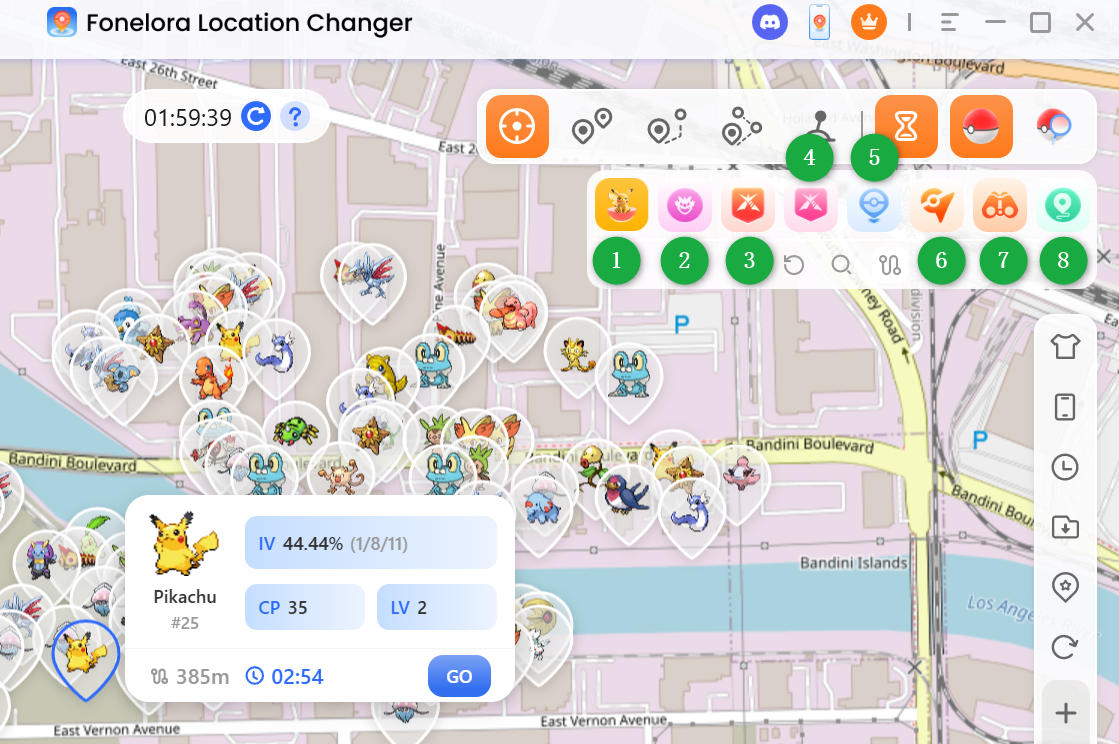
- Dedicated IV 100 Filter
Use Pokémon Search to display only available Pokémon with perfect 100% IVs. This is especially helpful when you want to avoid manually checking individual spawn reports.
- Pokémon Details and Despawn Countdown
Review Pokémon information such as IV, CP, level, distance and remaining spawn time before selecting a target.
- Direct GPS Location Loading
Select a Pokémon from the radar or search results and send its coordinates to Fonelora’s location-changing controls.
- Desktop and Mobile Support
The desktop version works through Windows or macOS, while Fonelora Go brings radar and location-changing features to supported iOS and Android devices.
You can choose the workflow that fits your setup instead of relying exclusively on a computer.
3. How to Find 100 IV Pokémon GO Coordinates with Fonelora
Fonelora provides two options: use the desktop client for a larger map interface or use Fonelora Go for mobile-based searching.
Method 1: Use Fonelora Location Changer on Windows or Mac
Step 1. Install Fonelora Location Changer
Download and launch Fonelora Location Changer on your Windows PC or Mac. Connect a supported iPhone or Android device using the appropriate connection method, then select Game Mode.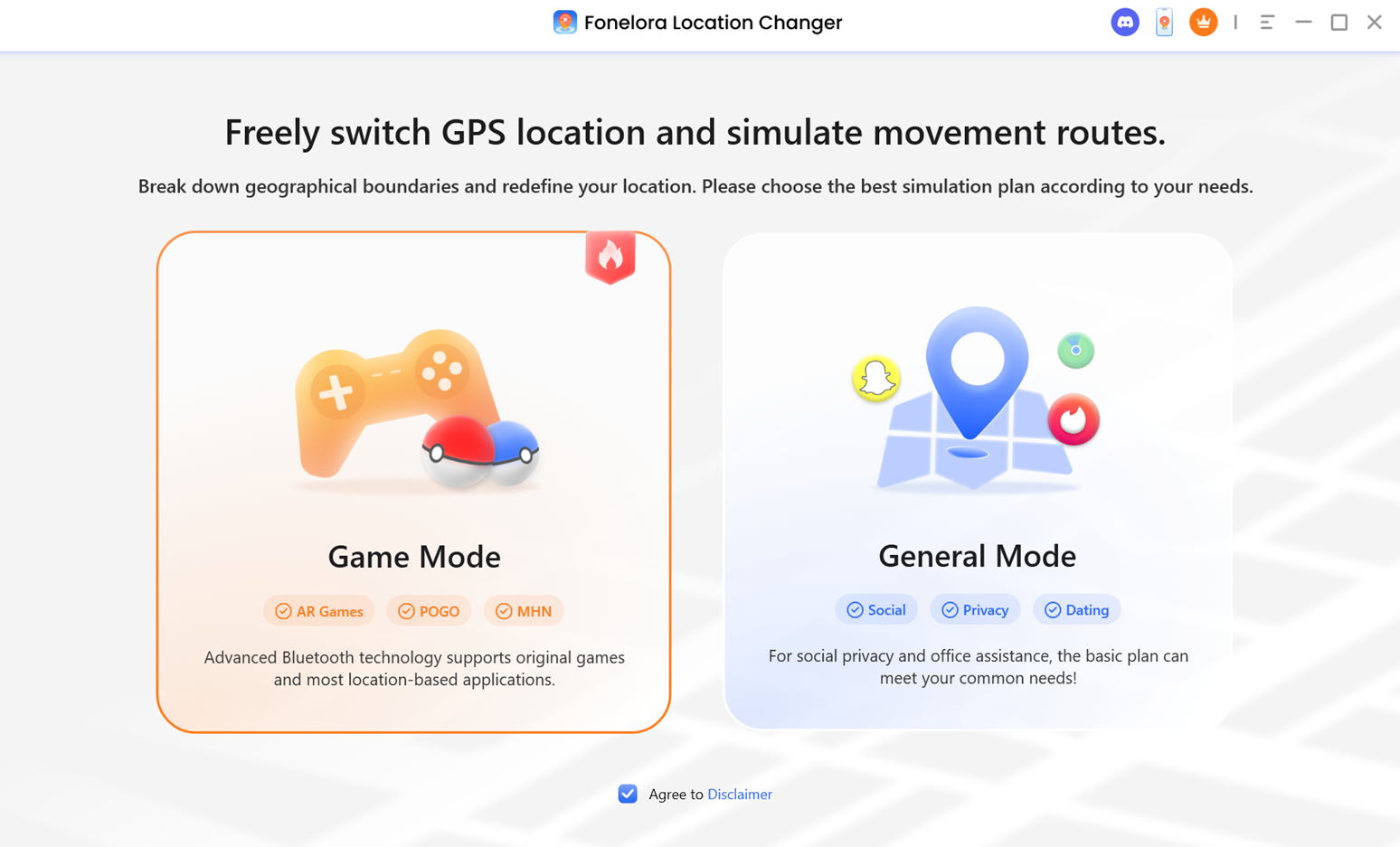
Step 2. Open Pokémon Radar or Pokémon Search
Find the PoGo tools on the right-side toolbar.
- PoGo Radar: Explore available Pokémon and other resources on the map.
- PoGo Search: Search for specific Pokémon and apply advanced filters.
For finding perfect-IV Pokémon, open PoGo Search.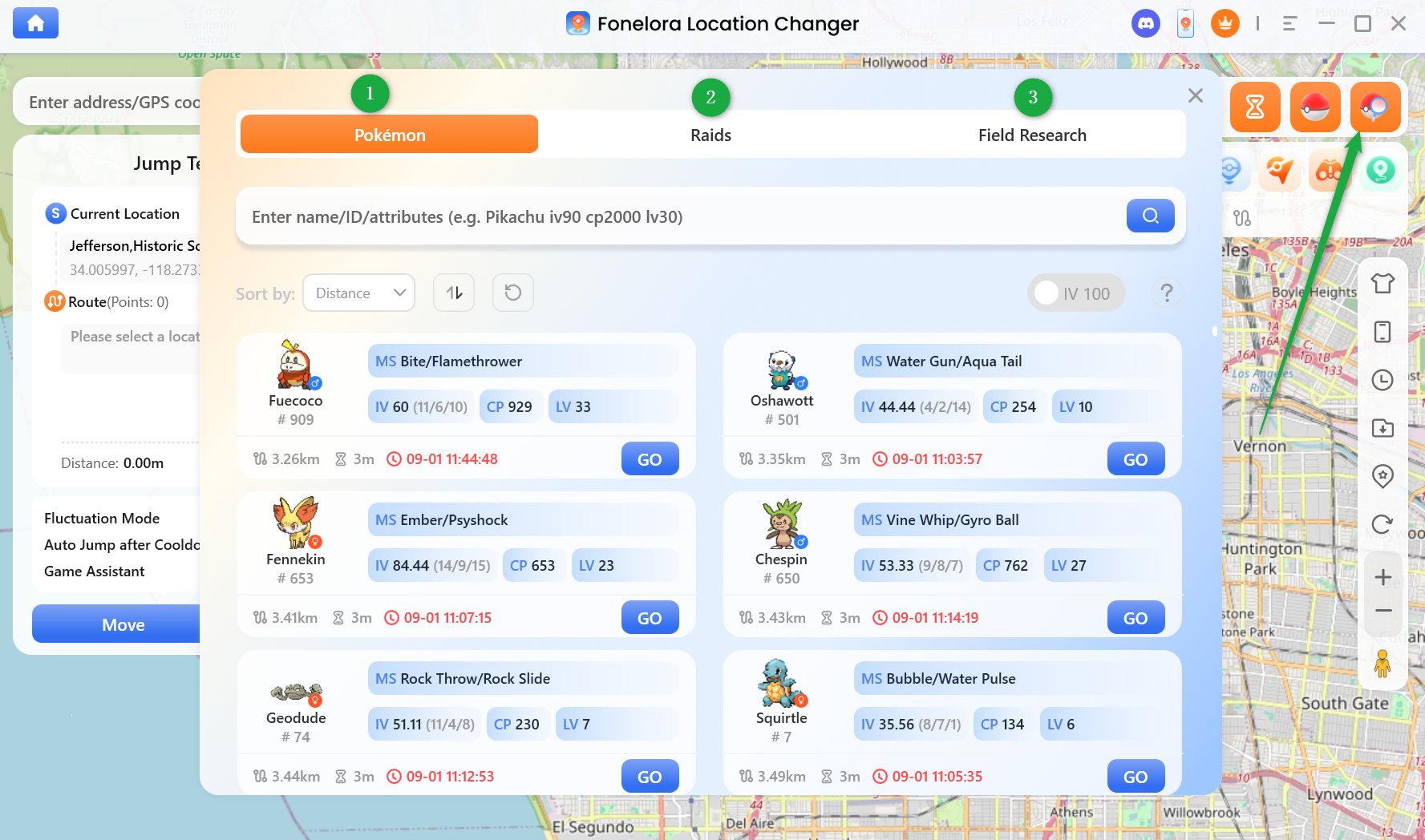
Step 3. Enable the IV 100 Filter
Select the Pokémon tab and enable IV 100. The search results will display available Pokémon matching the perfect-IV filter.
You can also search for particular Pokémon species or use other supported search parameters.
Step 4. Check Pokémon Coordinates and Availability
Review the matching Pokémon. Pay attention to their details and remaining spawn times. If you need more information about a particular spawn, open its resource card on the radar.
Step 5. Load the Coordinates and Change Your Location
Click Go on your selected Pokémon to send its coordinates to the currently selected location-changing mode. Then click Start Moving to apply the GPS location change.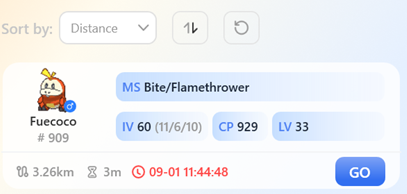
This integrated process removes the need to copy coordinates manually between multiple tools.
Method 2: Use Fonelora Go on iPhone or Android
If you prefer finding 100 IV Pokémon directly on your phone, Fonelora Go offers built-in Resource Radar and Pokémon Search features.
Step 1. Install Fonelora Go
Install Fonelora Go on your iOS or Android device and complete the initial setup. A computer may be required for the first-time setup on iPhone.
Step 2. Open Pokémon Search
Launch Fonelora Go, tap the Pokémon icon on the right toolbar, and open PoGo Search.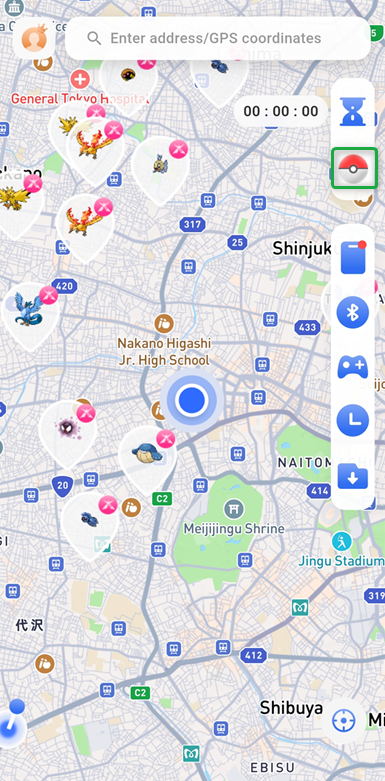
Step 3. Filter for 100 IV Pokémon
Select the Pokémon tab and enable IV 100 to find available perfect-IV Pokémon.
Step 4. Choose a Pokémon
Browse the results and check the Pokémon’s details and remaining spawn time.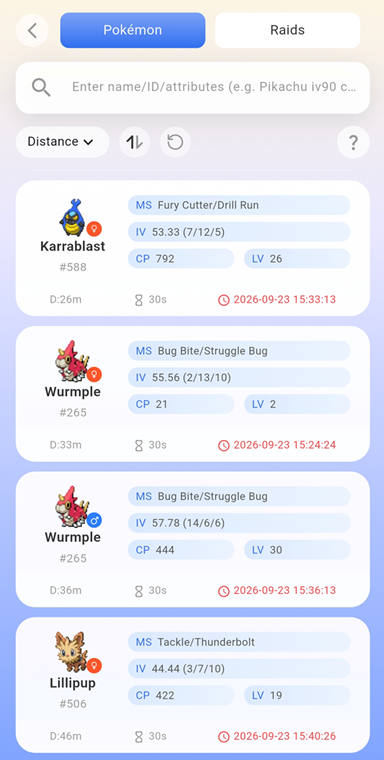
Step 5. Change Your Location
Tap Go to load the Pokémon’s coordinates and apply the location change.
With Fonelora Go, you can search for 100 IV Pokémon and manage GPS movement directly from your phone after completing the required setup.
4. Where to Find 100 IV Pokémon GO Coordinates: Popular Hotspots
If you’re searching for the best place to spoof Pokémon GO, popular areas with active Pokémon GO communities are useful starting points for radar searches.
However, there is an important distinction:
A popular Pokémon GO hotspot is not the same as a verified 100 IV Pokémon spawn.
The coordinates below identify well-known Pokémon GO locations, not currently confirmed hundo encounters.
| Popular Location | GPS Coordinates | Why Explore It? |
| Central Park, New York | 40.785091, -73.968285 | Popular urban park with Pokémon GO activity and walking routes |
| Pier 39, San Francisco | 37.809326, -122.409981 | Well-known waterfront hotspot with nearby PokéStops |
| Zaragoza, Spain | 41.662211, -0.894182 | Popular area for concentrated urban gameplay |
| Shinjuku, Tokyo | 35.690560, 139.699440 | Busy city district with Gyms and active Pokémon GO communities |
These places can be useful starting areas for browsing radar resources, but none guarantees a perfect Pokémon.
How to Choose the Best Location for Hundo Hunting
Instead of repeatedly visiting the same popular coordinates, try this approach:
- Start with a location where the Pokémon radar has available resource coverage.
- Open Pokémon Search and enable the IV 100 filter.
- Check the available results rather than assuming that a popular city has better IV odds.
- Review the remaining spawn times before selecting a target.
- Refresh the search when resources expire or no matching Pokémon are found.
The best location for finding a hundo is ultimately where a currently available, verified 100 IV Pokémon is spawning, not necessarily the most famous hotspot.
For a broader comparison of popular locations, see this guide to the best places to spoof Pokémon GO.
5. Important Tips Before Using 100 IV Pokémon GO Coordinates
Finding a perfect-IV coordinate is only part of the process. Several factors may affect your results.
1.Follow the Trainer Level 30 Rule
For ordinary shared wild spawns, trainers at Level 30 or above generally encounter matching IV values. Below Level 30, the same Pokémon may have different IVs. This means that a reported 100 IV coordinate may not produce a hundo for a lower-level trainer.
2.Pay Attention to Despawn Timers
Wild Pokémon do not stay at one location indefinitely. A resource listing may already be close to expiring when you find it. Check the remaining time before deciding whether to pursue it. Even a recently listed coordinate can become unavailable before you arrive.
3.Understand Cooldown Restrictions
Teleporting long distances and immediately interacting with Pokémon GO may trigger cooldown restrictions or account penalties.
Fonelora’s Cooldown Timer helps you manage waiting periods and reduce the risk of cooldown-related issues.
4.Refresh Your Radar Results
If your Pokémon GO 100 IV finder returns no results, it does not necessarily mean the tool is malfunctioning. There may simply be no matching live resources in the selected area. Try expanding the search area, changing the target Pokémon or refreshing the available resource data.
Final Thoughts: Find 100 IV Pokémon More Efficiently
A Pokémon GO 100 IV finder can make searching for perfect Pokémon more convenient, especially when it provides accurate coordinates and useful spawn information.
Discord channels and web maps remain practical options for occasional searches. However, their manual workflows can become inconvenient when dealing with time-limited Pokémon.
For players who want a more integrated experience, Fonelora Location Changer and Fonelora Go offer a convenient combination of Pokémon Radar, IV 100 filtering and GPS location controls.
You can use the desktop version for a larger map view or the mobile version for supported on-device workflows.
The key is to check live resource availability, understand the Trainer Level 30 rule and recognize the risks associated with location-changing tools.
Explore Fonelora Location Changer to learn more about its desktop and mobile Pokémon GO radar features.