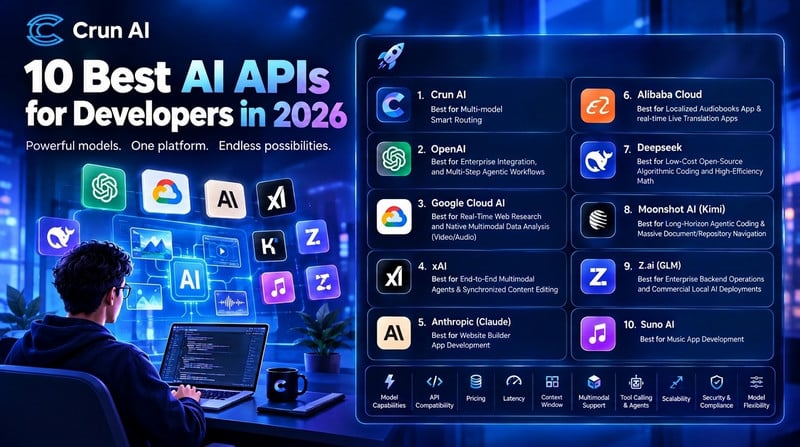
AI APIs are changing how developers build software. Instead of creating every AI feature from scratch, developers can connect applications to existing models for text generation, coding assistance, image creation, video production, voice interaction, and more.
In 2026, the AI API market offers more choices than ever. Some providers focus on advanced reasoning and coding, while others specialize in multimodal analysis, speech generation, or AI music. Multi-model platforms like Crun AI also allow developers to access different models through a unified interface.
However, choosing the right AI API is not just about finding the most powerful model. Developers must also consider pricing, response speed, integration requirements, security, and the flexibility to switch models as their applications grow.
This guide covers the 10 best AI APIs for developers in 2026, their main strengths, and the projects they are best suited for.
What Are the Types of AI API?
AI APIs allow applications to communicate with AI models through requests and responses. They can be grouped into several categories based on the tasks they perform.
Natural Language Processing (NLP) APIs
NLP APIs help applications understand and generate human language. Common capabilities include text generation, summarization, translation, sentiment analysis, information extraction, and code generation.
Modern language model APIs also support reasoning, structured outputs, embeddings, and tool calling. Developers can use them to build chatbots, AI assistants, coding tools, search systems, and automated business workflows.
Computer Vision APIs
Computer vision APIs process visual information, while generative image and video APIs create or modify visual content.
Depending on the model, developers can analyze images, recognize objects, generate product images, edit existing pictures, create marketing videos, or produce animated scenes from text and reference images.
These APIs are useful for e-commerce, gaming, design applications, video editing tools, and content creation platforms.
Speech & Audio APIs
Speech and audio APIs support tasks such as speech recognition, text-to-speech, voice cloning, audio transcription, translation, and real-time voice conversations. Some models can also generate music, sound effects, and complete audio tracks.
Developers can use these capabilities to build voice assistants, audiobook applications, meeting transcription tools, language-learning products, and AI music applications.
Many modern AI platforms combine multiple API categories, making it possible to build applications that understand text, images, video, and audio together.
Top 10 AI APIs for Developers in 2026
1. Crun AI — Best for Multi-Model Smart Routing
Crun AI is a unified multi-model AI API platform designed for developers, creators, and businesses that need access to different AI capabilities through one platform.
Instead of integrating every AI provider separately, developers can use Crun AI to access a range of language, image, video, audio, and music models through a unified API experience. The platform’s model catalog includes leading models from different providers, including OpenAI, Google, xAI, Anthropic, Alibaba, Deepseek, Moonshot, Z.ai, Suno, with availability depending on the current catalog and supported endpoints.
This approach is useful when an application needs more than one type of AI. A content creation tool, for example, might use a language model to develop a script, an image model to create concept art, a video model to generate scenes, and a music model to produce a soundtrack.
A unified platform can also make it easier to experiment with alternatives. Developers can compare different models for a task and choose an appropriate balance of output quality, speed, and cost. Smart routing, where supported, can help direct requests to suitable models based on application requirements.
Crun AI also provides developer documentation, model-specific endpoints, API usage tracking, and a Playground for testing supported models.
Best for: Multi-model applications, AI content creation platforms, SaaS products, and development teams that want to experiment with multiple AI providers without maintaining a separate integration for every model.
What to consider: Check model availability, endpoint compatibility, pricing, rate limits, and routing behavior for each workload. A unified API can simplify integration, but individual models may still have different input formats, output structures, and limitations.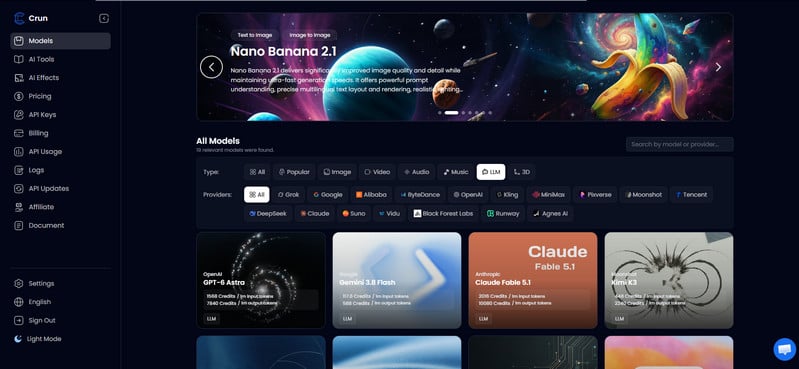
2. OpenAI — Best for Enterprise Integration and Multi-Step Agentic Workflows
OpenAI provides a broad set of AI capabilities through its API ecosystem. Developers can access language models for reasoning, coding, content generation, and structured data processing, alongside image generation, speech, audio, embeddings, and specialized models.
Its API tools can support multi-step workflows in which a model interprets a request, calls an external tool, processes the result, and produces a final response. This makes OpenAI useful for enterprise assistants, customer support systems, research tools, and AI-powered business applications.
Developers can also combine speech recognition and voice generation to create conversational interfaces. Embeddings can support semantic search, document retrieval, and recommendation systems.
Best for: Enterprise applications, AI agents, coding assistants, multimodal products, and applications that need several AI capabilities within one ecosystem.
What to consider: Model capabilities, API costs, rate limits, and data-handling requirements vary by model and service. Developers should test their specific workloads before selecting a production configuration.
3. Google Cloud AI — Best for Real-Time Web Research and Native Multimodal Data Analysis
Google Cloud AI provides access to AI services for language, vision, speech, and enterprise development. Its ecosystem includes Gemini models and image-generation technologies, with availability depending on the specific Google product and API.
Gemini Flash models are designed for applications that need a balance of speed, capability, and cost. Depending on the model and supported tools, developers can build applications that process documents, images, audio, and video.
For example, a developer could create a research assistant that summarizes information from connected search tools, analyzes a recorded meeting, or extracts useful details from video content.
Google’s image-generation ecosystem also includes Nano Banana branding for supported image-generation and editing models. Gemini Omni Flash should be evaluated against the official model catalog to confirm its exact product name and API availability before integration.
Best for: Multimodal applications, research assistants, video and audio analysis, and products built around Google Cloud services.
What to consider: Real-time web research may require a supported search or grounding tool. Check regional availability, quotas, and the exact model endpoint before building around a particular capability.
4. xAI — Best for End-to-End Multimodal Agents and Synchronized Content Editing
xAI offers APIs for its Grok language models and an expanding set of generative capabilities. Depending on current API availability, developers can work with language, image, video, and voice or audio-related features.
Grok’s language models can support conversational applications, coding assistance, reasoning, and workflows that use external tools. Image and video generation capabilities can help developers create content from prompts and visual references.
Combining these functions can support more advanced creative workflows. For example, an application could generate a visual concept, revise the prompt using a language model, and produce a video based on the approved direction.
For synchronized content editing, developers should verify that the specific editing, reference-handling, and audio-video features they need are available through the API rather than only in a consumer-facing product.
Best for: Multimodal agents, content-generation applications, and products that combine language intelligence with visual creation.
What to consider: Image, video, and audio capabilities may have separate endpoints, pricing, or availability restrictions. Check the official API documentation for supported inputs and outputs.
5. Anthropic (Claude) — Best for Website Builder App Development
Anthropic’s Claude API is a strong option for developers building applications that involve coding, long documents, and complex instructions.
Claude models can help generate code, explain existing projects, review implementations, and transform natural-language requirements into structured plans. These capabilities make Claude a great choice for website builders, AI coding assistants, and software development agents.
For example, a website-building application could accept a user’s description, generate page components, revise the code based on feedback, and help identify errors. With appropriate tools and execution environments, the application can also connect model outputs to a development workflow.
Claude’s long-context capabilities can be valuable when an application needs to process multiple files or substantial technical documentation. Actual context limits depend on the selected model.
Best for: Website builders, coding assistants, code review, repository analysis, and developer productivity tools.
What to consider: Generated code should be validated, tested, and reviewed before deployment. Tool use and context capacity vary across models and API configurations.
6. Alibaba Cloud — Best for Localized Audiobooks and Real-Time Translation Applications
Alibaba Cloud offers AI services for language, speech, and visual generation. Its Qwen model family supports language-related tasks, while its broader AI ecosystem includes speech technologies and generative media models.
Qwen3-TTS is relevant to applications that need text-to-speech capabilities, such as localized audiobooks, voice-enabled learning products, and automated narration. Developers should check the currently supported languages, voices, deployment options, and commercial terms for the specific model.
For a live translation application, developers may combine speech recognition, translation, and speech synthesis. A typical workflow captures a speaker’s audio, converts it to text, translates the text, and generates speech in the target language.
Best for: Multilingual applications, audiobook platforms, voice assistants, localization workflows, and generative media products.
What to consider: A complete real-time translation system may require multiple models and careful latency management. Confirm language coverage and commercial usage rights before launch.
7. DeepSeek — Best for Cost-Efficient Coding and Mathematical Reasoning
DeepSeek has attracted developer interest through its language models, coding capabilities, and cost-conscious API options. Depending on the model, its APIs can support code generation, debugging, mathematical reasoning, and general text tasks.
Developers can integrate DeepSeek into coding assistants, algorithm-solving tools, technical chatbots, and applications that process structured instructions.
Its reasoning-oriented capabilities are useful for tasks that require multiple steps, such as explaining a mathematical solution or investigating a programming error. Lower API costs can also make it attractive for applications that process many requests.
Best for: Coding assistants, mathematical problem-solving, technical automation, and budget-conscious language applications.
What to consider: Compare accuracy, response time, output quality, and total cost on your own test cases. Cost alone does not determine which model is best.
8. Moonshot AI (Kimi API) — Best for Long-Horizon Agentic Coding and Large Repository Navigation
Moonshot AI develops the Kimi model family, which is known for language tasks involving long documents and complex information processing. Its API can support applications that need to analyze large amounts of text, work with technical documentation, or maintain context across multi-step tasks.
For developers, potential applications include repository analysis, document research, codebase question-answering, and AI agents that coordinate several operations.
For example, a repository assistant could inspect project documentation, identify relevant files, summarize dependencies, and help developers plan a code change. The application can combine the model with file search, code execution, and other tools to complete more complex tasks.
Long-context support can reduce the need to split information into many small requests, although careful retrieval and context management are still important.
Best for: Large-document analysis, coding agents, repository navigation, research assistants, and long-running information workflows.
What to consider: Context limits, tool-calling behavior, output limits, and pricing differ by model. Test performance on realistic repositories rather than relying only on advertised context length.
9. Z.ai (GLM API) — Best for Enterprise Backend Operations and Flexible AI Deployment
Z.ai provides access to GLM language models for reasoning, coding, text generation, and agentic applications. The exact features depend on the selected model and API offering.
Developers can use GLM models to build internal assistants, automated support systems, document-processing pipelines, and backend services that handle structured tasks.
For example, an enterprise application could use a language model to classify incoming requests, extract important fields, draft responses, and route work to the appropriate internal system. Tool calling can connect these outputs to existing software when configured with suitable permissions.
Organizations interested in greater control over deployment may also evaluate the available model weights, licenses, and infrastructure requirements for relevant GLM releases.
Best for: Enterprise assistants, coding applications, backend automation, and organizations evaluating different model deployment options.
What to consider: Do not assume that every GLM model is available for commercial local deployment. Verify licensing, hosting options, security requirements, and API compatibility before choosing an implementation.
10. Suno AI — Best for Music App Development
Suno specializes in AI-generated music. Its technology can turn text prompts into musical compositions and songs, making it relevant to applications for creators, video producers, and interactive entertainment.
Potential use cases include soundtrack generation, music prototyping, creative tools, and applications that help users explore different musical styles.
One important consideration is API access. Developers should verify whether Suno offers an official API for their intended use case. If it does not, a third-party gateway may provide access to Suno-related functionality, subject to the gateway’s actual capabilities and terms.
A gateway can simplify integration, but it introduces an additional dependency. Developers should check reliability, data handling, pricing, usage rights, and whether the service is authorized to provide access.
Best for: AI music applications, creative production tools, soundtrack prototyping, and music-focused user experiences.
What to consider: Confirm API authorization and commercial music rights before launch. Do not assume that access through a third-party provider grants the same permissions as a direct, officially supported integration.
How to Choose the Right AI API
The best API depends on your application’s requirements, budget, and technical environment. Evaluate the following factors before making a decision.
Model Capabilities
Start with the task you need to solve. A coding assistant may require strong programming and reasoning skills, while an audiobook application needs natural-sounding speech.
API Compatibility
Check whether the API works with your programming language, framework, and existing infrastructure. OpenAI-compatible interfaces can simplify migration, but compatibility does not guarantee that every endpoint or feature will work without changes.
Pricing
Compare input and output token prices, image-generation costs, video duration charges, audio usage fees, and other expenses. Include retries, failed requests, and additional infrastructure in your estimates.
Latency
Fast responses matter for live chat, voice assistants, and interactive tools. Measure actual response times under realistic traffic rather than relying solely on published benchmarks.
Context Window
The context window determines how much information a model can process in one request. Larger contexts can help with long documents and code repositories, but they may increase cost and do not eliminate the need for good retrieval strategies.
Multimodal Support
If your application handles images, video, audio, or text together, confirm that the selected model accepts the required input formats and produces the outputs you need.
Tool Calling and Agents
Tool calling allows models to interact with functions, databases, search systems, and external services. For agentic workflows, also evaluate reliability, error recovery, permission controls, and the ability to manage multi-step operations.
Scalability
Review rate limits, concurrency, throughput, quotas, and support for production workloads. Make sure the provider can handle expected traffic and offers a practical path to increasing capacity.
Security and Compliance
Review data retention, encryption, access controls, regional processing, and relevant compliance commitments. Avoid sending sensitive information to an API until your organization’s requirements have been checked against the provider’s policies and terms.
Model Flexibility
Your first model may not remain the best choice as prices, capabilities, and product requirements change. Consider whether you can test alternatives, switch providers, or use a unified multi-model platform without rewriting large parts of your application.
FAQs about AI APIs
Which AI API Is Free for Developers?
Several providers offer free access, trial credits, or limited usage. For example, Crun AI provides eligible new users with free credits. But the terms vary and can change. Check the current pricing pages for OpenAI, Google Cloud, DeepSeek, and other providers before integrating an API.
Which API Is Best for Developers?
There is no single best AI API for every project. OpenAI is worth evaluating for broad AI capabilities and agentic workflows; Google Cloud AI for multimodal applications; Anthropic for coding and complex instructions; DeepSeek for cost-conscious reasoning and coding; and Crun AI for accessing multiple model families through a unified platform.
The right choice is the one that meets your requirements for quality, cost, latency, security, and maintenance.
Why Is It Important to Implement AI in Your Development and Workflow?
AI can help automate repetitive work, improve information retrieval, generate drafts, support coding, and enable features that would otherwise take significant time to develop.
How Can You Integrate AI into Your Development Strategy?
Begin with one clear use case, such as document summarization, customer support, code assistance, or image generation. Select a suitable API, build a small proof of concept, and evaluate its quality, latency, and cost.
Before production, add authentication, secure API-key management, logging, rate limiting, error handling, and output validation. Monitor performance and compare alternative models as your usage grows.
How Can Crun AI Help Developers?
Crun AI helps developers access multiple AI model families through a unified platform. Instead of managing a separate integration for every supported provider, developers can explore available language, image, video, audio, and music models through one platform.
Its developer tools include API documentation, model endpoints, a Playground, and usage tracking. This can help teams prototype AI features, compare models, and manage integrations for applications that use different AI capabilities.
Conclusion
The best AI API for your project depends on what you are building. OpenAI, Google Cloud AI, xAI, Anthropic, Alibaba Cloud, DeepSeek, Moonshot AI, Z.ai, and Suno each offer different capabilities and trade-offs.
For developers building applications that combine multiple AI capabilities, a unified platform such as Crun AI can provide another way to explore and integrate different models.
Start with your core use case, test several options, compare total costs, and choose an API architecture that can evolve as your application grows.