If anyone searches for “burn ISO to USB” they will get pages and pages of Rufus links. However, there is a big misconception with Rufus… it doesn’t create USB CD-ROM drives!
The only thing Rufus does is take a bootable ISO file and write the data to a USB stick. Basically Rufus will extra the data on an ISO file and write it to the flash drive. You can do the same thing with WinRAR.
There is nothing magical about Rufus when it comes to “making a CD” because Rufus doesn’t make a “CD.”
If you need to make a USB CD-ROM flash drive the best solution found so far, is the Disc License drive. The Disc License drive is a blank USB CD-ROM flash drive. Using their Drive Wizard software (free), easily write ISO files to USB. The resultant drive will be a USB CD-ROM flash drive.
Before we get into Disc License technology, we do need to clear up some points about WinRAR and Rufus software. WinRAR will extract all the files contained in an ISO file and write them to your USB flash drive; however, if the ISO is bootable, WinRAR won’t write the boot code. This is where Rufus does shine. The Rufus software will write all the files contained in an ISO file along with the boot code to make your device bootable. With that said, there is a clear advantage for using Rufus over WinRAR.
Does Rufus burn any ISO file to USB? NO.
Does Rufus make your USB flash drive read-only, like a CD? NO.
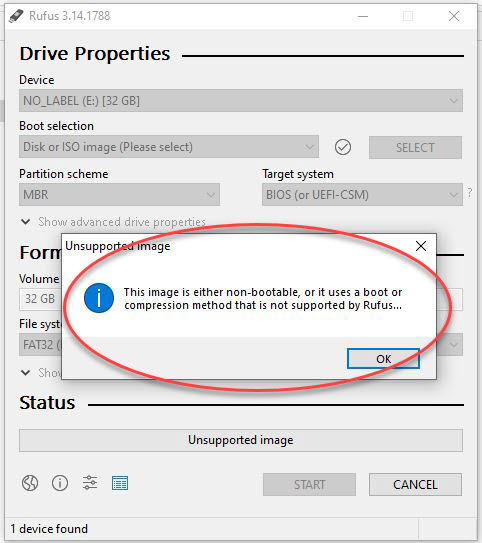
If the ISO file isn’t bootable, there isn’t much [more] Rufus can offer. A non-bootable image will display an error message saying “This image is either non-bootable, or it uses a boot or compression method that is not supported by Rufus.”
Rufus is truly designed for one thing:
Taking operating system ISO files and writing them to flash drives. This is a valuable tool for sure. With optical drives all but gone from laptops and computers and Microsoft supplying ISO files for their operating system, something needs to be done for getting the data of the ISO file copied to a flash drive, which of course must be bootable, and used in computers lacking a CD drive. Thank you Rufus!

As you can see from the image below the resultant drive from Rufus is a standard read/write flash drive. It does not appear as a CD-ROM and the device is not read-only (write protected).
Here, Windows assigns the typical flash drive icon to the device.

Here, Windows can format the content created by Rufus.

However; making a bootable USB drive for an operating system install might not be your ultimate goal.
Many users search the internet on how to make a USB CD-ROM flash drive from an ISO file and will never get a straight answer (until now).
There are many features people want to take advantage of with a USB CD-ROM flash drive configuration. Here are some:
- The need for auto-run functionality for software installations.
- Wanting the data on the USB stick to be read-only, or write protected.
- A library of ISO files a User doesn’t want to convert to image (IMG) files.
- User wanting to insure additional data isn’t added to the drive.
The Nexcopy solution will take any ISO file and copy the data to the USB flash drive to make a true USB CD-ROM flash drive. It is not required for the ISO to be bootable, only an image file with the file extension of.iso.
The Disc License drive by Nexcopy is a blank USB CD-ROM flash drive when it’s connected to the host computer. As you can see in this screen shot below, the device is a “RAW” CD-ROM drive. This is equivilant to a blank CD-R or DVD-R. The capacity of the blank USB CD-ROM is the same as the GB capacity of the flash drive itself. There is no ISO file size limit.

Once the ISO file is “burned” to the USB flash drive the end result is an optical disc with your content. As shown from the screen shot below you can see Windows assigned the USB flash drive a CD-ROM icon because, from a hardware stand-point, Windows thinks the USB is an optical disc.
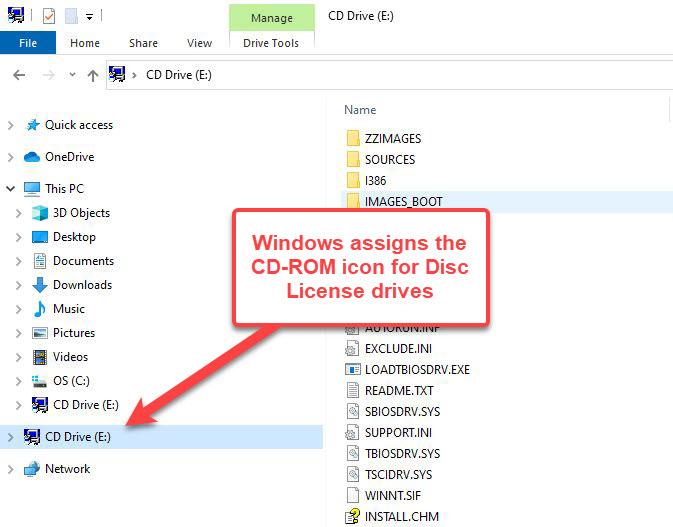
Trying to do the same thing we did with the Rufus flash drive, let us try and format the device. As you can see from the screen shot below since Windows flagged this device as a CD-ROM, Microsoft doesn’t even give the option to format. Nor does Windows give the option to delete a file.

We then took the Disc License drive and put the USB into a Mac computer to see how the OS handled the drive, and as you can see below, Mac computers also treat the drive as a USB CD-ROM flash drive.

With the above information in hand, if you are in search of creating a “true” USB CD-ROM flash drive then a Disc License drive is the right solution. The drive acts like a true optical disc in the operating system, the files are read-only and files cannot be deleted or formatted off the drive. In addition, files can’t jump onto the drive so an extra security measure against a virus or malware spreading through USB.
Source: GetUSB.info – Rufus and burning ISO files to USB flash drives.