There is no doubt in saying that videos are the key element for communication with the audience. According to the online sessions’ demand, video presentations can bring your purpose to another level. From education to business managers, video presentation software has great demand.
There are many pretty exceptional presentation video makers that will help you to enhance the visibility and promise to deliver a clear concept. This article will list down the 10 best ways to record a PowerPoint presentation.
What Is Video Presentation?
Video presentations are a well-known form of communication with a particular person through the help of a video. These presentations can even be used to explain a certain idea completely. These presentation video can be made with the help of PowerPoint slides, images that are still, animations, or even actual footages.
These video presentations come up in various formats, such as animated, educational, business, explainer, or product presentations. Such videos can be shared on any platform with some improved features. You are enabled to add a live introduction in your summit or webinars to impact your audience.
Adding video presentations gives a personal touch to your business and brand. It provides the surety of huge engagement due to numerous elements including, animations, transitions, and motion graphics. Video presentations have proven to be very useful for businesses and teaching purposes, especially during the pandemic period. These presentations have provided these institutions to successfully function their work with the aid of appropriate presentation video tools.
10 Best Video Presentation Softwares
Comprised of advanced features, there are many video presentation tools available in the market. In this part, we will discuss the 10 best video presentation software as well as their key features for a better understanding.
SOOMUS
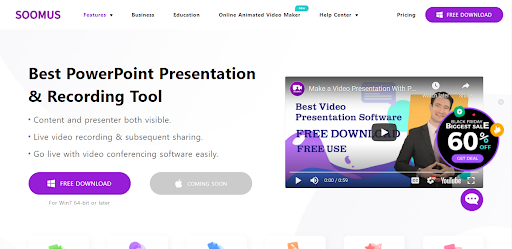
SOOMUS is known as the best video presentation software that enables video-makers to create impressive presentation pieces. The tool is integrated with a wide range of templates that saves your quality time. Apart from presentations, SOOMUS also lets you design advertisements for marketing or business purposes. With an easy to navigate and advanced interface, you are able to interact with its interface.
This tool gives you a revolutionary chance just to design your online presentations with a clear and better concept. Being a popular presentation tool, SOOMUS can be connected to third-party apps such as Zoom, Skype, etc. Therefore, the tool has gained huge recognition in education or business. The application allows screen sharing and video conferencing that makes your entire editing process smoother.
SOOMUS brings a platform to put your innovative ideas into outstanding video presentations. Undoubtedly, it is a flexible tool that deals with high-end features just to design your interesting presentations. It has a supported feature to adjust the presentation settings, including content and images. Some key features of SOOMUS are:
- This tool allows the user to import their educational or business-related well-prepared PPT file directly to its interface.
- Get the enhanced visuals, text, images, and other elements to be added to your presentations.
- Its huge template library saves a lot of time and effort in creating a video presentation from scratch.
- SOOMUS is able to change the background and makes it entirely true-to-life.
Make your Video Presentation Attractive and Meaningful by Clicking Here >>
Animaker
Animaker is a presentation video tool that provides its services for marketing, business, or educational purposes. It allows the video-makers to edit their videos in a variety of different styles. This video presenter software supports an easy interface to create animated characters, scenes, presentations, etc.
It also includes a huge library of audio, characters, images to be used in your videos. Animaker also offers a good amount of royalty-free media to create engaging and grabbing content for the audience. You can add or record music and voice-overs in your videos to look more presentable. Some of the key features supported by Animaker are as follows.
- Offers different texts, numbers, and backgrounds.
- Thousands of templates for animations.
- Allows several audios to add.
- Flexible fees for software.
Canva
Canva has a drag-and-drop interface that is one of the best software to record PowerPoint presentations. It is capable of designing and managing the creative skills of beginners and experts. You can use its free graphic content including tons of templates that will help you out. Canva lets you customize its graphic pieces to make them according to your marketing campaigns.
It also enables the marketers to record PowerPoint presentations with audio and video. The software offers a wide range of free and paid templates and elements to save the time and effort to create your work from scratch.
It has impressive elements of editing, cropping, and blurring, etc. Video editors can also add some extras, such as fun stickers or captions. Some key features of Canva are:
- Allows PDF, PNG, JPG, MP4, and GIF formats.
- Different folders for organized work.
- Intuitive drag-and-drop interface.
- Offers all types of social media templates and videos.
LibreOffice
Another powerful and effective video presentation software, LibreOffice, is rich in editing features. It provides the simplest way to embed your favorite videos into presentations. The tool is an open-source program that enables any person to use it. Anyone from business or education can access the tool’s features.
The video presenter software includes various sets of templates to be added to your presentations. LibreOffice has huge editing fonts, sizes, and colors. The user can even access the video clips library. LibraOffice have the following key features:
- Range of several templates.
- Various editing options.
- Audio and music effects.
- Better compatibility with OS.
Keynote
Another video presentations tool, Keynote, allows you to design and create presentations. It is an Apple version of the PowerPoint tool that is simple and combined with tons of advanced features. You can make elegant design pieces that do not require high skills. It enables you to generate professional, engaging, and clean slides design.
Keynote lets you add or change the themes according to your meeting. The user can use intuitive features that make the creation of any project easier. The tool offers a great opportunity to record presentations and explore new information.
Integrated with smooth design, everything in this tool looks modern with basic and necessary features. Following are some features offered by this tool:
- Offers built-in fonts and templates.
- Adds live videos in any presentation slides.
- Allows device synchronization.
- Provides animation options to add.
iSpringSolution
The fast and interactive software iSpringSolution allows the creation of professional presentations and modules. It does not require extra advanced skills to proceed with the tasks. iSpringSolution is an enhanced specially designed for creating training videos, e-courses, and dialogue simulations.
Professionally designed courses with simulations can be prepared using this tool. It provides a way to do training for partners, sales, or products. Undoubtedly, iSpring is used all over the world as an effective e-learning tool. iSpringSolution key features are as follows:
- iSpring Suite for fast and efficient eLearning.
- iSpring Quiz Maker for setting up the best interactive assessments.
- iSpring Page for making up perfect microlearning courses.
- iSpring Learn LMS for training yourself with robust professional approaches.
Visme
This drag-and-drop video presenter allows you to design your video presentations and other content. It can create customizable slides with plenty of elements to enhance the visual richness. With the help of its undo-redo options, the users can create an accurate final product for their meeting or seminar.
Visme is also a cloud-based solution that is integrated with hundreds of templates. It has numerous layouts, text fonts, styles, or icons. Moreover, it lets you add or upload any audio in their presentations. Following are some key features:
- Different color themes.
- User-friendly learning tool.
- Improved designing elements.
- Templates for instant results.
Promo
Promo is another video content maker tool that enables users to customize their business or educational videos. It supports several latest features, which are super helpful to bring your creativity in the editing. The tool has a wide range of video clips that can be used for any business or educational purpose.
It is a one-stop video presentation maker that lets you instantly design and create videos. A cloud-based software consisting of a simple and effective interface. In short, you can design high-quality video presentations with great support for error handling. A few key features of Promo are listed:
- Millions of images and videos.
- Allows the recording of audio tracks.
- HD video downloading.
- Responsive interface.
Lumen5
It is a bit of changed software that allows you to create video presentations. Originally, it imports the URL of any blog and then creates a presentation video with AI. However, Lumen5 has added more exciting features which can be used to customize the content.
This cloud-based video app offers several templates to start with the editing of videos and images. Lumen5 has animations for your presentation video. It also supports the drag-and-drop of some elements that make it stand out in the editing apps. Lumen5 is integrated with the following features:
- It gives many audio options.
- Supports 4 pricing plans.
- Variety of royalty-free elements.
- Integrated with an intelligent text analyzer.
Premiere
Quality and efficient video presenter software- Premiere Rush is mandatory when you want to create expert video content. It has relatively basic editing features that will serve the purpose of creating presentations. Adobe Premiere Rush allows you to split and trim their target editing video.
The user can also choose background music, loops, and sound effects in presentations. Premiere Rush lets you get through the shooting to sharing options. It is a desktop video editing app that does not require much space on the memory. Some key features of Premiere Rush are as follows:
- User-friendly and straightforward interface.
- Instant performance.
- Provides impressive title options.
- Effortless process for creating high-quality videos.
Wrapping Up
The above discussion is based on different ways to record your presentation video efficiently. As we have listed, there are many options available to assist you in designing high-quality presentation slides. Therefore, a thorough review of each tool will be helpful while choosing the software for your project.