

• Send Us A Tip
  • Calling all Tech Writers
  • Advertise
Monday, July 6, 2026
  • Login
TechStory
  • News
  • Crypto
  • Gadgets
  • Memes
  • Gaming
  • Cars
  • AI
  • Startups
  • Markets
  • How to
No Result
View All Result
  • News
  • Crypto
  • Gadgets
  • Memes
  • Gaming
  • Cars
  • AI
  • Startups
  • Markets
  • How to
No Result
View All Result
TechStory
No Result
View All Result
Home How to

How to view drafts on Instagram

by Khushi Sethi
February 13, 2022
in How to, Tech
Reading Time: 2 mins read
0
How to view drafts on Instagram
TwitterWhatsappLinkedin

So, you’re nearing the end of editing your Instagram post when you realise something is missing. Perhaps the caption requires a level of flair that you haven’t yet been able to achieve. Perhaps the image requires a little more work, but you’re short on time at the moment. Instagram allows you to save your draught work and publish it later, saving you the trouble of doing all of this and more. But where do you start looking for draught Instagram posts?
You might also like

How to view instants on Instagram?

How to get coin bags in Pokémon Go?

How to request money on X?

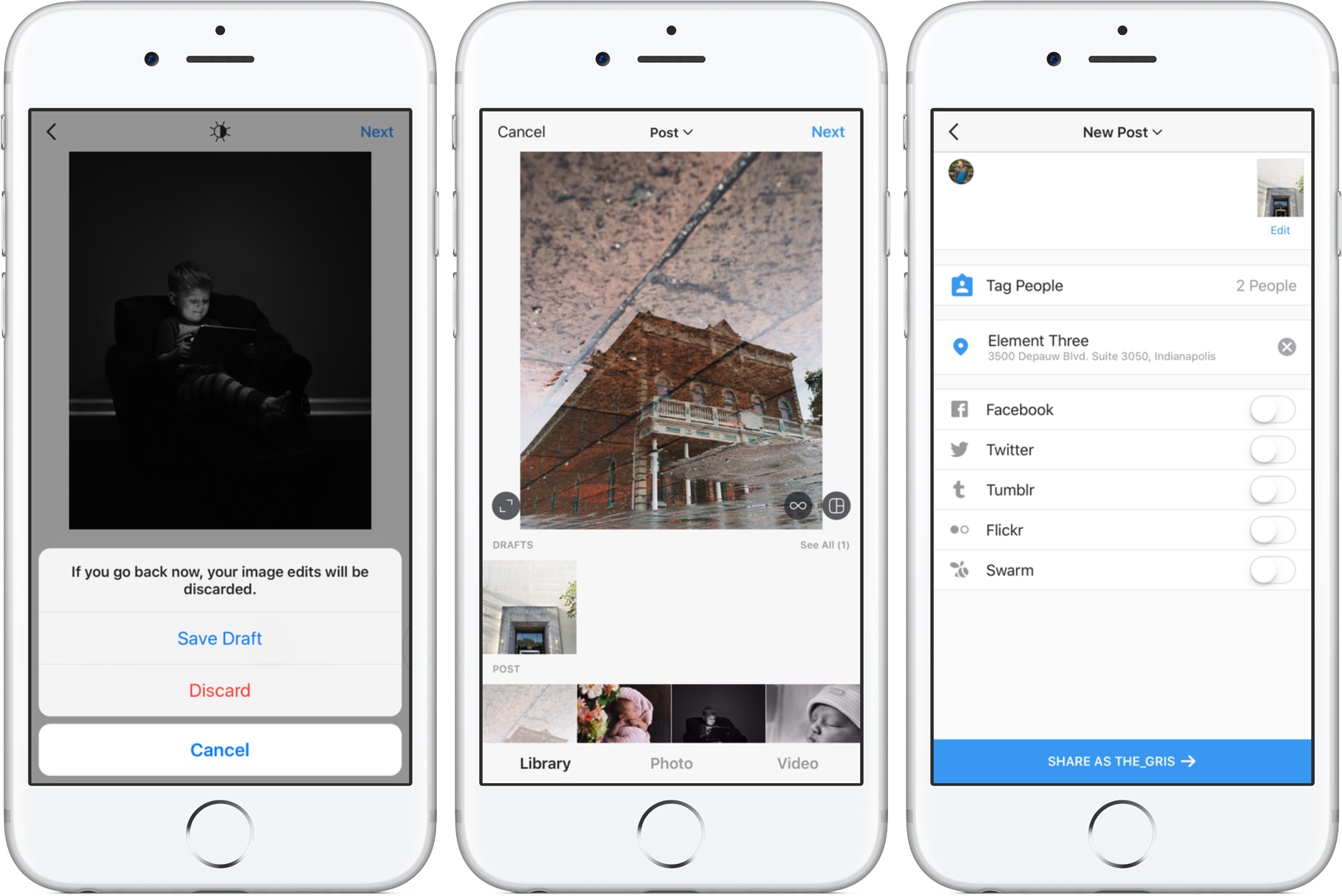
At long last, Instagram is adding much-needed Drafts to save unfinished  posts for later
Source: idownloadblog

What’s more, how do you go about creating a draught post in the first place?

Before we begin, let’s look at a simpler solution. If you need to create draught posts for multiple platforms at the same time, Postfity can help. Here’s how to use Postfity to create draught posts for a variety of social media platforms.


Step 1: Create a draught post on Instagram

Open the Instagram app on your smartphone.


Step 2:

At the bottom of your screen, tap the ‘upload’ or ‘+’ icon.


3rd step

Choose a photo from your gallery. Then press the ‘Next’ button.


4th step

Make any changes you want to the image. You have the option of using preset filters or manually editing the image. Tap ‘Next’ when you’re finished.


5th step

This is the section where you write your post’s caption. Toggle the “If you want to make more changes to your content but aren’t quite ready to publish it yet, click the icon.


the sixth step

When you press the button, “When you click the icon again, you’ll be asked what you want to do with your post, and you can choose to delete it.


Where to Look for Instagram Draft Posts


First, go to the bottom of your screen and select the ‘+’ icon.


Step 2:


All of your draught posts will be visible above your gallery. Yes, you can find draught posts on Instagram in this manner.


You can even keep track of your draughts and decide what to do with them. Choose ‘Edit’ from the drop-down menu.


To delete all of your posts, select all of the images and then tap ‘Done.’


That’s all there is to it. You can not only find your draught posts, but you can also edit them or delete them if necessary. If you’re short on time and don’t want to waste time creating and finding draught posts, use Postfity to multitask on your favourite social media platforms, such as Facebook, Instagram, and Twitter.


Final Thoughts

Editing your content on the go is now easier than ever, thanks to Instagram’s ability to work on draught posts later. For maximum engagement, make sure you use all of Instagram’s features, including Instagram stories and Instagram Music.

Bonus tip: Schedule your content to go live at the most appropriate times of the day. Few people will see your post at 5 a.m., so don’t sabotage your entire marketing campaign by posting at odd hours of the day. Postfity can also be used to schedule your posts.

Tags: InstagramSocial Mediatechtechnology
Tweet54SendShare15
Previous Post

Air travel is “currently the most carbon intensive activity an individual can make”

Next Post

Samsung Galaxy Z Fold 4 Concept Renders with Galaxy S22 design tipped online

Khushi Sethi

Recommended For You

How to view instants on Instagram?

by Afeefa Ansari
July 6, 2026
0
Instants

Receiving instant messages from friends on Instagram? Here is how you can receive and open them when sent. Let us see how it can be done and how...

Read more

How to get coin bags in Pokémon Go?

by Afeefa Ansari
July 6, 2026
0
Coin Bags

Do you want to get a coin bag in Pokémon Go? Follow the guide to know how you can get this item in the game and then use...

Read more

How to request money on X?

by Afeefa Ansari
July 6, 2026
0
X

Want to ask for money from someone on X? Let us assist you. Follow the guide to know how you can judge someone to get money if you're...

Read more
Next Post
Samsung Galaxy Z Fold 4 Concept Renders with Galaxy S22 design tipped online

Samsung Galaxy Z Fold 4 Concept Renders with Galaxy S22 design tipped online

Please login to join discussion

Techstory

Tech and Business News from around the world. Follow along for latest in the world of Tech, AI, Crypto, EVs, Business Personalities and more.
reach us at info@techstory.in

Advertise With Us

Reach out at - info@techstory.in

Aviator Game India 2026

BROWSE BY TAG

#Crypto #howto 2024 acquisition AI amazon Apple Artificial Intelligence bitcoin Business China cryptocurrency e-commerce electric vehicles Elon Musk Ethereum facebook funding Gaming Google India Instagram Investment ios iPhone IPO Market Markets Meta Microsoft News OpenAI samsung Social Media SpaceX startup startups tech technology Tesla TikTok trend trending twitter US

© 2025 Techstory.in

No Result
View All Result
  • News
  • Crypto
  • Gadgets
  • Memes
  • Gaming
  • Cars
  • AI
  • Startups
  • Markets
  • How to

© 2025 Techstory.in

Welcome Back!

Login to your account below

Forgotten Password?

Retrieve your password

Please enter your username or email address to reset your password.

Log In
Are you sure want to unlock this post?
Unlock left : 0
Are you sure want to cancel subscription?
