

• Send Us A Tip
  • Calling all Tech Writers
  • Advertise
Sunday, July 26, 2026
  • Login
TechStory
  • News
  • Crypto
  • Gadgets
  • Memes
  • Gaming
  • Cars
  • AI
  • Startups
  • Markets
  • How to
No Result
View All Result
  • News
  • Crypto
  • Gadgets
  • Memes
  • Gaming
  • Cars
  • AI
  • Startups
  • Markets
  • How to
No Result
View All Result
TechStory
No Result
View All Result
Home How to

How to access my photo stream

by Shivya Sethi
July 2, 2023
in How to, Tech
Reading Time: 3 mins read
0
How to access my photo stream
TwitterWhatsappLinkedin

Introduction:

In the digital era, our smartphones have become the primary tool for capturing and storing precious moments through photos. Apple’s iCloud Photo Stream is a fantastic feature that automatically syncs your photos across all your Apple devices. In this article, we will guide you through the process of accessing your Photo Stream and help you unleash the magic of reliving your cherished memories.
You might also like

Silicon Megadeal Samsung Lands Landmark $200 Billion AI Chip Contract with Broadcom

The Pentagon’s $7 Billion Lifeline Can Defense Cash Stop the Oracle Stock Collapse?

Why Semiconductor Factories Cost Billions: Inside the World’s Most Expensive Buildings

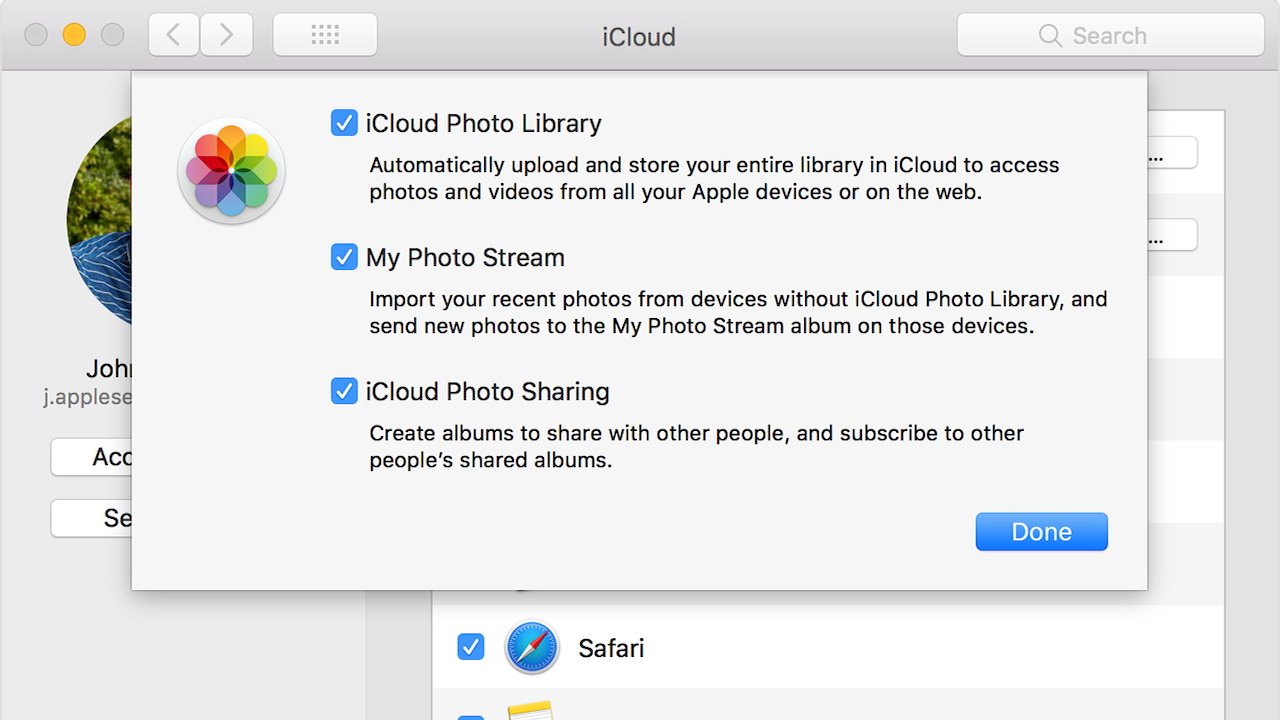
Moving My Photo Stream photos to iCloud or elsewhere
Source: Apple Insider

1. Setting up iCloud Photo Stream:

To access your Photo Stream, you first need to enable it on your Apple device. Toggle on the “iCloud Photos” option, and ensure that the “Upload to My Photo Stream” feature is also activated.

2. Accessing Photo Stream on iPhone and iPad:

To view your Photo Stream on an iPhone or iPad, open the “Photos” app. At the bottom of the screen, select the “Albums” tab and scroll down until you find the “My Photo Stream” album. Tap on it, and voila! Your synced photos will appear, sorted by the date they were added.

3. Accessing Photo Stream on Mac:

On your Mac, open the “Photos” app. In the sidebar, you’ll find “My Photo Stream” under the “Shared” section. Click on it to access your synchronized photos. Remember to keep your Mac connected to the internet to ensure the latest photos are available.

4. Accessing Photo Stream on Apple TV:

To access your Photo Stream on Apple TV, make sure you are signed in to the same iCloud account as your other devices. Open the “Photos” app on your Apple TV, and you’ll find the “My Photo Stream” option. Click on it to enjoy your collection of memories on the big screen.

5. Accessing Photo Stream on Windows PC:

While iCloud is primarily designed for Apple devices, you can still access your Photo Stream on a Windows PC. Download and install the iCloud for Windows application from Apple’s website. Sign in with your Apple ID, select “Options” next to “Photos,” and enable “My Photo Stream.” The photos will then be available through the “iCloud Photos” folder in File Explorer.

6. Sharing and Managing Your Photo Stream:

Photo Stream allows you to share your photos with friends and family effortlessly. Simply select the desired photos and use the sharing options available on your device. You can also manage your Photo Stream by deleting unwanted photos. Remember, removing a photo from your stream won’t delete it from your device’s camera roll or iCloud library.

7. Troubleshooting Photo Stream Syncing Issues:

If you encounter any syncing issues with your Photo Stream, ensure that your device has a stable internet connection. Additionally, make sure you are signed in to iCloud using the same Apple ID across all devices. Restarting your devices or toggling the Photo Stream options off and on can also help resolve any syncing problems.

8. Alternative Options for Photo Storage:

While iCloud Photo Stream is a convenient way to access your photos, it’s always good to have backup options. Consider using other cloud storage services like Google Photos, Dropbox, or OneDrive to keep multiple copies of your precious memories.

Conclusion:

With the advent of smartphones and cloud storage services, accessing your photos from multiple devices has become more convenient than ever. With iCloud Photo Stream, reliving your cherished moments has never been easier. By following the steps outlined in this article, you can effortlessly access your synchronized photos on various Apple devices. Take advantage of this feature to ensure that your memories are always at your fingertips, ready to be shared and enjoyed with your loved ones. Start accessing your Photo Stream today and unlock the magic of your digital photo album!


Tags: Access my photoaccess my photo streamMy photo streamPhotoPhoto stream
Tweet54SendShare15
Previous Post

AI Weekly News: Advancements and Impacts of Artificial Intelligence

Next Post

How to become a bookkeeper

Shivya Sethi

Shivya Sethi is an aspiring advocate. She is an assertive and outspoken young lad. She channelizes her energy into writing. Tech is what keeps her brain gear oiled for what comes on her plate every other day. Writing and helping tech - tortured people gets her adrenaline rush.

Recommended For You

Silicon Megadeal Samsung Lands Landmark $200 Billion AI Chip Contract with Broadcom

by Anochie Esther
July 26, 2026
0
Samsung $200 billion chip deal with Broadcom

The global race to supply physical hardware for artificial intelligence workloads has produced the largest semiconductor manufacturing contract in history. As tech giants build out gigawatt-scale data centers...

Read more

The Pentagon’s $7 Billion Lifeline Can Defense Cash Stop the Oracle Stock Collapse?

by Anochie Esther
July 26, 2026
0
Pentagon $7 billion Oracle contract

The intersection of national defense procurement and Silicon Valley balance sheets has produced one of the most high-stakes corporate rescue narratives of the year. For nearly a decade,...

Read more

Why Semiconductor Factories Cost Billions: Inside the World’s Most Expensive Buildings

by Ishaan Negi
July 26, 2026
0
Why Semiconductor Factories Cost Billions: Inside the World’s Most Expensive Buildings

Every time a company announces a new semiconductor factory, the headline almost always includes a staggering price tag. $10 billion. $20 billion. $50 billion. Some projects now stretch...

Read more
Next Post
How to become a bookkeeper

How to become a bookkeeper

Please login to join discussion

Techstory

Tech and Business News from around the world. Follow along for latest in the world of Tech, AI, Crypto, EVs, Business Personalities and more.
reach us at info@techstory.in

Advertise With Us

Reach out at - info@techstory.in

Aviator Game India 2026

BROWSE BY TAG

#Crypto #howto 2024 acquisition AI amazon Apple Artificial Intelligence bitcoin Business China cryptocurrency e-commerce electric vehicles Elon Musk Ethereum facebook funding Gaming Google India Instagram Investment ios iPhone IPO Market Markets Meta Microsoft News OpenAI samsung Social Media SpaceX startup startups tech technology Tesla TikTok trend trending twitter US

© 2025 Techstory.in

No Result
View All Result
  • News
  • Crypto
  • Gadgets
  • Memes
  • Gaming
  • Cars
  • AI
  • Startups
  • Markets
  • How to

© 2025 Techstory.in

Welcome Back!

Login to your account below

Forgotten Password?

Retrieve your password

Please enter your username or email address to reset your password.

Log In
Are you sure want to unlock this post?
Unlock left : 0
Are you sure want to cancel subscription?
