Niantic has just announced the Dancing in the Moonlight 2026 event for Pokémon GO, running from September 23 to 27. Clefairy will be showing up far more often than usual, special “Moonlight O’Clock” windows will boost spawns at set times, and every catch during the event earns double Catch XP. It’s a type of event that rewards players that can get out and play for a few hours.
This is the challenging part for many. While walking to new locations is at the heart of Pokémon GO, not everyone wants to do it for free time, mobility, or even just the fun of it to hatch an egg or spin a Pokéstop. That’s why there’s a ton of questions, particularly around major events like this. Here’s how it really works.: how to play Pokémon GO without moving? Well, it’s GPS location-changing tools that allow the game to know you’re at a location you aren’t in, but you’re not going anywhere.
Can You Play Pokémon GO Without Moving?
Yes. Players who are not keen on walking can use GPS devices to change location to reduce, or eliminate, the walking expected in a game.
In a way, Pokémon GO is oblivious to where you are — it assumes you give it your location data and then uses that as the basis for the game as presented. GPS spoofing is where it gets stuck: A GPS location changing application provides it with a false set of coordinates. The game cannot differentiate, and treats the new location as though you walked there.
This can be achieved in two simple methods. The first one is teleporting in which your in-game position will jump instantly to a new position on the map. The second of these is simulated movement, that is, where the joystick or a predetermined track moves your character across the map, while you sit on your couch.
How MocPOGO Helps You Play Pokémon GO Without Moving
MocPOGO is an iOS and Android GPS location changer that’s very similar to what you’ll need for this.
Change GPS Location lets you swap your device’s virtual location for another one, either by typing in a destination or tapping a spot on the map.
Teleport takes that a step further by moving you there instantly, which is handy if you just want to check a Pokéstop-heavy area across town, or across the world, without waiting.
For movement that looks and feels more natural, there’s the Joystick, which puts an on-screen control on your map so you can nudge your character around manually while staying exactly where you physically are.
Route Simulation does something similar but on autopilot — you draw out a path, and the app walks it for you, with adjustable speed settings where the platform allows it.
iPhone users get an extra option: Native Mode, covered in detail in MocPOGO’s iOS setup guide. It’s built to work with the standard, unmodified Pokémon GO app, runs through the MocPOGO iOS App, and doesn’t require a computer to use. It also works over cellular data, not just Wi-Fi, so you can change your location on the fly whether you’re at home or out running errands.
How to Play Pokémon GO Without Moving with MocPOGO
If you want the full rundown, MocPOGO has a step-by-step usage guide, but here’s the short version.
Step 1: Connect Your Device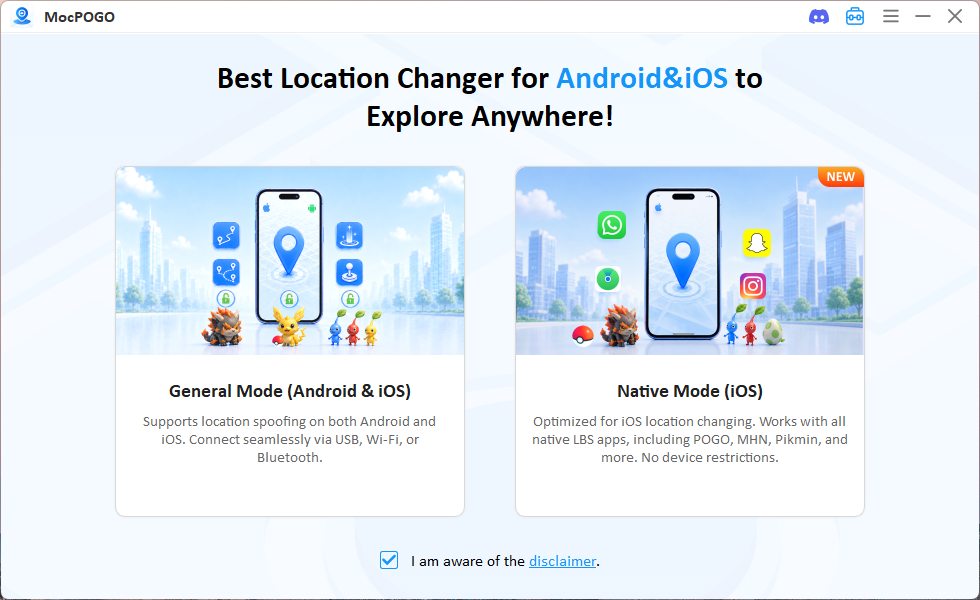
Install and run MocPOGO on your computer, then connect your iPhone or Android phone to the computer via USB, Wi-Fi or Bluetooth. The exact process depends on your device and the mode you choose, but the software walks you through it either way.
Step 2: Choose a Location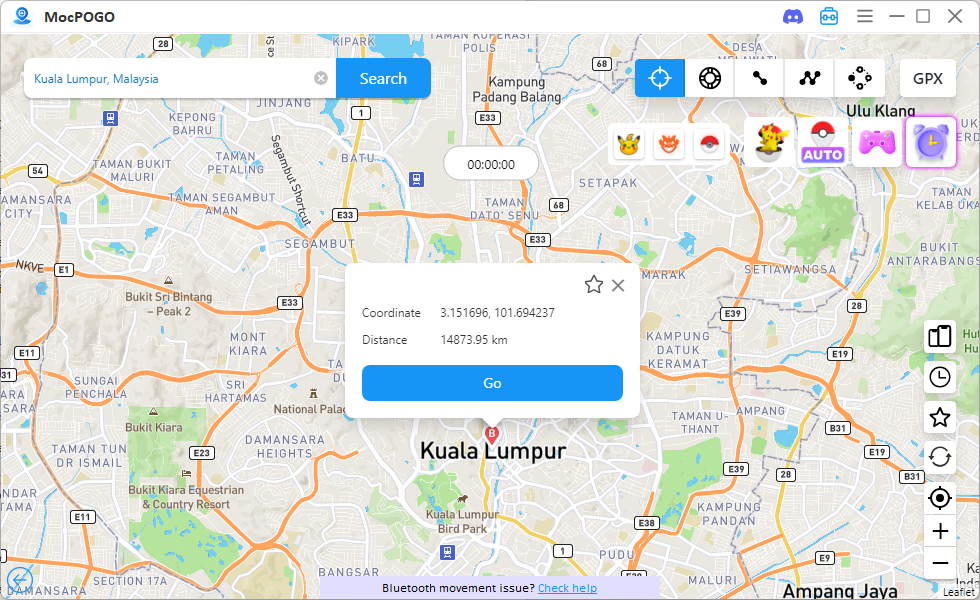
Open the map or search bar inside MocPOGO and look up wherever you want to appear — a city, a specific landmark, a coordinate, whatever you’re after. Once you find it, select it as your destination and hit the Go button. Your device’s reported GPS position updates to the spot you picked. Open Pokémon GO afterward and you should see your character sitting at the new location.
Step 3: Teleport or Simulate Movement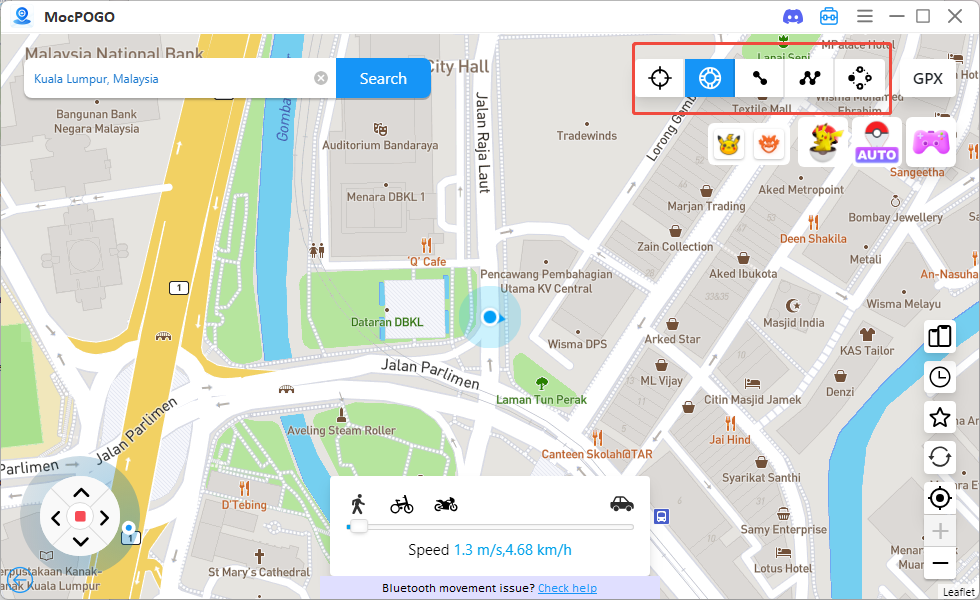
From here you’ve got options. Teleport gets you there instantly and leaves you standing still once you arrive. The joystick lets you steer your character around by hand. Route simulation(two-spot mode or multi-spot mode) moves you along a path you’ve already set up, continuously, without any input needed. The last two are the ones that matter most if you want your character actually walking around a neighborhood or a park without you lifting a foot.
Step 4: Open Pokémon GO and Start Playing
Launch the game and play as usual — spin Pokéstops, catch what’s around, take on gyms in the area. Just keep in mind that not every feature or every event mechanic behaves identically everywhere, so results can vary a bit depending on where you’ve placed yourself.
Frequently Asked Questions
Do I need to jailbreak my iPhone to play Pokémon GO without moving?
No. MocPOGO can change the GPS location on iPhone without jailbreaking anything, so your device stays exactly as it was out of the box.
Can I play Pokémon GO without moving if I don’t have a computer?
Yes, at least on the iPhone. The MocPOGO iOS App runs Native Mode entirely from your phone, no computer needed, and it works over cellular data as well as Wi-Fi, so it’s fine to use outdoors too. Android is a bit different — options vary by device, but MocPOGO’s Android app includes a dedicated game mode that works on both Wi-Fi and cellular, though it does require a modded version of the game.
Can Niantic detect spoofing?
Niantic also monitors for behavior that violates the Terms of Service of Pokémon GO and may act upon accounts it identifies. No method of changing location should be considered as a completely undetectable and/or risk free way as no one can honestly guarantee it; If you do, make sure you do so wisely and knowingly, for it is against the rules of the game.
Conclusion
So, how to play Pokémon GO without moving? GPS location-changing technology is really the main answer, giving players a way to explore the game’s map without covering real ground. MocPOGO packages that into a few practical tools — location changing, teleport, joystick control, and route simulation — that cover most reasons someone might want to stay put while still playing. If walking around for the Dancing in the Moonlight event (or any event, really) isn’t in the cards for you right now, it’s worth taking a closer look at what MocPOGO offers.