

Your iPhone uses GPS, Wi-Fi, Bluetooth, and cellular networks to determine your approximate location. While this feature is useful for navigation and location-based services, there are situations where you may want to use a different location.
If you’re looking for how to change GPS location on iPhone, there are several approaches to consider. However, not all methods offer the same level of flexibility. This guide explains the common options and introduces PoKeep Location Changer as a convenient desktop-based solution.
What Can You Do by Changing Your iPhone GPS Location?
Once your virtual GPS location has been changed, location-based apps may detect the selected location instead of your actual position, depending on the app and how it verifies location data.
Possible uses include:
- Testing location-based apps and services
- Exploring location-specific content
- Simulating movement between different locations
- Testing GPS-related features during app development
- Playing location-based games like Pokémon Go with a virtual position
Whatever your intention, a practical location-changing method should ideally be easy to operate, support a wide range of locations, and avoid requiring complicated system modifications.
Common Ways to Change GPS Location on iPhone and Their Limitations
There are several ways to modify or simulate an iPhone’s location.
Using Xcode: One option is to use Apple’s developer tools. Xcode includes location simulation features that can be useful for developers testing applications. However, this approach is primarily designed for development and may not be convenient for everyday users. They are also not designed primarily as dedicated location-changing utilities.
Using a VPN: A VPN can change the apparent IP-based location of your internet connection, but it generally does not change the GPS coordinates reported by the iPhone. As a result, it may not work when an app specifically relies on GPS data.
Some users also turn to specialized desktop GPS location tools. These programs are designed specifically to simulate a different location on a connected mobile device. For users who want a straightforward way to change an iPhone’s virtual GPS position, a dedicated desktop location tool can be more convenient.
Best Way: Change GPS Location with a Desktop GPS Location Tool
A dedicated desktop GPS location tool provides a more direct way to simulate a different location on an iPhone. PoKeep Location Changer is one option designed for users who want to modify their device’s GPS location more conveniently and precisely. PoKeep provides a location-focused interface where you can select a destination and apply it to your connected device.
It can be useful for users who need more control over simulated locations and movement. Depending on the supported features and device configuration, you can select different locations or simulate movement along a route.
Why Choose PoKeep Location Changer
PoKeep Location Changer focuses on making GPS location changes easier to manage. Its main advantages include:
- Simple operation: The location-changing process is designed to be accessible without complicated development steps.
- No jailbreak required: You can change the virtual location without modifying the iPhone’s system through a jailbreak.
- Flexible location selection: Users can choose or search any location on a map rather than being restricted to a small number of predefined locations.
- Movement simulation: Route-based features can help simulate movement between different locations instead of simply switching from one point to another.
- Strong compatibility: PoKeep supports working with broad iPhone and Android models through a desktop computer.
- Useful for location-based apps: It can be used in numerous location-based apps, including maps, games, and date apps.
These features make PoKeep a practical choice for users who want a dedicated solution rather than relying on a VPN or development software.
How to Change iPhone Location Without Jailbreaking
With PoKeep Location Changer, the general process is straightforward:
Step 1: Connect your iPhone
Install and launch PoKeep on your computer, then connect your iPhone using USB, Wi-Fi, or Bluetooth. Follow the on-screen instructions to set up your iPhone, such as turning on developer mode.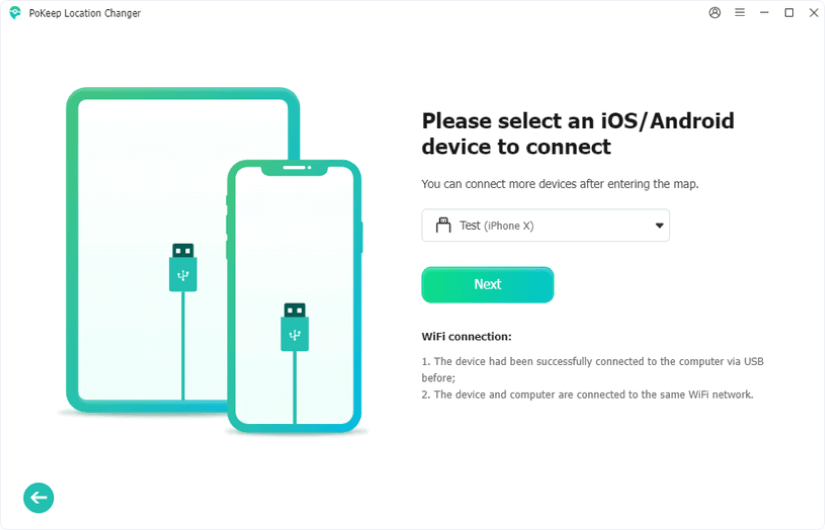
Step 2: Select a mode
According to your needs, choose Game Mode or General Mode. Open the map and search for the location you want to use. You can select a destination directly from the map or enter a specific location.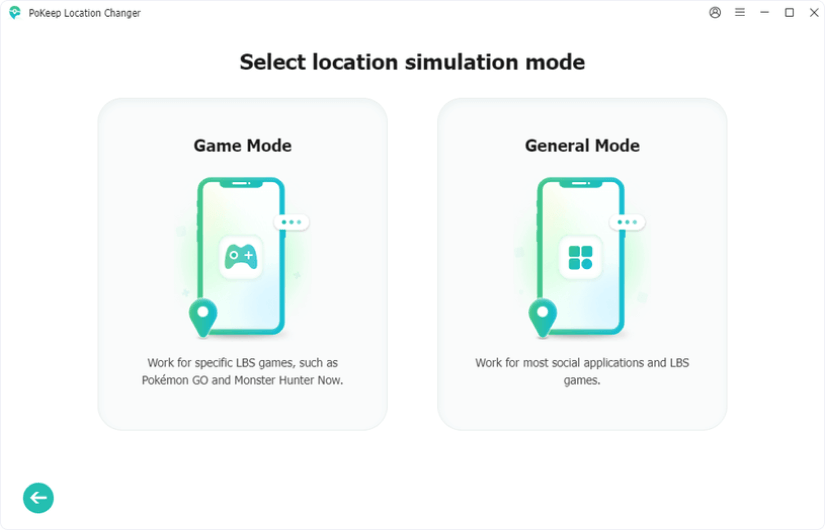
Step 3: Start changing your location
Confirm the selected location and click Start Modifying. Your iPhone will change the location instantly and report the simulated GPS position to supported location-based apps. You can also use its movement mode and joystick mode to simulate realistic movement by selecting a specific path and speed.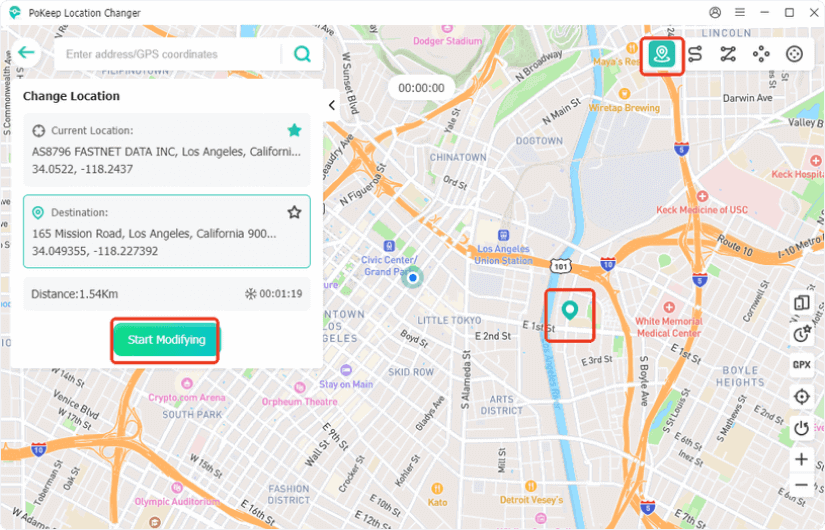
Because the exact interface and supported features can vary by device and software version, follow the instructions displayed by PoKeep during setup.
How to Change iPhone Location Back to Normal
If you want to return to your actual location, select the Reset Location button at the bottom right of the PoKeep Location Changer map interface. Your iPhone will restart and revert to its actual GPS location. Then, disconnect your device from PoKeep. You can also disconnect and restart your device directly to restore your actual location.
Frequently Asked Questions
- Can I Change My iPhone GPS Location Without Jailbreaking?
Yes. Dedicated desktop GPS location tools such as PoKeep Location Changer can provide location simulation without requiring you to jailbreak your iPhone, subject to supported device and iOS configurations.
- Can I Change My iPhone Location Without a Computer?
Yes, but options are limited. iPhone doesn’t offer a built-in way to change GPS location system-wide without a computer. Third-party apps may provide alternatives, but compatibility varies.
- Will Every App Detect My Changed Location?
Not necessarily. Apps can use different methods to determine location, including GPS, IP addresses, Wi-Fi, cellular information, and other signals. Therefore, changing GPS data does not guarantee that every app will recognize the simulated location.
Conclusion
There are several ways to change GPS location on an iPhone. For those looking for a simpler way to change GPS location on iPhone without jailbreaking, a dedicated desktop solution such as PoKeep Location Changer can be worth considering. With map-based location selection, movement simulation, 360° joystick mode, and support for iPhone and Android devices, it provides a more flexible approach to GPS location simulation.
Before using any location-changing tool, check its current device and iOS compatibility and make sure its use complies with the rules of the apps or services involved.




