

• Send Us A Tip
  • Calling all Tech Writers
  • Advertise
Thursday, July 30, 2026
  • Login
TechStory
  • News
  • Crypto
  • Gadgets
  • Memes
  • Gaming
  • Cars
  • AI
  • Startups
  • Markets
  • How to
No Result
View All Result
  • News
  • Crypto
  • Gadgets
  • Memes
  • Gaming
  • Cars
  • AI
  • Startups
  • Markets
  • How to
No Result
View All Result
TechStory
No Result
View All Result
Home How to

How to do a Credit Freeze?

by Afeefa Ansari
June 22, 2025
in How to
Reading Time: 2 mins read
0
Credit-Freeze

Credits - ar.inspiredpencil.com

TwitterWhatsappLinkedin

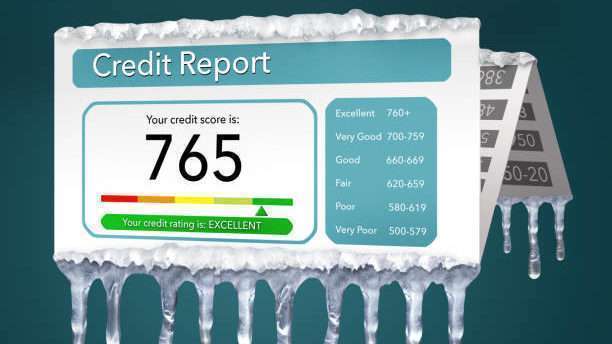
Do you want to protect yourself from identity theft? Then Credit Freezing seems like a legit idea. In this guide, we shall discuss all about credit freezing and what are the ways you can do it too. We shall also see the basic requirements for freezing credit and so on. Let us begin.

You might also like

How To Get Nether Realm Cookie Cutters in CookieRun: Kingdom

How To Activate Skulls In Halo: Combat Evolved Campaign

How To Kill The Juggernaut In Call Of Duty: Warzone

What does ‘Credit Freezing’ mean?

Credit freezing, also called a security freeze, is a powerful tool to protect yourself from identity theft. It essentially “locks” your credit reports with the three major bureaus, namely – Equifax, Experian, and TransUnion, preventing lenders from accessing them. This makes it incredibly difficult for someone to open new credit accounts in your name, as most require a credit check. You can temporarily “thaw” your credit when you genuinely need to apply for new credit, then re-freeze it afterward. It’s free and doesn’t affect your credit score! You just need to follow a few easy steps to re-freeze it or de-freeze it.

Steps to go for a Credit Freeze

If you want to go for a Credit Freeze, then these are the steps that you need to follow –

  • Contact All Three Bureaus: You must freeze your credit with Equifax, Experian, and TransUnion separately. Freezing with one doesn’t affect the others, so you’ll have to do it with all one by one.
  • Choose Your Method: Each bureau offers online, phone, or mail options. Online is usually the fastest and easiest. You can follow other methods if that suits you the best.
  • Provide Information: Be ready to provide your full name, current and previous addresses, date of birth, and Social Security Number for identity verification. While you are entering your details, make sure to do it right as it may lead to troubles in your request.
  • Verify and Confirm: Follow the prompts to verify your identity. Once confirmed, the freeze will be placed. You might receive a confirmation email or letter.
  • Keep Records: If using online, save your login details. If by mail, keep copies of everything you send.
  • Thawing When Needed: If you apply for new credit, you’ll need to temporarily “thaw” your report with the specific bureaus the lender uses. You can set an end date for the thaw or re-freeze manually.

Benefits of Credit Freezing

Credit freezing offers significant peace of mind as well as other benefits. Its primary benefit is preventing identity theft and fraud by blocking access to your credit report. This makes it nearly impossible for criminals to open new accounts in your name, even if they have your personal information. It’s free to place, lift, and remove, making it an accessible security measure. Plus, freezing your credit doesn’t harm your credit score or affect your existing accounts. You remain in control, simply “thawing” it when you legitimately need to apply for credit whenever you need it.

If you want to Freeze your credit, you can do so by following a few simple steps. But make sure that you enter the correct information whenever needed.


Tags: #howtocredit freezecredit reportcredit safetyidentity theft
Tweet62SendShare17
Previous Post

Honda Recalls Over 259,000 Cars in U.S. Due to Brake Pedal Defect

Next Post

Jeff Bezos and Lauren Sánchez’s $16M Venetian Wedding

Afeefa Ansari

Recommended For You

How To Get Nether Realm Cookie Cutters in CookieRun: Kingdom

by Khilav Jadav
July 29, 2026
0
How to Leave a Guild in Cookie Run Kingdom

Nether Realm Cookie Cutters are a special event currency in CookieRun: Kingdom. They are used for limited-time summons connected to the Nether Realm update and cannot be earned...

Read more

How To Activate Skulls In Halo: Combat Evolved Campaign

by Khilav Jadav
July 29, 2026
0
How To Activate Skulls In Halo: Combat Evolved Campaign

Skulls are one of the most enjoyable features in Halo: Combat Evolved Anniversary. They let you customize the campaign with gameplay modifiers that can make missions much harder,...

Read more

How To Kill The Juggernaut In Call Of Duty: Warzone

by Khilav Jadav
July 29, 2026
0
How to Unlock Mastery Camos in Call of Duty Warzone

The Juggernaut is one of the toughest enemies you can face in Call of Duty: Warzone. Covered in heavy armor and carrying a deadly Minigun with unlimited ammunition,...

Read more
Next Post
Jeff Bezos

Jeff Bezos and Lauren Sánchez's $16M Venetian Wedding

Please login to join discussion

Techstory

Tech and Business News from around the world. Follow along for latest in the world of Tech, AI, Crypto, EVs, Business Personalities and more.
reach us at info@techstory.in

Advertise With Us

Reach out at - info@techstory.in

Aviator Game India 2026

BROWSE BY TAG

#Crypto #howto 2024 acquisition AI amazon Apple Artificial Intelligence bitcoin Business China cryptocurrency e-commerce electric vehicles Elon Musk Ethereum facebook funding Gaming Google India Instagram Investment ios iPhone IPO Market Markets Meta Microsoft News OpenAI samsung Social Media SpaceX startup startups tech technology Tesla TikTok trend trending twitter US

© 2025 Techstory.in

No Result
View All Result
  • News
  • Crypto
  • Gadgets
  • Memes
  • Gaming
  • Cars
  • AI
  • Startups
  • Markets
  • How to

© 2025 Techstory.in

Welcome Back!

Login to your account below

Forgotten Password?

Retrieve your password

Please enter your username or email address to reset your password.

Log In
Are you sure want to unlock this post?
Unlock left : 0
Are you sure want to cancel subscription?
