Have you ever thought about whether web pages have their own archived versions? Well, it is kind of true. Follow the guide to find the archived versions of a web page and explore them. So, let’s get started.
What are archived web pages?
Archived web pages are saved, historical captures of websites captured at specific points in time. Let us explain! Digital archives, like the renowned Wayback Machine, regularly crawl the internet to store copies of millions of sites. This prevents content from disappearing forever when a site gets updated, taken down, or abandoned.
These preserved pages serve as a clock you can turn in any direction you like, allowing anyone to see how a website looked years ago, retrieve deleted articles, or track how information changed over time. It is like having a look back at your history on devices. They are immensely important for researchers, journalists, and everyday web users looking for lost information and deleted content on the web. Essentially, web archiving ensures that the internet’s fleeting history remains permanently accessible, protecting important digital content from simply fading away into thin air.
Finding the archived versions of a web page
In the hunt for archived pages of a web page you like, this is what you can do.
- Start by copying the full website address or URL of the specific web page you want to view from your web browser location bar.
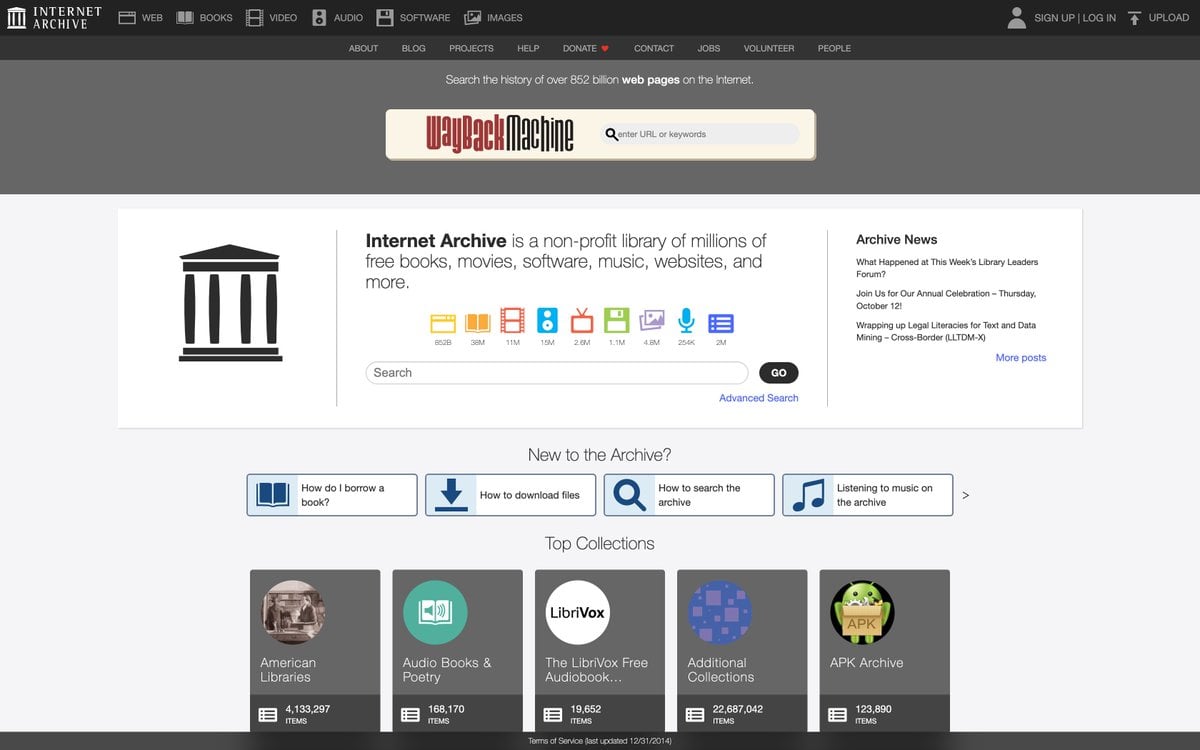
- Now just go over to the Internet Archive website at archive.org, which hosts the famous Wayback Machine historical retrieval tool.
- You can paste the copied web link directly into the main search box on the homepage and click on Enter to start searching. This will trigger the search, and you have to wait.
- Now, finally, review the interactive calendar grid, which visually highlights every single year, month, and day a snap was successfully taken.
- You can then select a highlighted year at the top, click a colored date on the calendar, and choose a specific timestamp pop-up to load the page.
- If this doesn’t fit well for you, you can also try alternative site archives like Archive. Today by pasting your link into their database search field if the Wayback Machine lacks results.
- You can also inspect search engine results on Google, tapping the small three-dot menu beside a result to check for cached or archived web page options. Besides this, you can also use some web aggregation portals like Memento Time Travel, which simultaneously queries dozens of digital libraries and university archives globally.
- Save or bookmark the exact snapshot link so you can easily return to it.