• Send Us A Tip
  • Calling all Tech Writers
  • Advertise
Wednesday, July 8, 2026
  • Login
TechStory
  • News
  • Crypto
  • Gadgets
  • Memes
  • Gaming
  • Cars
  • AI
  • Startups
  • Markets
  • How to
No Result
View All Result
  • News
  • Crypto
  • Gadgets
  • Memes
  • Gaming
  • Cars
  • AI
  • Startups
  • Markets
  • How to
No Result
View All Result
TechStory
No Result
View All Result
Home How to

How to secure your online accounts with passkeys?

by Afeefa Ansari
July 8, 2026
in How to
Reading Time: 2 mins read
0
Passkeys

Credits - chorus.co.uk

TwitterWhatsappLinkedin

Passkeys are known to be stronger than passwords any day. If you, too, want to secure your online accounts with passkeys, then these are the steps you need to follow. Let’s jump in and have a look at the process.

You might also like

How to check if a website is safe?

How to check if your email has been leaked?

How to forward mail to a new address?

What are passkeys?

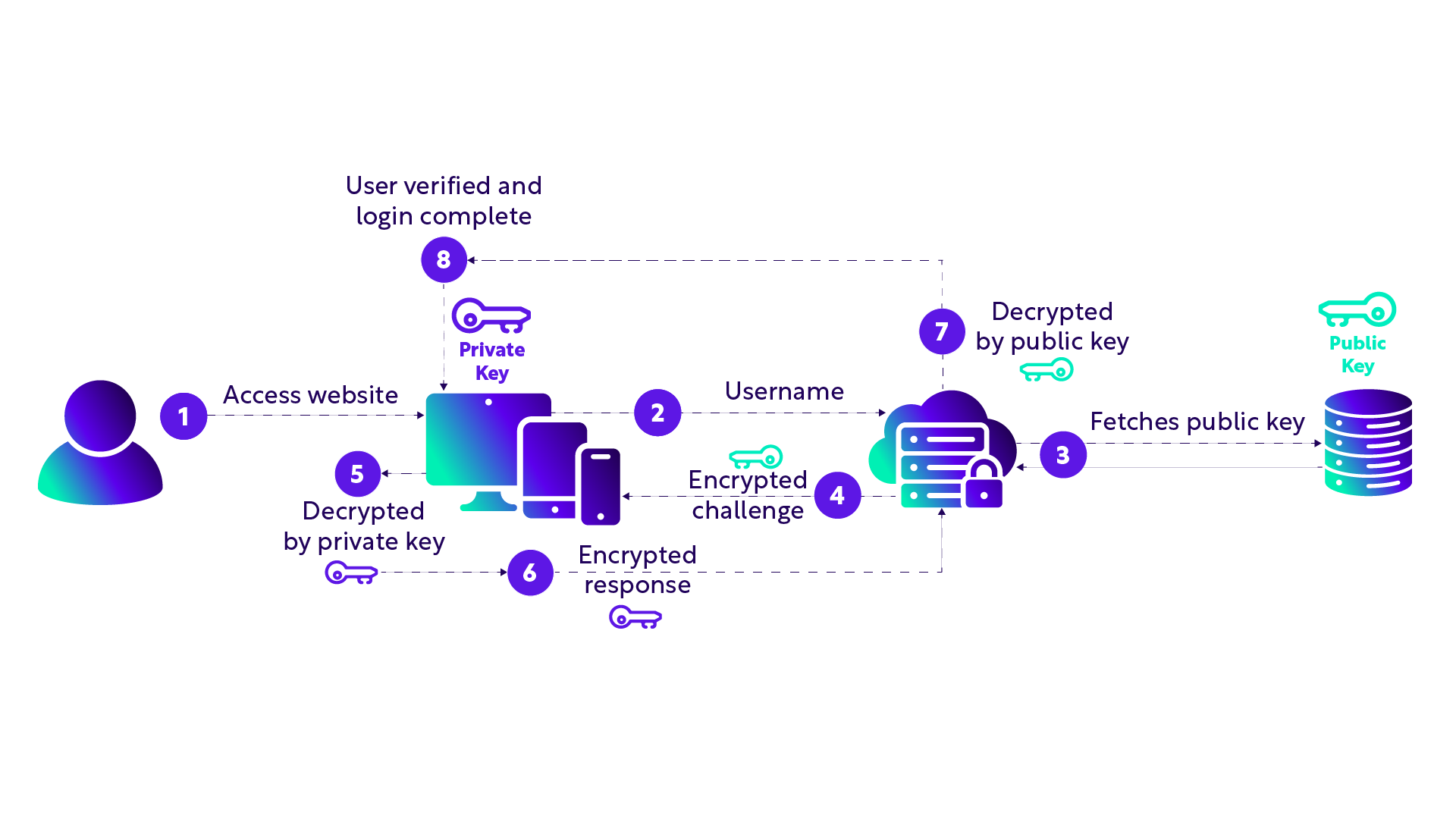
Passkeys are a modern solution to people’s passwords being misplaced or misused. It is known to be a much safer way to log into your online accounts without ever using a traditional password. Instead of typing a string of letters and numbers, a passkey lets you sign in using the exact same methods you use to unlock your phone or computer. This means you can just use your fingerprint, a facial scan, or your device PIN. They are incredibly secure because they are mathematically tied to the specific website you are visiting. Because of this design, passkeys cannot be guessed, stolen in a data breach, or tricked out of you by a fake phishing website. They make logging in much faster and keep your accounts safer from hackers.

Steps to secure your online accounts with passkeys

If you want to secure your online accounts with passkeys, then these are the steps you need to follow.

  • To begin, you have to make sure your device is ready. And to do that, just ascertain that your phone, tablet, or computer is updated to its latest software version and that you have a screen lock enabled, like a PIN, fingerprint, or facial recognition.
  • Next, you can log in to an online account you want to secure, such as your Google, Apple, or any account you like. Jumping to the account settings page is usually the easiest place to start.
  • Here, you have to look for a tab labeled security, sign-in options, or password manager within those settings, as this is what we’re looking for to start. Websites that support this technology will have a specific option that says something like create a passkey or use passkeys.
  • Click on that option, and a prompt from your device’s operating system will pop up asking for permission to create the key. You can proceed.
  • Confirm the request by scanning your face, scanning your fingerprint, or typing in your device lock PIN, which you must have chosen earlier or saved as a setting.
  • Once confirmed, your device generates the unique cryptographic key pair and saves it securely. The next time you visit that website, you can completely skip typing a password and just use your biometric scan to log right in. This lets you make an entry without the hassle of a password.

Tags: #howto#PasskeysHow to secure your online accounts with passkeys?passkeys vs passwordsset up passkeys
Tweet54SendShare15
Previous Post

How to check if a website is safe?

Next Post

Lucid Rolls Out 0% Financing and $10,000 Discount to Clear Remaining 2026 Gravity SUVs

Afeefa Ansari

Recommended For You

How to check if a website is safe?

by Afeefa Ansari
July 8, 2026
0
Websites

We keep opening websites one after the other, often out of routine. But are they really safe for surfing? Let's figure out how you can be certain if...

Read more

How to check if your email has been leaked?

by Afeefa Ansari
July 8, 2026
0
Email

Concerned about your email being leaked? Follow the guide to check if your email has been leaked. Let's jump in and see how you can identify that. Steps...

Read more

How to forward mail to a new address?

by Afeefa Ansari
July 8, 2026
0
Mail

Forwarding an email is a simple process and is helpful all the same. Follow the guide to know how you can forward the mail to a new address!...

Read more
Next Post
Lucid Rolls Out 0% Financing and $10,000 Discount to Clear Remaining 2026 Gravity SUVs

Lucid Rolls Out 0% Financing and $10,000 Discount to Clear Remaining 2026 Gravity SUVs

Please login to join discussion

Techstory

Tech and Business News from around the world. Follow along for latest in the world of Tech, AI, Crypto, EVs, Business Personalities and more.
reach us at info@techstory.in

Advertise With Us

Reach out at - info@techstory.in

Aviator Game India 2026

BROWSE BY TAG

#Crypto #howto 2024 acquisition AI amazon Apple Artificial Intelligence bitcoin Business China cryptocurrency e-commerce electric vehicles Elon Musk Ethereum facebook funding Gaming Google India Instagram Investment ios iPhone IPO Market Markets Meta Microsoft News OpenAI samsung Social Media SpaceX startup startups tech technology Tesla TikTok trend trending twitter US

© 2025 Techstory.in

No Result
View All Result
  • News
  • Crypto
  • Gadgets
  • Memes
  • Gaming
  • Cars
  • AI
  • Startups
  • Markets
  • How to

© 2025 Techstory.in

Welcome Back!

Login to your account below

Forgotten Password?

Retrieve your password

Please enter your username or email address to reset your password.

Log In
Are you sure want to unlock this post?
Unlock left : 0
Are you sure want to cancel subscription?