• Send Us A Tip
  • Calling all Tech Writers
  • Advertise
Thursday, June 18, 2026
  • Login
TechStory
  • News
  • Crypto
  • Gadgets
  • Memes
  • Gaming
  • Cars
  • AI
  • Startups
  • Markets
  • How to
No Result
View All Result
  • News
  • Crypto
  • Gadgets
  • Memes
  • Gaming
  • Cars
  • AI
  • Startups
  • Markets
  • How to
No Result
View All Result
TechStory
No Result
View All Result
Home Tech

MP3 Studio: A Quick Guide On How To Use All The Features Of The Downloader App

by Rohan Mathawan
April 26, 2021
in Tech
Reading Time: 7 mins read
0
MP3 Studio: A Quick Guide On How To Use All The Features Of The Downloader App
TwitterWhatsappLinkedin

Having to go back to stream a song or video anytime you want to watch and rewatch them can be exasperating. You would always want to revisit these audios and videos. And in fact, you should be able to do that even without any internet access. Hence, you need to download them directly to your device.

You might also like

Paradigms of Authentication A Deep Dive into Passkeys vs Passwords

Syntropic Visibility The Blueprint for Disrupting Generative Search Engine Ecosystems

Home EV Charger Installation Costs Rise in 2026 as More Americans Switch to Electric Vehicles

Since platforms like Instagram and Facebook only support saving online and not directly to your device, you need a YouTube to mp3 downloader to download these files. Although some videos on YouTube can be saved offline to watch later. Still, there are limitations like the fact that you cannot send them to your friends or transfer them onto other devices.

“One has a lot of options available today to choose from when it comes to finding music online, provided you know which mp3 downloader to trust.” – Software Testing Help 

MP3Studio is a user-friendly YouTube to mp3 downloader that can be used to download multimedia files from various platforms for free. With the downloader tools available on MP3Studio, you can easily download videos from YouTube, Instagram, Facebook directly to your device and enjoy uninterrupted access anytime.​

Downloading Options

You can get the app for both Windows and Mac operating systems for your PC.

The Android version is also available for mobile phones. Click  https://mp3.studio to download the suitable version for your device.

MP3Studio Downloader Tools

● YouTube Downloader
● Facebook Downloader
● Instagram Downloader

YouTube Downloader

MP3Studio YouTube downloader is all you need to easily save videos from YouTube to your local storage and access them anytime, anywhere.

You may come across videos that pick your interest on YouTube and may want to save them offline to watch later. Sometimes, due to certain video policies, some of these videos cannot be saved offline and this can be frustrating especially if you no longer have access to the Internet.

Guru99 mentions:

“Because of network connectivity issues or company/college/ country restrictions, you may not be able to access YouTube videos. YouTube download tool can help you to download videos for later use.”
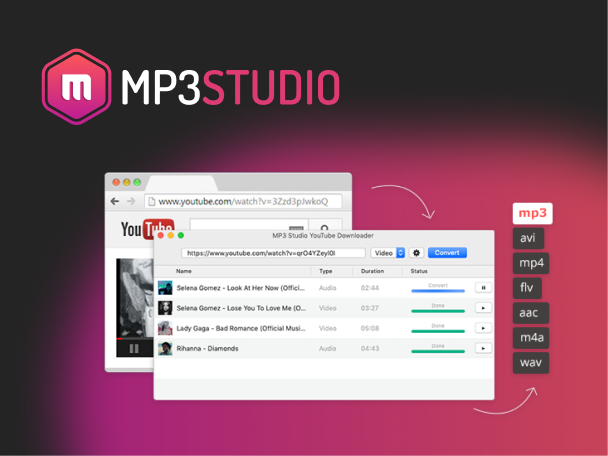
How to use YouTube Downloader to save files?

Follow the step by step instruction below to use YouTube Downloader to save videos and audios from YouTube:

1. Download MP3Studio YouTube downloader if you do not have it installed yet.
2. Open YouTube and select the video you would like to save on your device.
3. Copy the video URL in the address bar of your browser.
4. Open the YouTube downloader and paste the URL in the box provided.
5. Select your most preferred video or audio format.
6. Click on the “convert” button and wait.
7. Your video will be converted and downloaded.

Facebook Downloader

The Facebook downloader app allows you to save videos of choice from any Facebook account or feed directly to local storage on your mobile device or PC.

According to wikiHow,

“You’ll only be able to download video posted by people. Some “Facebook” videos, such as those found on advertisements, aren’t technically hosted on Facebook and thus aren’t downloadable through Facebook.” (source: https://www.wikihow.com/Download-Facebook-Videos-For-Free)

How to use Facebook Downloader to save files?

Follow the step by step instruction below to use Facebook Downloader to save videos from Facebook:

1. Open the Facebook app or website and find the video you want to save.
2. Click on the post menu of the video you wish to save.
3. Copy the URL link of the post.
4. Open the Facebook downloader app.
5. Paste the URL in the URL box provided on the downloader interface.
6. Select the file format you wish to save your video.
7. Click on download.
8. Wait for the file to download.

Instagram Downloader

As stated earlier, the Instagram app offers only a “save online” feature that allows you to get easy directions to save posts. You still need an internet connection to see these posts whenever you wish to watch them again.

However, with MP3Studio, you can easily download video posts, reels from your favourite Instagram pages and IGTV channels with a simple copy and paste action and a few clicks. You can save the downloaded video in your most preferred format.

How to use Instagram Downloader to save files?

Follow the step by step instruction below to use Instagram Downloader to save videos and audios from Instagram:

1. Open the Instagram app and search for the video you want to save.

2. Click on the post menu of the video you wish to download.

3. Copy the URL link of the post.

4. Open the Instagram downloader.

5. Paste the URL in the URL box provided on the downloader interface.

6. Select the file format you wish to save your video.

7. Click on download.

8. Wait for the file to download.

Advantages and Features of MP3STUDIO

Both the mobile and desktop versions of the app boast of these features and advantages:

● Free: The MP3Studio app is free to all users. It doesn’t require any form of registration. Just download the app and follow through with the installation process to start using it.
● Fast and Reliable: You can download multiple files simultaneously with the excellent speed with no problems at all. You can even go on with other things while the downloads continue in the background.
● User-friendly: The app is simple and convenient to use. You don’t need to be a computer guru to navigate your way to saving your videos. Just follow the instructions and you are good to go.
● Format Options: The MP3Studio app provides multiple multimedia format options. You can save videos or audio files in the format you find the most suitable.
● Storage Options: You can save your online multimedia files directly to local storage or external storage device of choice (SD cards, flash, etc.).
● No Root needed: Some apps require rooted devices to operate. MP3Studio works just fine on a regular device and does not need rooting your device to use.
● Quality Control: Need to manage data usage or want the best quality for maximum entertainment experience? This app allows you to select the quality of the video you want to download.

Conclusion

With a user-friendly interface and little to zero technical skill requirement, you can now permanently save your favourite videos and music to your device(s). Downloading multimedia files has never been this easy. Click here to start downloading music and videos effortlessly and have unrestricted access to them anytime for free.

Tweet56SendShare16
Previous Post

New Robot Inspired by Cheetah

Next Post

Tinder announces world-first proposal to report sexual violence to Australian police

Rohan Mathawan

Content Editor at Techstory Media | Technology | Gadgets | Written more than 5000+ articles about different niches from Tech to online real money gaming for reputed brands and companies. Get in touch Email: rohan@techstory.in For Business Enquires related to TechStory Info@techstory.in

Recommended For You

Paradigms of Authentication A Deep Dive into Passkeys vs Passwords

by Anochie Esther
June 18, 2026
0
passkeys vs passwords

The digital identity landscape is undergoing its most profound structural shift since the inception of the commercial internet. For more than six decades, the foundational mechanism protecting global...

Read more

Syntropic Visibility The Blueprint for Disrupting Generative Search Engine Ecosystems

by Anochie Esther
June 18, 2026
0
how to rank in AI search results

The global search engine framework is undergoing its most radical architectural shift since the inception of the web index. For decades, the discipline of search engine optimization relied...

Read more

Home EV Charger Installation Costs Rise in 2026 as More Americans Switch to Electric Vehicles

by Samir Gautam
June 17, 2026
0
Home EV Charger Installation Costs Rise in 2026 as More Americans Switch to Electric Vehicles

The growing popularity of electric vehicles in the United States is driving a parallel surge in demand for home charging infrastructure. As more households move away from gasoline-powered...

Read more
Next Post
Tinder

Tinder announces world-first proposal to report sexual violence to Australian police

Please login to join discussion

Techstory

Tech and Business News from around the world. Follow along for latest in the world of Tech, AI, Crypto, EVs, Business Personalities and more.
reach us at info@techstory.in

Advertise With Us

Reach out at - info@techstory.in

Aviator Game India 2026

BROWSE BY TAG

#Crypto #howto 2024 acquisition AI amazon Apple Artificial Intelligence bitcoin Business China cryptocurrency e-commerce electric vehicles Elon Musk Ethereum facebook funding Gaming Google India Instagram Investment ios iPhone IPO Market Markets Meta Microsoft News OpenAI samsung Social Media SpaceX startup startups tech technology Tesla TikTok trend trending twitter US

© 2025 Techstory.in

No Result
View All Result
  • News
  • Crypto
  • Gadgets
  • Memes
  • Gaming
  • Cars
  • AI
  • Startups
  • Markets
  • How to

© 2025 Techstory.in

Welcome Back!

Login to your account below

Forgotten Password?

Retrieve your password

Please enter your username or email address to reset your password.

Log In
Are you sure want to unlock this post?
Unlock left : 0
Are you sure want to cancel subscription?