
Losing access to your mobile due to a forgotten password can be incredibly frustrating. It can be wrong attempts at the screen lock or a phone stuck at FRP due to a lack of Google credentials. Luckily, a feature-packed Android phone unlocker provides a reliable way to regain access without complicated steps. They provide remedies for common lock-out situations, such as lost PINs, forgotten patterns, or biometric scanning errors.
A powerful Android unlocker should combine ease of use with advanced capabilities. Moreover, choosing the right software ensures a hassle-free experience to let users unlock their devices quickly. This article will explore the most powerful unlocker available today.
Part 1. What Are the Types of Android Phone Locks
Before looking for ways to unlock your mobile, it is important to understand different kinds of security options. Android devices come with multiple types of locks to protect personal data and prevent unauthorized access. Each type offers varying levels of security, convenience, and recovery options.
1. Pattern Lock
This security mechanism requires users to draw a specific shape or line across a grid of dots. It provides a balance between security and ease of use but can sometimes be less secure.
2. PIN Lock
A Personal Identification Number consists of numerical digits, usually between 4 to 6 characters. It offers stronger security than a pattern lock, especially when a longer PIN is used.
3. Password Lock
It allows alphanumeric combinations, making it the most secure traditional lock method. Users can include letters, numbers, and symbols, significantly enhancing security.
4. Fingerprint Lock
Many modern Android devices come with fingerprint sensors, allowing users to unlock their phones with a simple touch. This method is quick and convenient but can fail if the fingerprint sensor malfunctions.
5. Face Recognition
Face unlock technology scans a user’s facial features to grant access. While it provides hands-free convenience, some older versions can be fooled by photos or similar-looking individuals.
Part 2. How to Remove All Types of Screen Locks from Your Android
Due to the multiple types of phone locks, finding the right tool to get rid of them becomes important. Luckily, you have a perfect choice in the form of Dr.Fone – Screen Unlock (Android). It provides an effortless way to bypass restrictions like a fingerprint failure or a PIN that no longer works. This versatile choice lets users handle different sorts of lockout scenarios.
With a dynamic design and step-by-step guidance, even those without technical knowledge can unlock their devices quickly. Additionally, it ensures compatibility with a wide range of Android brands like Samsung, Huawei, LG, and more. Using this robust choice, users can perform a ZTE FRP bypass in a matter of minutes without any account credentials.
Key Features of Dr.Fone – Screen Unlock (Android)
- Offers unlocking methods that preserve user data for Samsung and LG, ensuring no files or settings are lost.
- Quickly removes screen locks within minutes, eliminating long waiting times or complicated steps.
- Ensures device integrity from unnecessary modifications or risks that could cause system instability.
Guide to Unlock ZTE and Other Android Screen Locks via Dr.Fone – Screen Unlock (Android)
It supports all major OS versions, ensuring effective unlocking regardless of system updates. Follow these detailed instructions to utilize this Android unlocker to regain device access:
Step 1. Proceed to Approach the Screen Unlock Menu
Begin by running Dr.Fone on your system and access the “Screen Unlock” function via the “Toolbox” tab. Following that, select “Android” as the phone type and click “Unlock Android Screen” from the next available options. 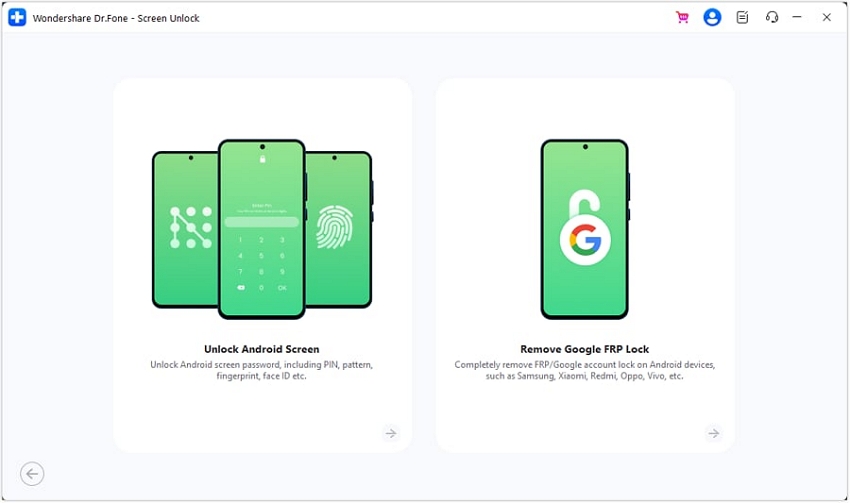
Step 2. Choose the Phone Brand and Follow the Instructions
At this point, attach your locked Android device and choose “ZTE” as the brand. Moving forward, follow the instructions provided on the screen to activate the required mode depending on your phone model. 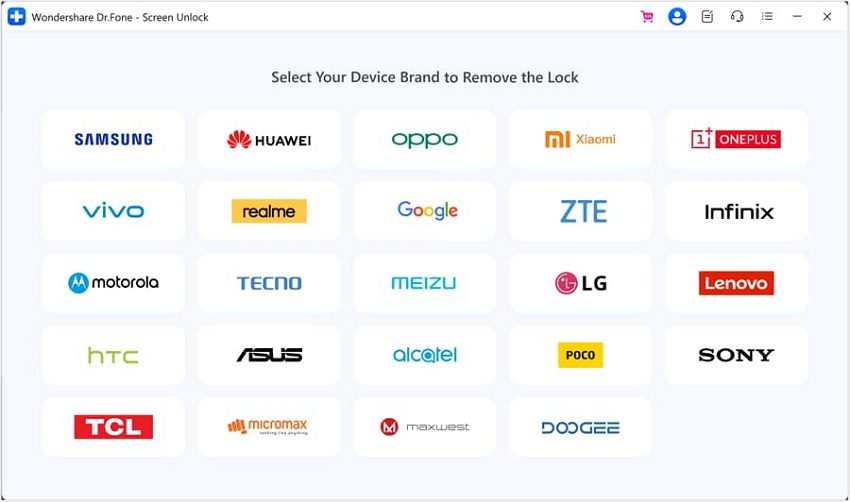
Step 3. Wait for the Software to Unlock Your Device
As soon as you successfully activate the mode and follow the provided steps, the program will start the lock removal process. Doing so will require a few moments as your access to your mobile gets restored.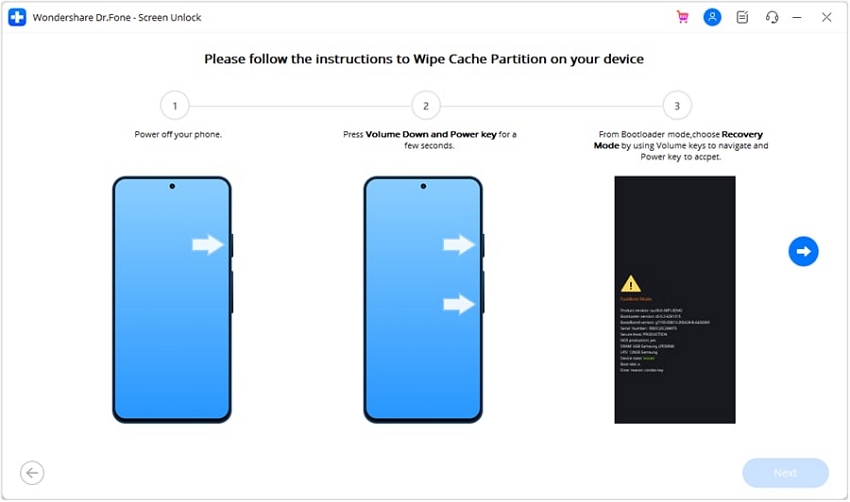
Part 3. How to Bypass FRP Lock from Your Android [100% Success Rate]
It is a crucial security feature designed to prevent unauthorized access after a factory reset. However, a major obstacle arises when users forget their Google account credentials or get a second-hand device. One of the most effective solutions for FRP bypass is Dr.Fone – Screen Unlock (Android).
This powerful tool allows users to remove this lock from all devices quickly and efficiently. Unlike complex manual methods, it provides a streamlined process that ensures a 100% success rate. The following detailed guide can help you bypass ZTE Blade A34 FRP without any issues:
Step 1. Make Your Way to the Remove Google FRP Lock Button
Once you have launched Dr.Fone – Screen Unlock (Android), click “Screen Unlock” from the “Toolbox” section to proceed. After choosing “Android” as the device type, tap “Remove Google FRP Lock” on the following screen.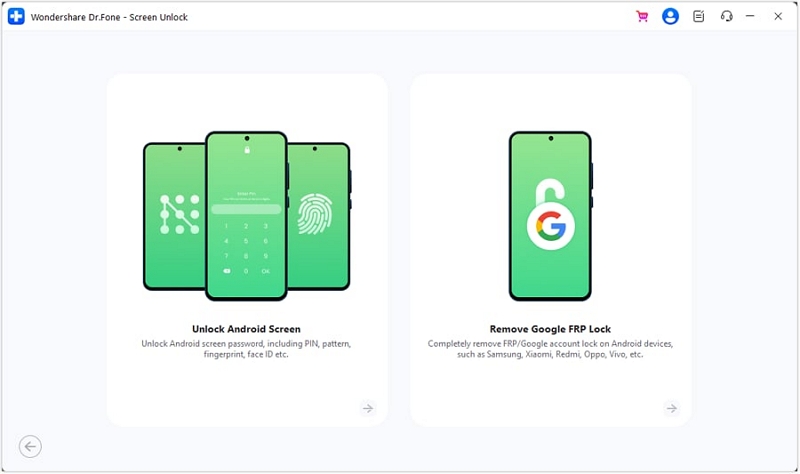
Step 2. Choose the Android Brand and Adhere to the Instructions
Then, proceed to opt for “ZTE” as the mobile brand and wait for the tool to download the required driver. Afterward, power off your phone and link it to the computer while holding the volume buttons for around three seconds. 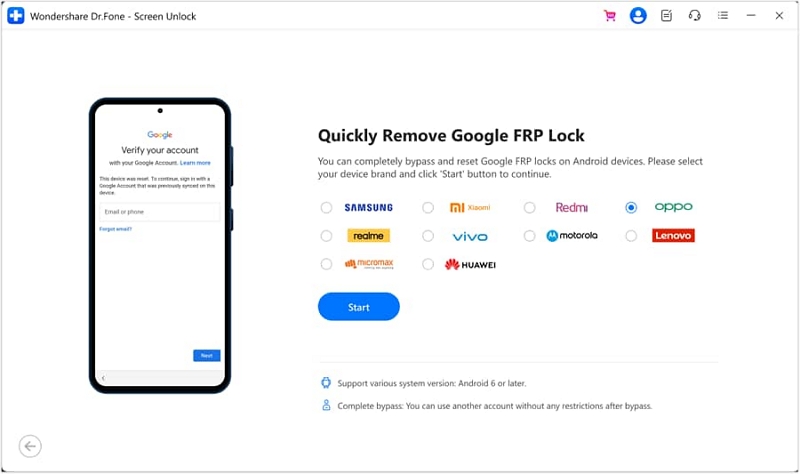
Step 3. Let the Program Get Rid of Google Lock
When you have successfully done so, the software will kickstart the FRP removal procedure. It will take a few moments to complete, after which you can click “Done” to conclude the operation. 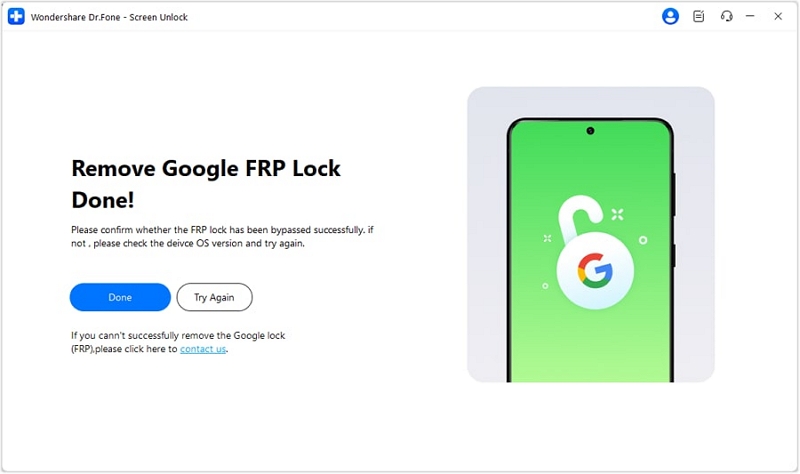
Conclusion
In summary, getting locked out of an Android device due to screen locks or FRP protection can be frustrating. Dr.Fone – Screen Unlock (Android) provides a reliable solution for removing all types of locks with a high success rate. When dealing with a forgotten password or FRP lock, this powerful software ensures quick access without hassle. Try it for an effortless unlocking experience without any risks.