• Send Us A Tip
  • Calling all Tech Writers
  • Advertise
Tuesday, June 30, 2026
  • Login
TechStory
  • News
  • Crypto
  • Gadgets
  • Memes
  • Gaming
  • Cars
  • AI
  • Startups
  • Markets
  • How to
No Result
View All Result
  • News
  • Crypto
  • Gadgets
  • Memes
  • Gaming
  • Cars
  • AI
  • Startups
  • Markets
  • How to
No Result
View All Result
TechStory
No Result
View All Result
Home Story

Enable long YouTube videos on your account

by Priyanka Chaubey
November 21, 2020
in Story, Tech
Reading Time: 2 mins read
0
YouTube to soon update its app with newly designed UI
TwitterWhatsappLinkedin
  • Post long  YouTube videos simply by verifying your Google Account to upload videos longer that are longer than 15 minutes.
  • Youtube allows you to upload and publish videos that are are under 15 minutes in length by default. 
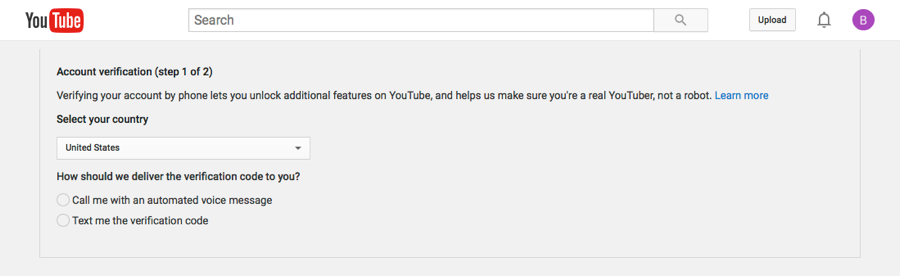
  • When you are using dekstop mode you can navigate directly to Google’s account verification page. However, on your iPhone or Android device Google lets you verify your account when you upload long YouTube videos.
Upload larger YouTube Videos
Source- Brightcove

Are you a Youtuber? Is creating YouTube videos your passion of life? Are you trying to publish videos that are larger than life but also large in file size? By default, YouTube allows you to publish videos that are equals to or less than 15 minutes in duration. If you want to upload videos that are larger than that, you still might have a way. By  verifying your Google Account, you can upload and publish videos that are up to 12 hours in length. Just make sure that your YouTube videos are not more than 128GB in size and you will be good to go!

You might also like

Wi-Fi 6E vs. Wi-Fi 7: Which Wireless Standard Should You Choose

What Is Zero Trust Security? A Complete Guide

Smart Rings vs Smartwatches: Which Is Best for You?

How to upload large videos using a browser in your dekstop for YouTube-

  1. Start your computer and launch a web browser.
  2. Open YouTube in your web browser.
  3. Navigate to the  YouTube’s verification page, and login with your credentials.
  4. You will recieve a set of instructions which will lead you to verify your account. Keep on following the instructions.
  5. Later, you will need to verify yourself with verification code which will come through a call or text message on your phone number.
  6. After you have completed the verification you will be easily be able to upload long YouTube videos that exceed the time limit of 15 minutes.

How to enable more than 15 minutes videos on YouTube using the mobile app

Note: You can carry out this proccess with both iPhone and Android. The steps will be pretty much the same for both the devices.

  1. Headstart the YouTube app in your iPhone/Android phone.
  2. When you will open the app, you will see an icon of plus sign at the bottom of your screen, tap on that. Later this step, tap on  “Upload a video” option which you will recieve from a pop-up box.
  3. Select the video which you want to upload on YouTube and is more than 15 minutes long. In case this video is the first video you are uploading on YouTube, you will first have to create a YouTube channel.
  4. Keep filling in the details that YouTube asks you to and then tap on ‘Next’.
  5. On the Select Audience page, answer the questions about whether it’s intended for kids and then tap “Upload.” If nothing happens, tap the back button at the top left.
  6. Follow the instructions to verify your Google Account. You’ll need to get a verification code using your mobile phone or using an automated voice call.

Tags: YoutubeYouTube videos
Tweet54SendShare15
Previous Post

Change Gmail password: Here are the easy steps to do it!

Next Post

YouTube to not give a dime or a damn while creating YouTube Ads On Creators’ Videos

Priyanka Chaubey

Recommended For You

Wi-Fi 6E vs. Wi-Fi 7: Which Wireless Standard Should You Choose

by Ishaan Negi
June 29, 2026
0
Wi-Fi 6E vs. Wi-Fi 7: Which Wireless Standard Should You Choose

Wireless technology has evolved rapidly over the past few years, and with each new generation, home networks have become faster, smarter, and better equipped to handle the growing...

Read more

What Is Zero Trust Security? A Complete Guide

by Ishaan Negi
June 29, 2026
0
What Is Zero Trust Security? A Complete Guide

Zero Trust security is a modern cybersecurity framework built on one simple principle: "Never trust, always verify." Unlike traditional security models that automatically trust users and devices inside...

Read more

Smart Rings vs Smartwatches: Which Is Best for You?

by Sneha Singh
June 29, 2026
0
Smart Rings vs Smartwatches: Which Is Best for You?

The wearable market has experienced a dramatic evolution during the past years. Initially, wearable technologies were limited to fitness trackers that helped people to keep track of their...

Read more
Next Post
How to Download YouTube Videos for IOS, Windows, and Android

YouTube to not give a dime or a damn while creating YouTube Ads On Creators' Videos

Please login to join discussion

Techstory

Tech and Business News from around the world. Follow along for latest in the world of Tech, AI, Crypto, EVs, Business Personalities and more.
reach us at info@techstory.in

Advertise With Us

Reach out at - info@techstory.in

Aviator Game India 2026

BROWSE BY TAG

#Crypto #howto 2024 acquisition AI amazon Apple Artificial Intelligence bitcoin Business China cryptocurrency e-commerce electric vehicles Elon Musk Ethereum facebook funding Gaming Google India Instagram Investment ios iPhone IPO Market Markets Meta Microsoft News OpenAI samsung Social Media SpaceX startup startups tech technology Tesla TikTok trend trending twitter US

© 2025 Techstory.in

No Result
View All Result
  • News
  • Crypto
  • Gadgets
  • Memes
  • Gaming
  • Cars
  • AI
  • Startups
  • Markets
  • How to

© 2025 Techstory.in

Welcome Back!

Login to your account below

Forgotten Password?

Retrieve your password

Please enter your username or email address to reset your password.

Log In
Are you sure want to unlock this post?
Unlock left : 0
Are you sure want to cancel subscription?