• Send Us A Tip
  • Calling all Tech Writers
  • Advertise
Saturday, September 5, 2026
  • Login
TechStory
  • News
  • Crypto
  • Gadgets
  • Memes
  • Gaming
  • Cars
  • AI
  • Startups
  • Markets
  • How to
No Result
View All Result
  • News
  • Crypto
  • Gadgets
  • Memes
  • Gaming
  • Cars
  • AI
  • Startups
  • Markets
  • How to
No Result
View All Result
TechStory
No Result
View All Result
Home Business

How to locate your orders in Amazon

by Amandeep Suter
January 26, 2021
in Business, Learning, Tech
Reading Time: 3 mins read
0
How to locate your orders in Amazon
TwitterWhatsappLinkedin

Online Shopping Revolution

Once upon a time, there was only one way of shopping. Go to the store, look at what’s available and buy it. Today, you can just sit at your home, browse on your phone and look at the millions of products available online. Once, you have finalized what you want, proceed to pay for it in any way you like. Wait for a day or two, and Voila! You have your desired product with you.

You might also like

Microsoft Announces Big Changes to Xbox Cloud Gaming, Switches to Monthly Hour Limits

Flock Is Cancelled—And Its Competitors Are Profiting

It’s Time for Mark Zuckerberg to Resign From Meta

That’s the change Amazon has brought to us. This online shopping revolution has changed our lives in many ways.

A to Z

Amazon locate Orders
Everything from A to Z

What started as an online bookstore, today, as become a giant platform that sells everything you need. From an A4 notebook to Z Line drawer files, it is truly a platform that has everything from A to Z. Currently. Amazon has more than 100 Million users in India, alone, which is a testament to how massive the company is.

So today, let’s answer a common question which many new Amazon users have – How to find your orders?

 So, here’s a step by step guide to locate your order in the app –

a). The first step is to open the Amazon app.
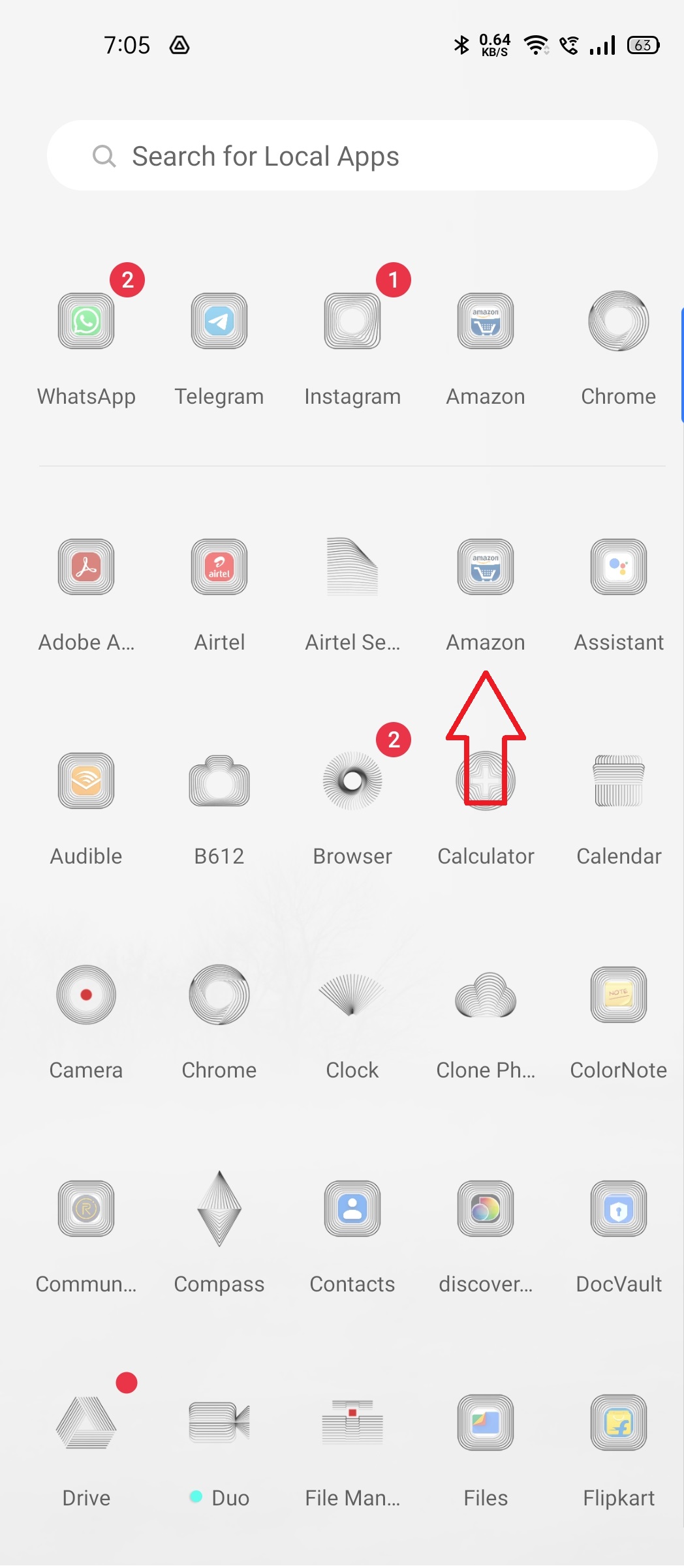
You will see the Amazon home screen as shown below –
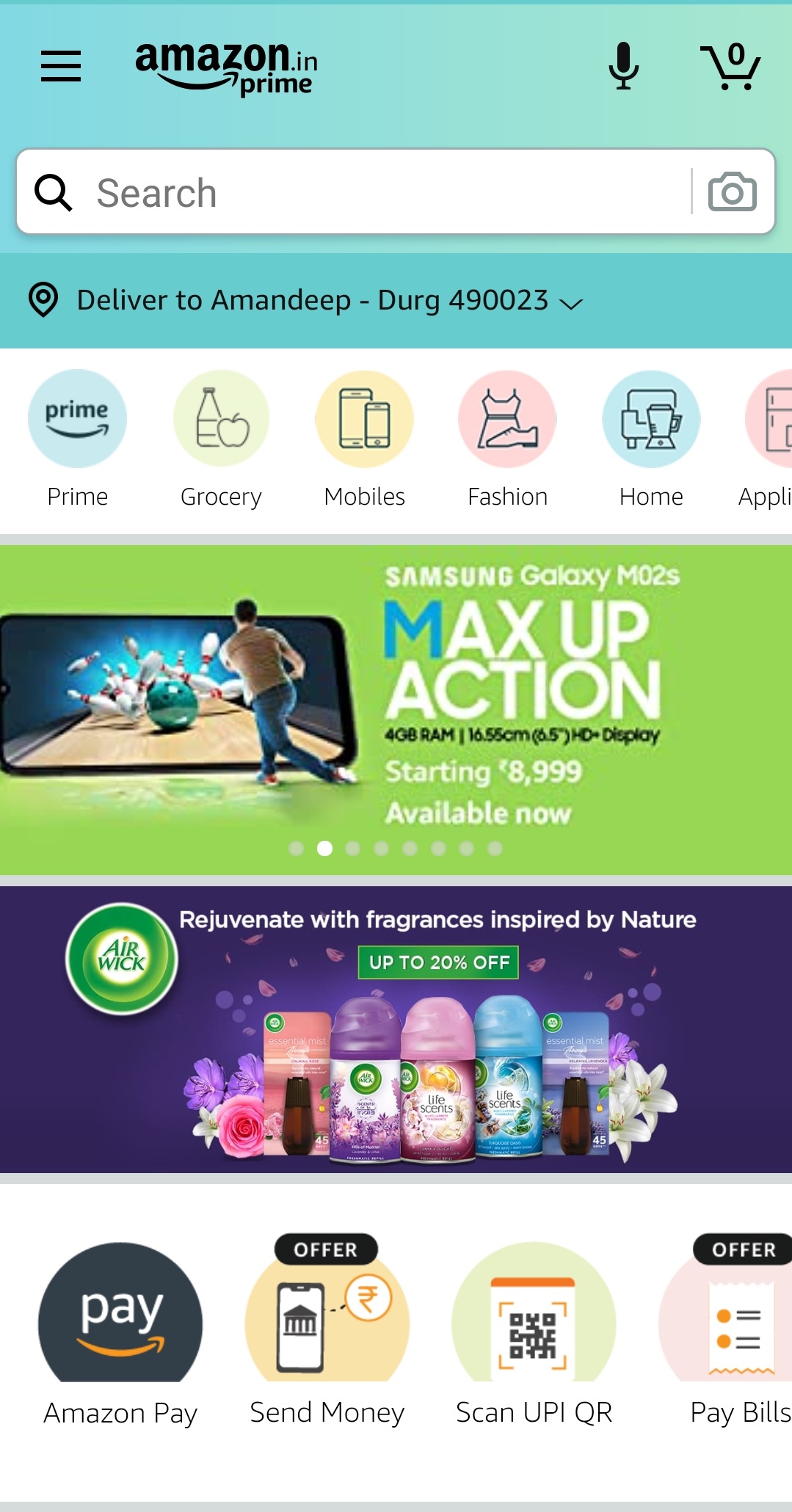
b). The next step is to tap on the 3 horizontal lines (Hamburger button) located on the top left corner, above the search bar.

Amazon locate Orders

c). After tapping on the Hamburger button, you will see a menu that will have various options, like Your orders, Buy Again, Wish list, Account details, and others. Finally, tap on “Your Orders” to find all your current and previous orders.

d). You will be able to find your orders. If you want to see the order details, click on the specific product for it.
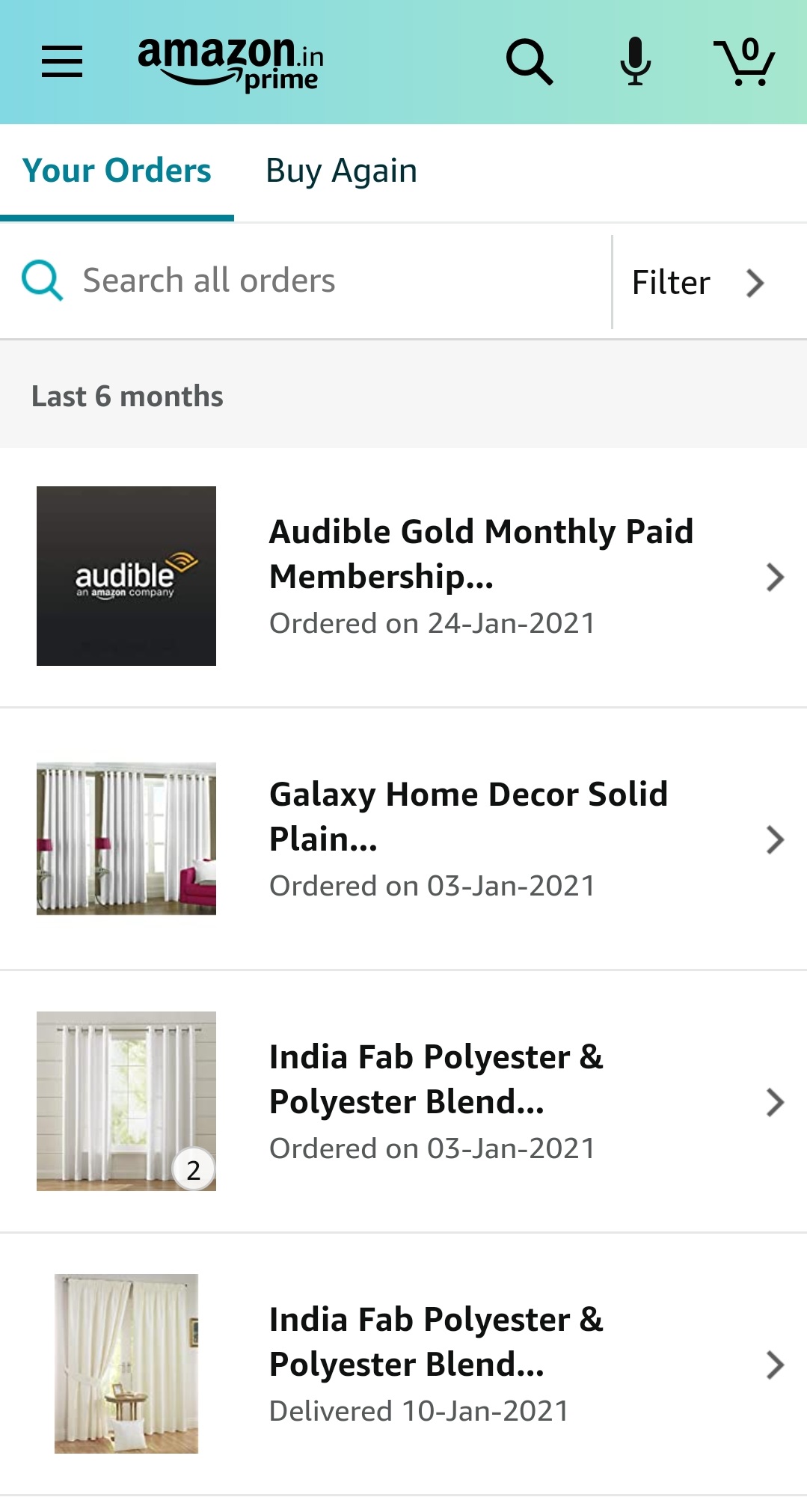
Now, let’s take a look at how you can locate your orders in the desktop version –
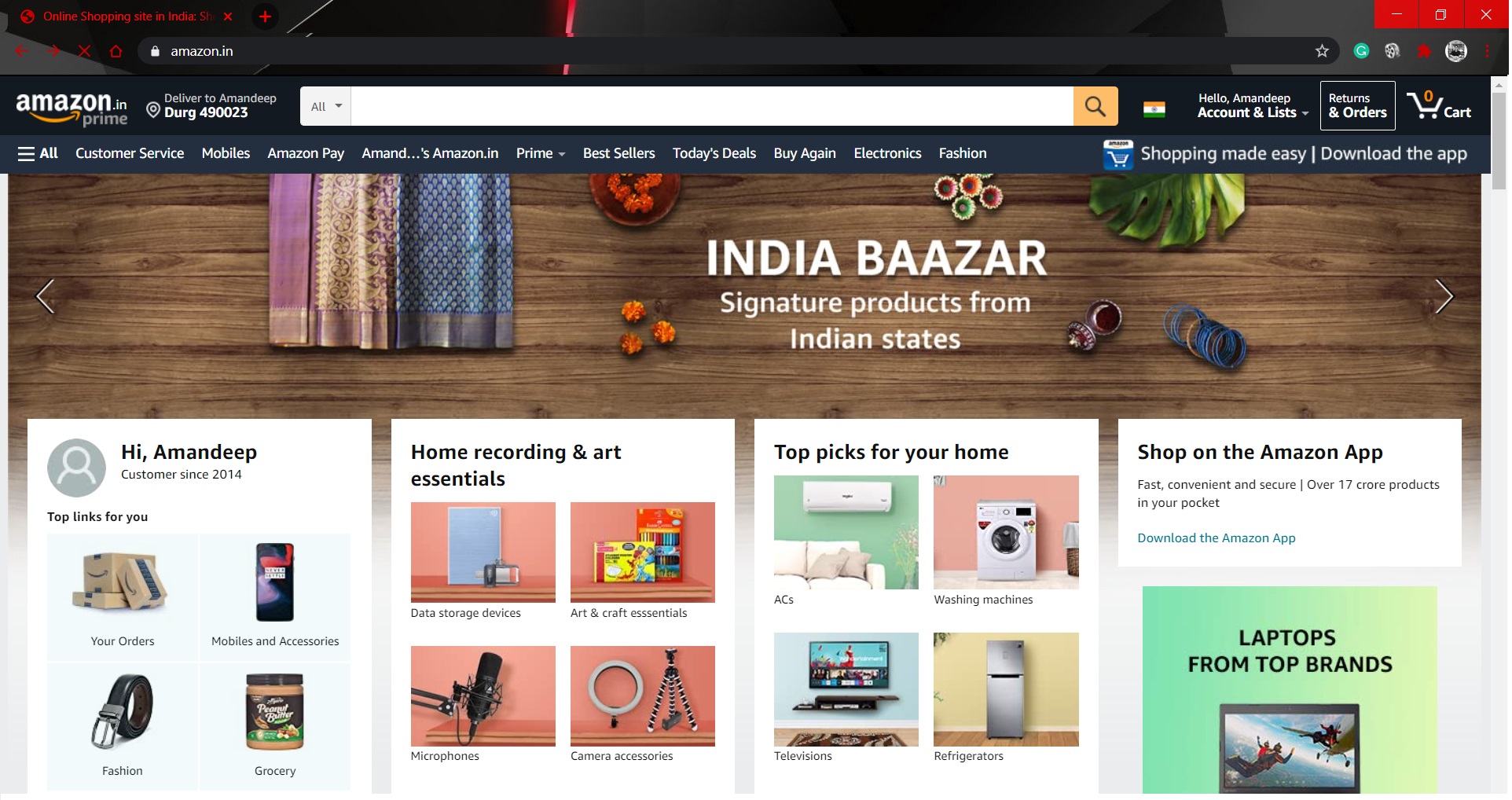
  1. Go to the official website of Amazon India.
Amazon locate Orders

2. Click on “Returns & Orders” which is located on the top right of the screen. 
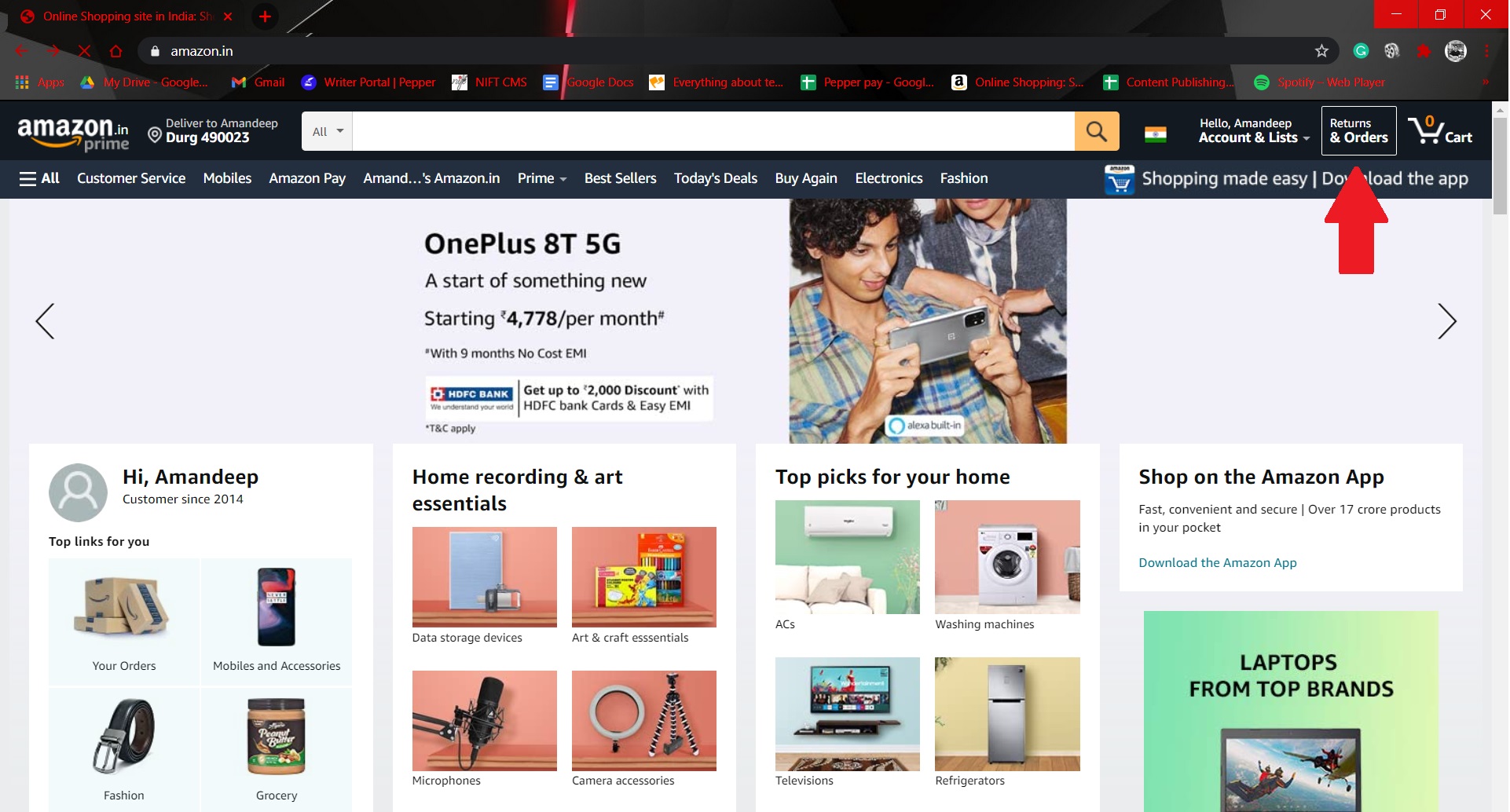
3. Alternatively, you can also click on Accounts & Lists, which is beside the Order option. You will notice several options regarding your account. Go to “Your  Orders” which is under the Your Account section.
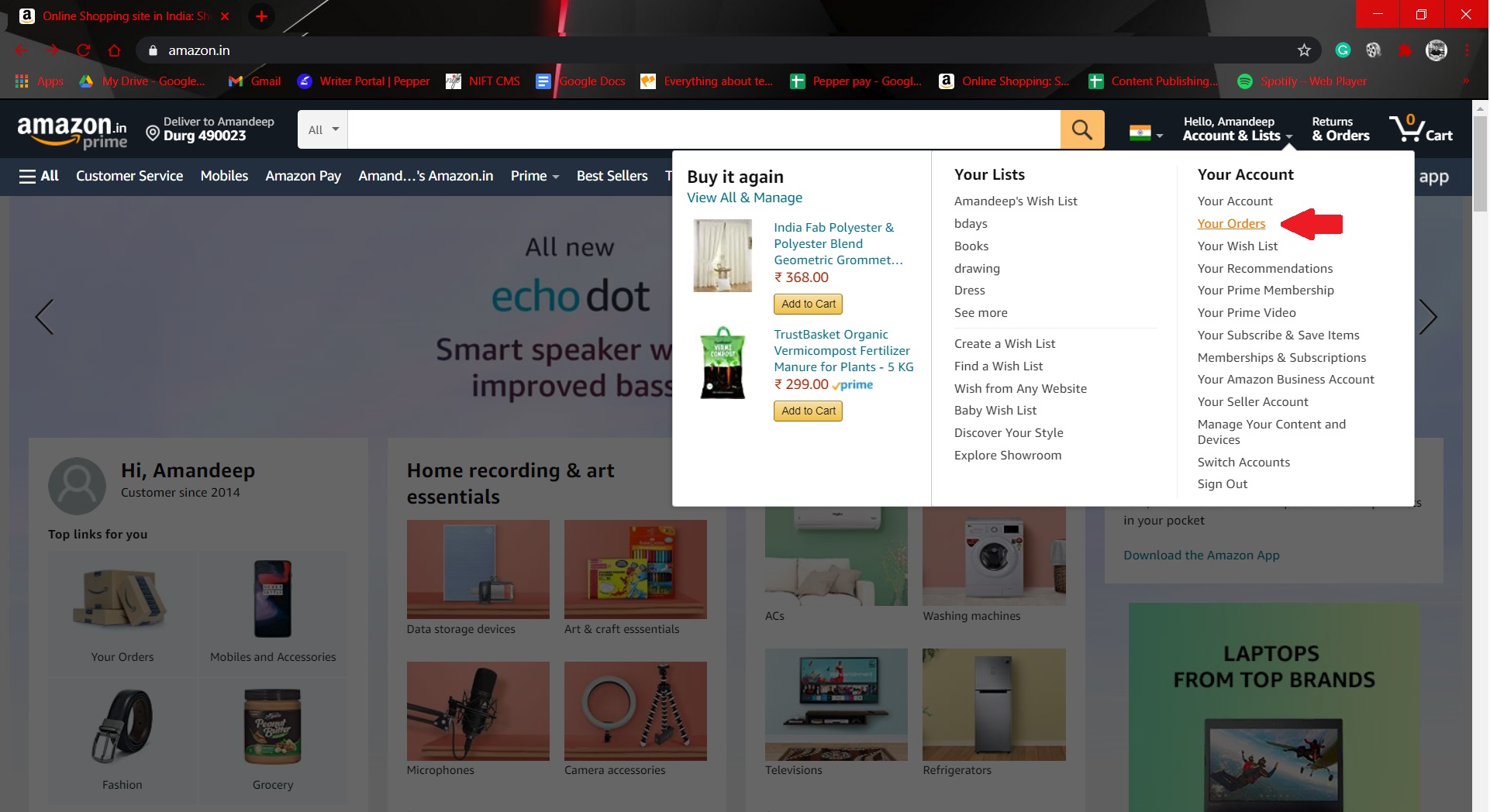
4. Voila! Your Amazon orders will be visible on your screen. Amazon initially shows the orders made in the last 3 months. You can also check older ones by changing the timeline from “3 months” to “6 months” or more based on your requirement.

That’s it! Yes, simple right? So, go on, look at your past orders and let us know in the comments what other “How to” guides you will like to read. Happy Shopping!


Tags: amazonAmazon IndiaJeff Bezozonline shoppingOrders
Tweet55SendShare15
Previous Post

Indian government permanently bans TikTok and 58 other apps

Next Post

Keeping your money and data secure with online banking

Amandeep Suter

A son, a brother and a friend who loves to write!

Recommended For You

Microsoft Announces Big Changes to Xbox Cloud Gaming, Switches to Monthly Hour Limits

by Shailja Jha
September 5, 2026
0
Microsoft Announces Big Changes to Xbox Cloud Gaming, Switches to Monthly Hour Limits

Microsoft is making a major change to Xbox Cloud Gaming, introducing monthly limits on how long subscribers can stream games through the cloud. The move marks a significant...

Read more

Flock Is Cancelled—And Its Competitors Are Profiting

by Shailja Jha
September 5, 2026
0
Flock Is Cancelled—And Its Competitors Are Profiting

The backlash against automated license plate readers is growing across the United States, but opposition to one of the industry's most recognizable companies has not necessarily meant an...

Read more

It’s Time for Mark Zuckerberg to Resign From Meta

by Shailja Jha
September 5, 2026
0
It’s Time for Mark Zuckerberg to Resign From Meta

Mark Zuckerberg has spent more than two decades building Facebook into Meta, one of the most powerful technology companies in the world. But the latest legal settlement involving...

Read more
Next Post
Open raises $30 Million funding

Keeping your money and data secure with online banking

Please login to join discussion

Techstory

Tech and Business News from around the world. Follow along for latest in the world of Tech, AI, Crypto, EVs, Business Personalities and more.
reach us at info@techstory.in

Advertise With Us

Reach out at - info@techstory.in

Aviator Game India 2026

BROWSE BY TAG

#Crypto #howto 2024 acquisition AI amazon Apple Artificial Intelligence bitcoin Business China cryptocurrency e-commerce electric vehicles Elon Musk Ethereum facebook funding Gaming Google India Instagram Investment ios iPhone IPO Market Markets Meta Microsoft News OpenAI samsung Social Media SpaceX startup startups tech technology Tesla TikTok trend trending twitter US

© 2025 Techstory.in

No Result
View All Result
  • News
  • Crypto
  • Gadgets
  • Memes
  • Gaming
  • Cars
  • AI
  • Startups
  • Markets
  • How to

© 2025 Techstory.in

Welcome Back!

Login to your account below

Forgotten Password?

Retrieve your password

Please enter your username or email address to reset your password.

Log In
Are you sure want to unlock this post?
Unlock left : 0
Are you sure want to cancel subscription?