• Send Us A Tip
  • Calling all Tech Writers
  • Advertise
Sunday, July 26, 2026
  • Login
TechStory
  • News
  • Crypto
  • Gadgets
  • Memes
  • Gaming
  • Cars
  • AI
  • Startups
  • Markets
  • How to
No Result
View All Result
  • News
  • Crypto
  • Gadgets
  • Memes
  • Gaming
  • Cars
  • AI
  • Startups
  • Markets
  • How to
No Result
View All Result
TechStory
No Result
View All Result
Home How to

How to recover Deleted files from Microsoft Teams

by Amandeep Suter
January 31, 2021
in How to, Tech
Reading Time: 3 mins read
0
Recover files Microsoft Teams
TwitterWhatsappLinkedin

Welcome to another article of “How to.” Today, we will discuss a solution for a problem that is quite common. How often has this scenario occurred? Imagine having an important test or a meeting soon, and you have worked hard on your file. But unfortunately, for some reason, it gets deleted!

You might also like

Silicon Megadeal Samsung Lands Landmark $200 Billion AI Chip Contract with Broadcom

The Pentagon’s $7 Billion Lifeline Can Defense Cash Stop the Oracle Stock Collapse?

Why Semiconductor Factories Cost Billions: Inside the World’s Most Expensive Buildings

The world seems to end. This can happen to anyone. Especially in a time of Work from home and Online classes! Thankfully, one of the most popular videoconferencing apps, Microsoft Teams, has a solution to it. 

Recover files Microsoft Teams
So let’s figure out how can you recover files from Microsoft Teams –

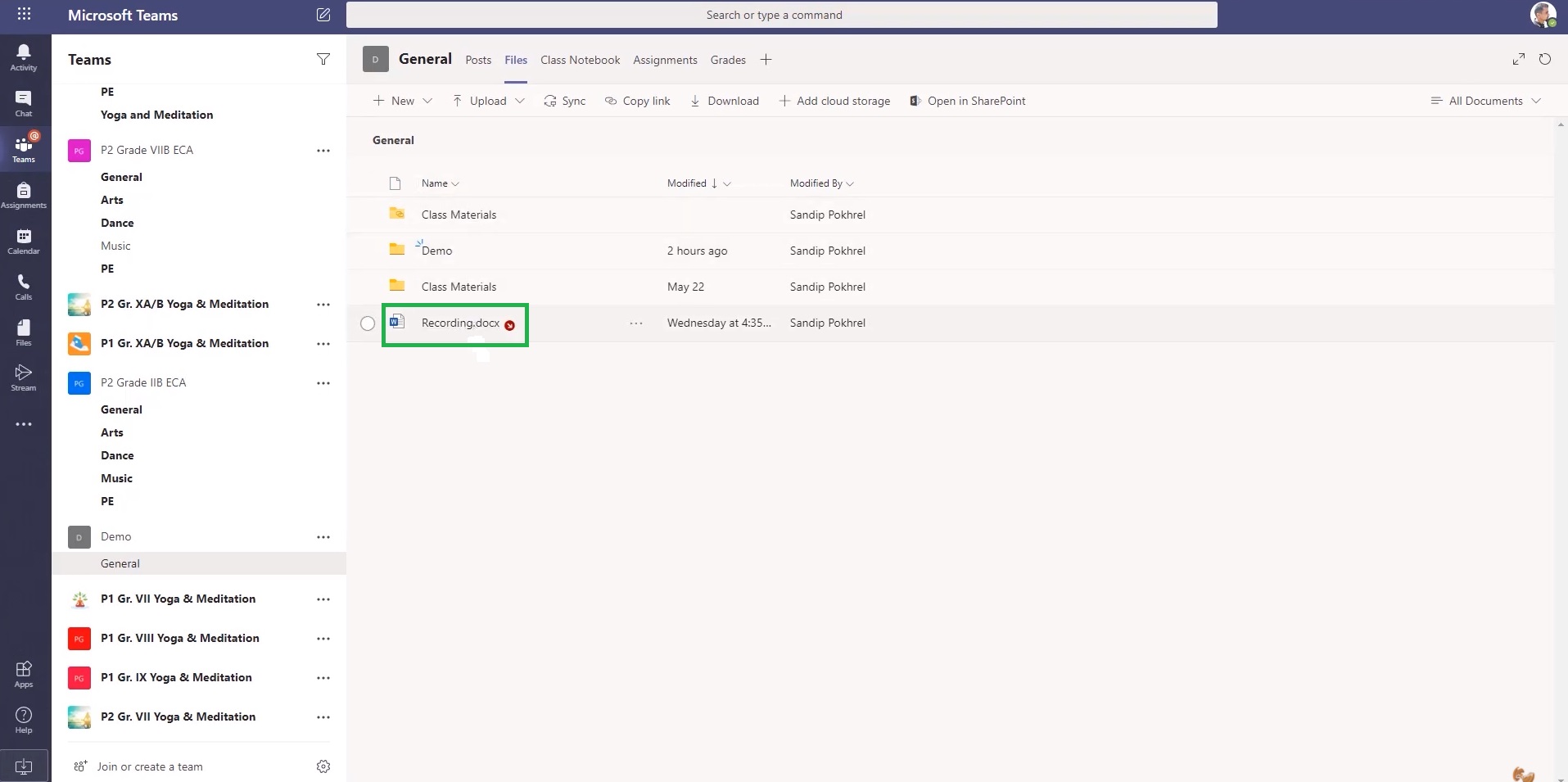
a). Open Microsoft Teams. You will find it in the “General” section.Recover files Microsoft Teams

 

b). Go to Files as shown below. This is where all your important documents and files will be located at. Recover files Microsoft Teams
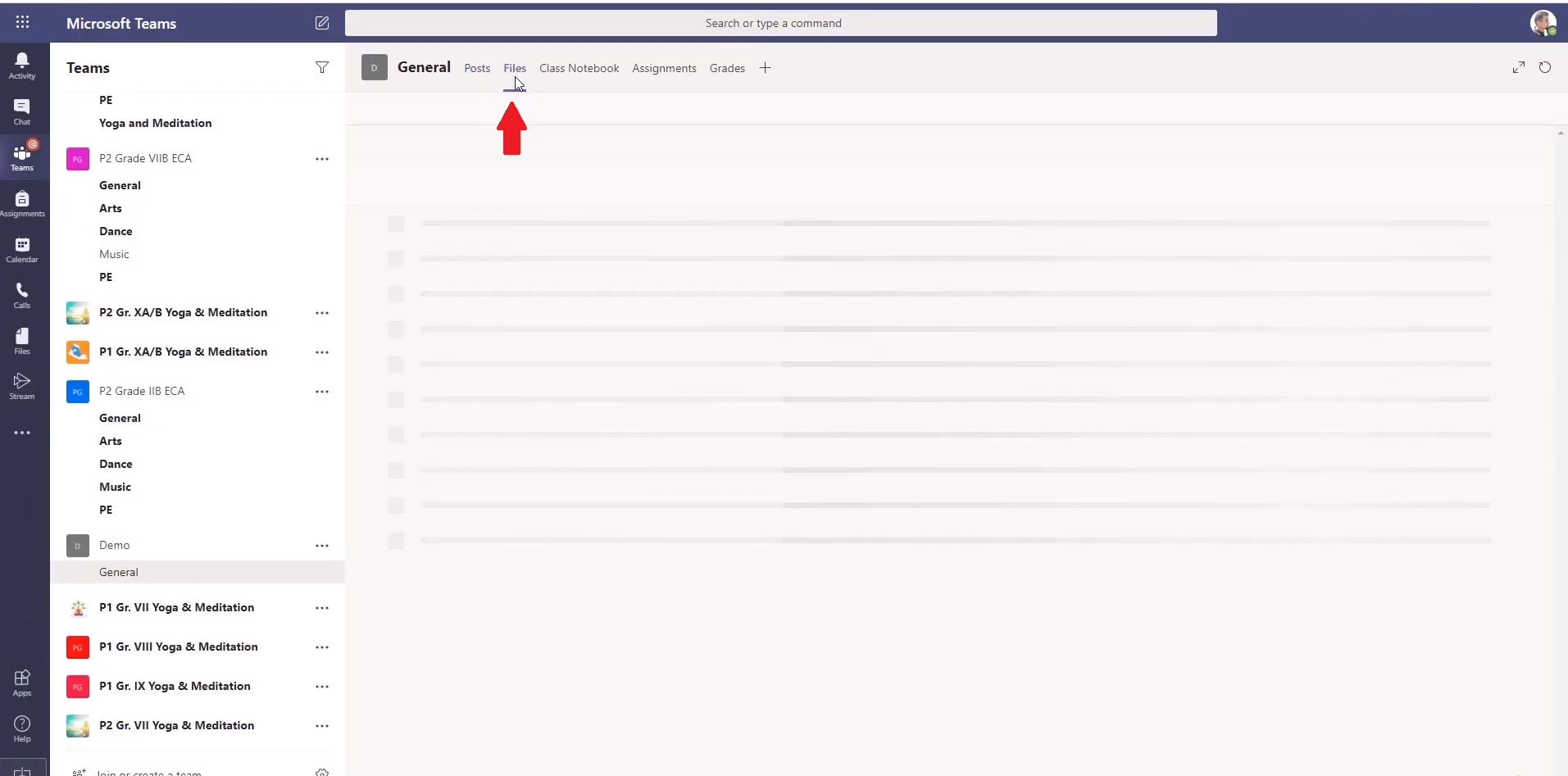
c). Now, for example, think about this Recording.docx as the file which you accidentally deleted. It can happen since the delete button is just under download, so one can often do it in a hurry.

d). Oops! The file has vanished.

e). Now instead of Panicking, what you need to do is, look for “SharePoint.” It will be located on the top of your screen, besides “add cloud storage.” Click on “Open in SharePoint”.f). You will be redirected to the SharePoint tab.

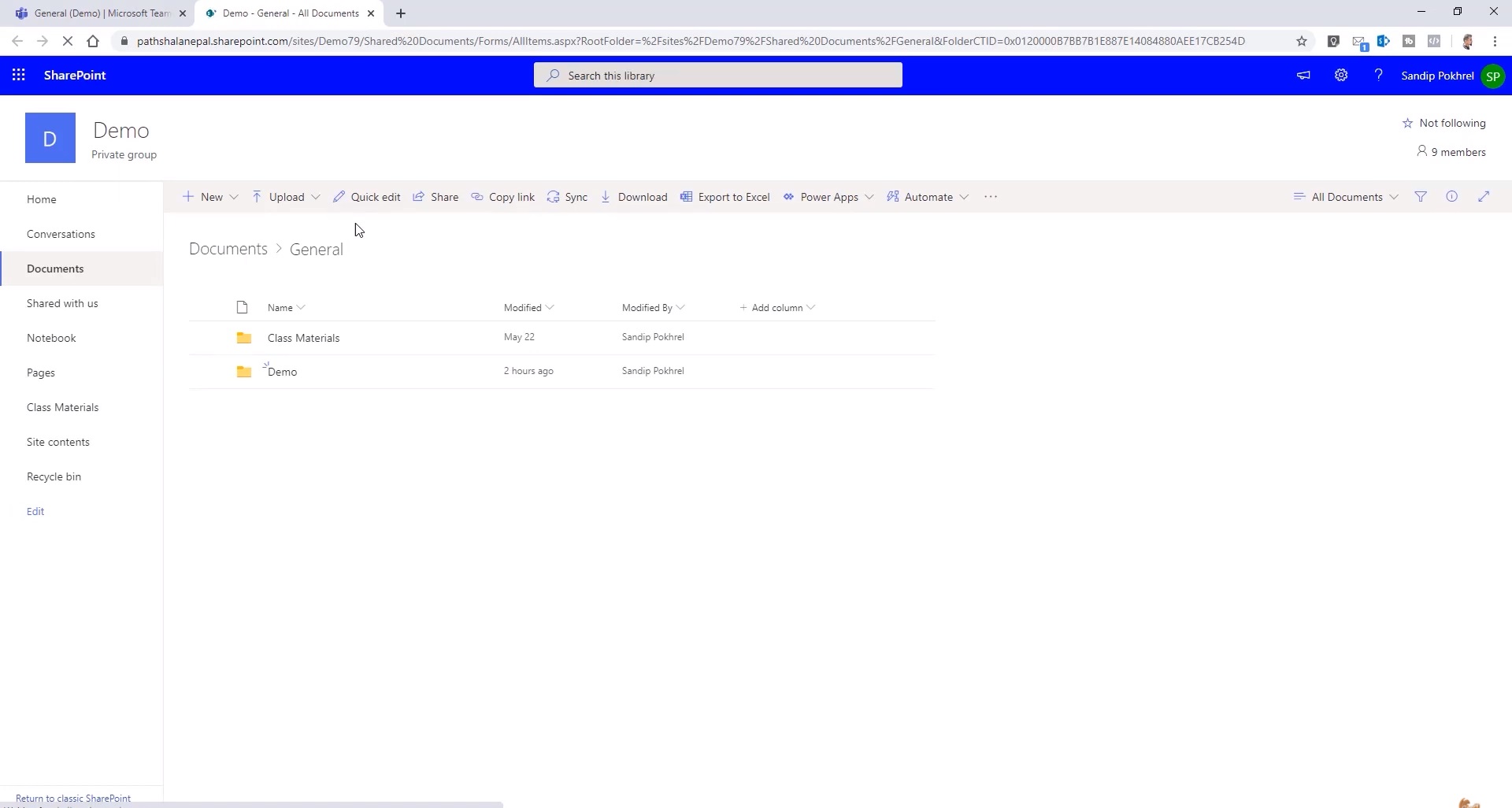
g).  Now, look for the lifesaver known as “Recycle Bin.” It will be located at the down-left corner of your screen, just above Edit. Click on it.

h). Yes! Breathe and relax. You have found your lost treasure. Along with it, you will also see other deleted files.
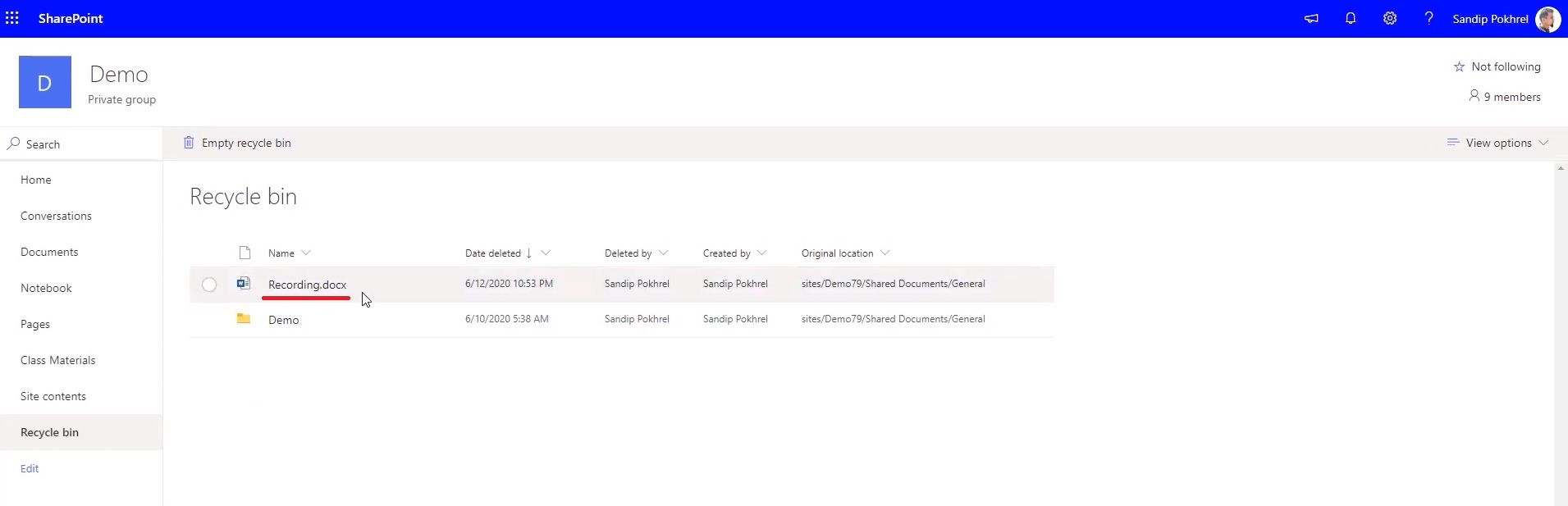
i). Now click on the required file. You will see two options above. Please click on “Restore.”
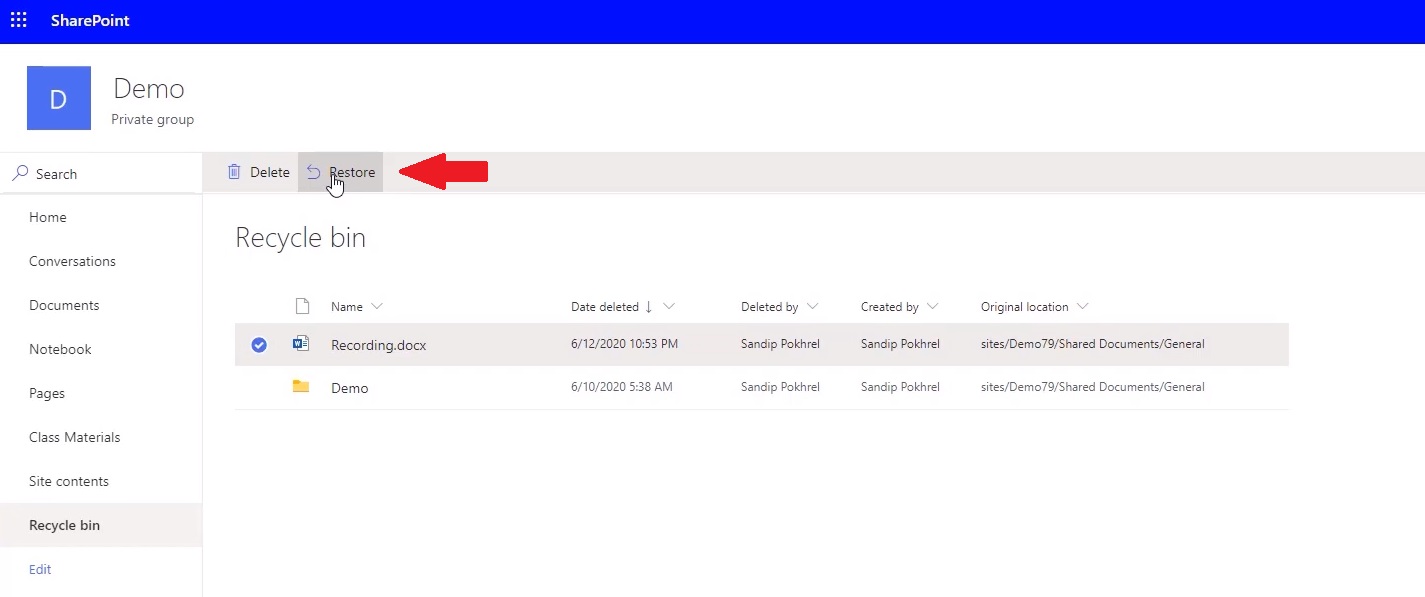
j). Voila! Your file has been successfully restored. Recover files Microsoft Teams
That’s how you can recover files from your Microsoft Teams. In case you have any doubts, you can also look at this video for more clarity –

Also, a special mention to this wonderful Youtube channel – Sandip. He posts great content regarding the IT tips and tricks which we can use in our daily life. Do check it out.


Tags: deleteHow toMicrosoft teamsRecover FileZoom
Tweet54SendShare15
Previous Post

A battle of Stocks – Young Reddit Investors VS Wall Street Elite. Who will Win?

Next Post

World’s first Bitcoin playbook announced by MicroStrategy

Amandeep Suter

A son, a brother and a friend who loves to write!

Recommended For You

Silicon Megadeal Samsung Lands Landmark $200 Billion AI Chip Contract with Broadcom

by Anochie Esther
July 26, 2026
0
Samsung $200 billion chip deal with Broadcom

The global race to supply physical hardware for artificial intelligence workloads has produced the largest semiconductor manufacturing contract in history. As tech giants build out gigawatt-scale data centers...

Read more

The Pentagon’s $7 Billion Lifeline Can Defense Cash Stop the Oracle Stock Collapse?

by Anochie Esther
July 26, 2026
0
Pentagon $7 billion Oracle contract

The intersection of national defense procurement and Silicon Valley balance sheets has produced one of the most high-stakes corporate rescue narratives of the year. For nearly a decade,...

Read more

Why Semiconductor Factories Cost Billions: Inside the World’s Most Expensive Buildings

by Ishaan Negi
July 26, 2026
0
Why Semiconductor Factories Cost Billions: Inside the World’s Most Expensive Buildings

Every time a company announces a new semiconductor factory, the headline almost always includes a staggering price tag. $10 billion. $20 billion. $50 billion. Some projects now stretch...

Read more
Next Post
Microstrategy to sell stocks and invest $500M in Bitcoin

World's first Bitcoin playbook announced by MicroStrategy

Please login to join discussion

Techstory

Tech and Business News from around the world. Follow along for latest in the world of Tech, AI, Crypto, EVs, Business Personalities and more.
reach us at info@techstory.in

Advertise With Us

Reach out at - info@techstory.in

Aviator Game India 2026

BROWSE BY TAG

#Crypto #howto 2024 acquisition AI amazon Apple Artificial Intelligence bitcoin Business China cryptocurrency e-commerce electric vehicles Elon Musk Ethereum facebook funding Gaming Google India Instagram Investment ios iPhone IPO Market Markets Meta Microsoft News OpenAI samsung Social Media SpaceX startup startups tech technology Tesla TikTok trend trending twitter US

© 2025 Techstory.in

No Result
View All Result
  • News
  • Crypto
  • Gadgets
  • Memes
  • Gaming
  • Cars
  • AI
  • Startups
  • Markets
  • How to

© 2025 Techstory.in

Welcome Back!

Login to your account below

Forgotten Password?

Retrieve your password

Please enter your username or email address to reset your password.

Log In
Are you sure want to unlock this post?
Unlock left : 0
Are you sure want to cancel subscription?