• Send Us A Tip
  • Calling all Tech Writers
  • Advertise
Saturday, September 19, 2026
  • Login
TechStory
  • News
  • Crypto
  • Gadgets
  • Memes
  • Gaming
  • Cars
  • AI
  • Startups
  • Markets
  • How to
No Result
View All Result
  • News
  • Crypto
  • Gadgets
  • Memes
  • Gaming
  • Cars
  • AI
  • Startups
  • Markets
  • How to
No Result
View All Result
TechStory
No Result
View All Result
Home How to

How to deactivate my Instagram account

by Arya Roy
June 2, 2021
in How to, Tech
Reading Time: 1 min read
0
How to deactivate my Instagram account

Source: https://www.businessinsider.in/tech/how-to/a-beginners-guide-to-instagram-the-wildly-popular-photo-sharing-app-with-over-a-billion-users/articleshow/77876081.cms

TwitterWhatsappLinkedin

Instagram may be great to keep up with your friends and other events happening around the world, but it might not suit everyone. So for them, here is a guide on how you can delete/deactivate your Instagram account. Before that though, it is important to note that when you delete your account, your photos, videos, profile, likes, followers, and comments are all also permanently deleted.

You might also like

Weekly Technology News

Weekly Startup Funding News

How to Send Automated Messages on WhatsApp

After your account has deleted, you can sign up again for a new account with the same username or associate it with a different account until that username is used by someone else who is new to Instagram.

Keep in mind that if your account is deleted for violating by Instagram itself for violating any designated community guidelines that you are supposed to follow, you cannot sign up again using the same username as before.

How to request the permanent deletion of your account

Prior to deleting an account, you may want to log in and download a copy of all the important information that is associated with your account since you will no longer have access to Instagram’s data download tools after your account is deleted.

Go to the Delete your account page from either mobile browser or computer. If you are not logged into Instagram on the web, you will be asked to log in as a first step. This is because you cannot delete your account from the Instagram mobile application.

You will be asked about your reason behind deleting your account. There will be a drop-down menu from which you have to select an option and type in your password again. The option to permanently delete your account will be available only if you choose a reason from the given menu. After this, tap on [username] Delete.
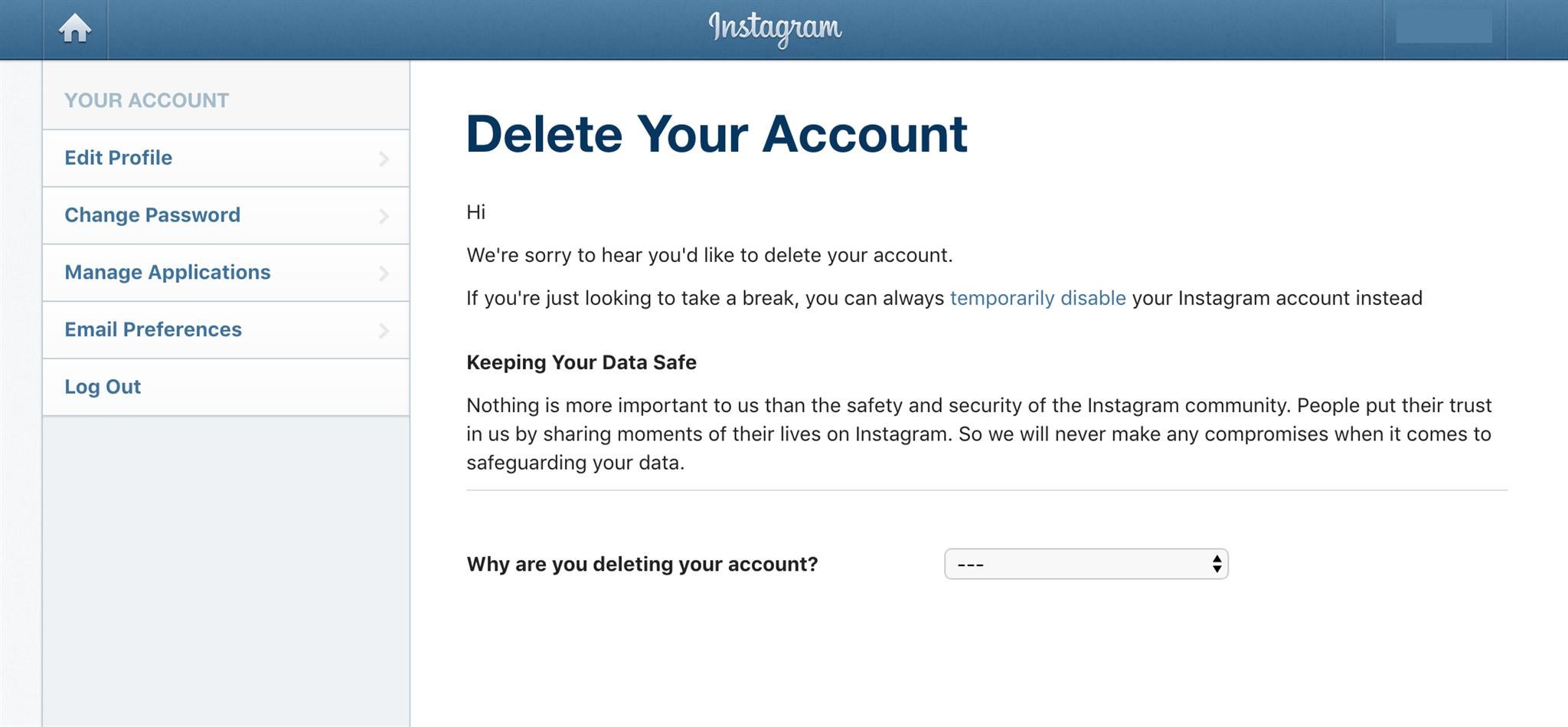

Source: https://www.trustedreviews.com/news/delete-instagram-account-2947924
Tags: Instagram
Tweet54SendShare15
Previous Post

How to Change Your Grades Online Hack

Next Post

You can own stake in Mexican football club along with NFT for $1.3 Million

Arya Roy

Hi, this is Arya! Writing has always been a passion of mine, regardless of the topic I choose. Besides that, I am a huge foodie and music lover, whose interests range from world politics to horror films to everything in between.

Recommended For You

Weekly Technology News

by Shailja Jha
September 19, 2026
0
Weekly Technology News

France Probes Misuse of Smart Glasses in Sexual Harassment Cases French authorities are investigating the alleged misuse of camera-equipped smart glasses in cases involving sexual harassment and the...

Read more

Weekly Startup Funding News

by Shailja Jha
September 19, 2026
0
Weekly Startup News

Ryft Raises £20M as Manchester Payments Fintech Targets Europe and US Expansion Manchester-based payments fintech Ryft has raised £20 million in a Series B funding round as it...

Read more

How to Send Automated Messages on WhatsApp

by Rohan Mathawan
September 19, 2026
0
How to Send Automated Messages on WhatsApp

Automated WhatsApp messages are most useful when they respond to something that has already happened. A customer submits a form. An order changes status. Someone books an appointment....

Read more
Next Post
You can own stake in Mexican football club along with NFT for $1.3 Million

You can own stake in Mexican football club along with NFT for $1.3 Million

Please login to join discussion

Techstory

Tech and Business News from around the world. Follow along for latest in the world of Tech, AI, Crypto, EVs, Business Personalities and more.
reach us at info@techstory.in

Advertise With Us

Reach out at - info@techstory.in

Aviator Game India 2026

BROWSE BY TAG

#Crypto #howto 2024 acquisition AI amazon Apple Artificial Intelligence bitcoin Business China cryptocurrency e-commerce electric vehicles Elon Musk Ethereum facebook funding Gaming Google India Instagram Investment iPhone IPO Market Markets Meta Microsoft News OpenAI samsung Social Media SpaceX startup startups tech Tech news technology Tesla TikTok trend trending twitter US

© 2025 Techstory.in

No Result
View All Result
  • News
  • Crypto
  • Gadgets
  • Memes
  • Gaming
  • Cars
  • AI
  • Startups
  • Markets
  • How to

© 2025 Techstory.in

Welcome Back!

Login to your account below

Forgotten Password?

Retrieve your password

Please enter your username or email address to reset your password.

Log In
Are you sure want to unlock this post?
Unlock left : 0
Are you sure want to cancel subscription?