• Send Us A Tip
  • Calling all Tech Writers
  • Advertise
Thursday, July 23, 2026
  • Login
TechStory
  • News
  • Crypto
  • Gadgets
  • Memes
  • Gaming
  • Cars
  • AI
  • Startups
  • Markets
  • How to
No Result
View All Result
  • News
  • Crypto
  • Gadgets
  • Memes
  • Gaming
  • Cars
  • AI
  • Startups
  • Markets
  • How to
No Result
View All Result
TechStory
No Result
View All Result
Home How to

How to create a profile on Google Chrome browser

by Arya Roy
June 8, 2021
in How to, Tech
Reading Time: 2 mins read
0
How to create a profile on Google Chrome browser

Source: https://tech.hindustantimes.com/tech/news/new-google-chrome-spyware-lets-hackers-track-your-online-activity-71592460289375.html

TwitterWhatsappLinkedin

Google Chrome provides its users with a number of features to personalise your experience on your browser. One of these is creating a profile on the Google Chrome browser.

You might also like

The Shadow Balance Sheet Big Tech Conceals $1.65 Trillion in Off-Balance-Sheet AI Debt

How to find unclaimed money in your name?

How to choose a password manager?

Profiles on the Chrome browser allows you to retain your information, such as passwords, history, bookmarks, and other settings, and keep them separate. The feature can prove to be useful when you have to share your device with other users. You can also keep your work and personal browsing experience separate from each other. You are recommended to use the feature for your own usage as otherwise, others may be able to see your Chrome profile info, such as your search history.

Adding a new profile on Google Chrome

  1. Open the Chrome browser on your device.
  2. Click on the Profile icon. This can be found in the top-right corner of your screen.
  3. Hit the Add button.
  4. If you choose to sync your Google account, Google will automatically put your account name for the profile.
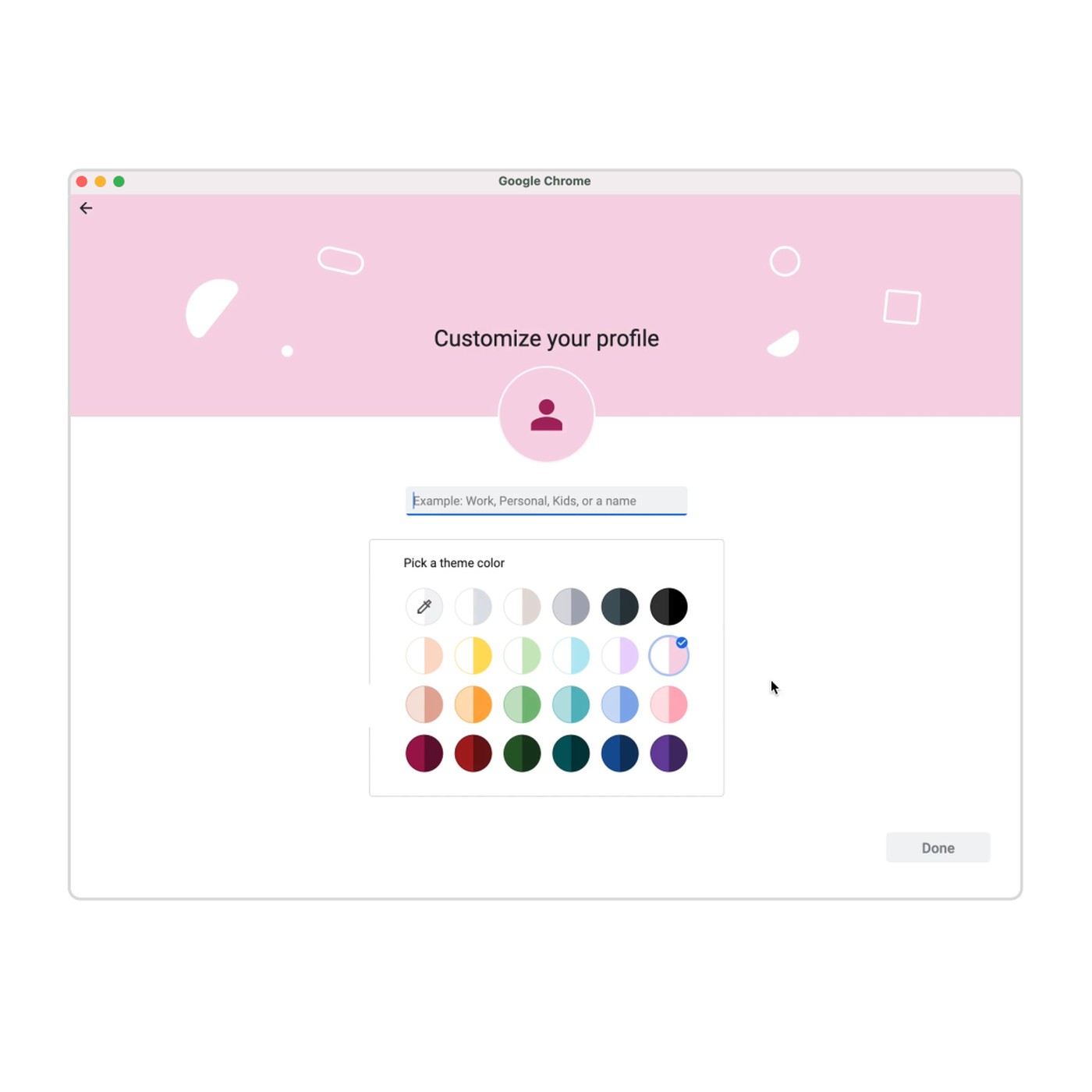
  5. For your account, you can choose a photo, name, and even a colour scheme of your preference.
Source: https://www.theverge.com/2021/3/2/22309154/google-chrome-reading-list-new-profile-bookmarks-colors-features

Switching between Chrome profiles 

  1. Open the Chrome browser on your device.
  2. Click on the Profile icon. This can be found in the top-right corner of your screen.
  3. There will be a drop-down menu, from which you have to choose the profile that you want to use.

Removing a profile from Chrome 

  1. Open the Chrome browser on your device.
  2. Click on the Profile icon. This can be found in the top-right corner of your screen.
  3. Click on Manage profiles.
  4. Choose the profile that you wish to remove.
  5. Click on More and click on Delete.
Tags: Google Chrome
Tweet54SendShare15
Previous Post

Five Amazing Benefits of Near Field Communication

Next Post

SpaceX Starlink Services File FFC Application For Smaller Antenna

Arya Roy

Hi, this is Arya! Writing has always been a passion of mine, regardless of the topic I choose. Besides that, I am a huge foodie and music lover, whose interests range from world politics to horror films to everything in between.

Recommended For You

The Shadow Balance Sheet Big Tech Conceals $1.65 Trillion in Off-Balance-Sheet AI Debt

by Anochie Esther
July 23, 2026
0
off-balance-sheet AI debt

The global race for artificial intelligence dominance has triggered a historic infrastructure spending boom, but the true financial weight of this expansion remains largely hidden from public view....

Read more

How to find unclaimed money in your name?

by Afeefa Ansari
July 23, 2026
0
Unclaimed money

Do you think you have some unclaimed money in your name that you're yet to find and cash out? Follow the guide to know how you can find...

Read more

How to choose a password manager?

by Afeefa Ansari
July 23, 2026
0
Password manager

Wanting a password manager for your device and the passwords it contains? We've got you. Follow the guide to learn how you can pick the right password manager...

Read more
Next Post
SpaceX Starlink Services File FFC Application For Smaller Antenna

SpaceX Starlink Services File FFC Application For Smaller Antenna

Please login to join discussion

Techstory

Tech and Business News from around the world. Follow along for latest in the world of Tech, AI, Crypto, EVs, Business Personalities and more.
reach us at info@techstory.in

Advertise With Us

Reach out at - info@techstory.in

Aviator Game India 2026

BROWSE BY TAG

#Crypto #howto 2024 acquisition AI amazon Apple Artificial Intelligence bitcoin Business China cryptocurrency e-commerce electric vehicles Elon Musk Ethereum facebook funding Gaming Google India Instagram Investment ios iPhone IPO Market Markets Meta Microsoft News OpenAI samsung Social Media SpaceX startup startups tech technology Tesla TikTok trend trending twitter US

© 2025 Techstory.in

No Result
View All Result
  • News
  • Crypto
  • Gadgets
  • Memes
  • Gaming
  • Cars
  • AI
  • Startups
  • Markets
  • How to

© 2025 Techstory.in

Welcome Back!

Login to your account below

Forgotten Password?

Retrieve your password

Please enter your username or email address to reset your password.

Log In
Are you sure want to unlock this post?
Unlock left : 0
Are you sure want to cancel subscription?