• Send Us A Tip
  • Calling all Tech Writers
  • Advertise
Saturday, August 22, 2026
  • Login
TechStory
  • News
  • Crypto
  • Gadgets
  • Memes
  • Gaming
  • Cars
  • AI
  • Startups
  • Markets
  • How to
No Result
View All Result
  • News
  • Crypto
  • Gadgets
  • Memes
  • Gaming
  • Cars
  • AI
  • Startups
  • Markets
  • How to
No Result
View All Result
TechStory
No Result
View All Result
Home Tech Mobile

How to Securely Erase All Data on Your iPhone

by Rohan Mathawan
July 23, 2021
in Mobile, Tech
Reading Time: 3 mins read
0
How to Securely Erase All Data on Your iPhone
TwitterWhatsappLinkedin

If you’re going to sell your old iPhone, or just handing it over to other people, you might want to make sure if all your personal data is thoroughly wiped before you do so. Follow the four steps below and you can wipe your iPhone completely and let it go without worry.

You might also like

Which Printer Is Best for Scrapbook Photo Printing?

Upstox Explores IPO Plans as User Base Crosses 2 Crore

Australia Passes News Bargaining Levy Targeting Meta and Google

1. Backup Your Data

Before erasing all data from your iPhone, the most important thing to do is to ensure that you have made a backup of your iPhone. A backup enables you to copy the important data you don’t want to lose, so you can transfer your data to a new device if you need. You can back up your iPhone using iCloud, iTunes, or using your computer.

2. Perform a Factory Reset to Wipe Your iPhone

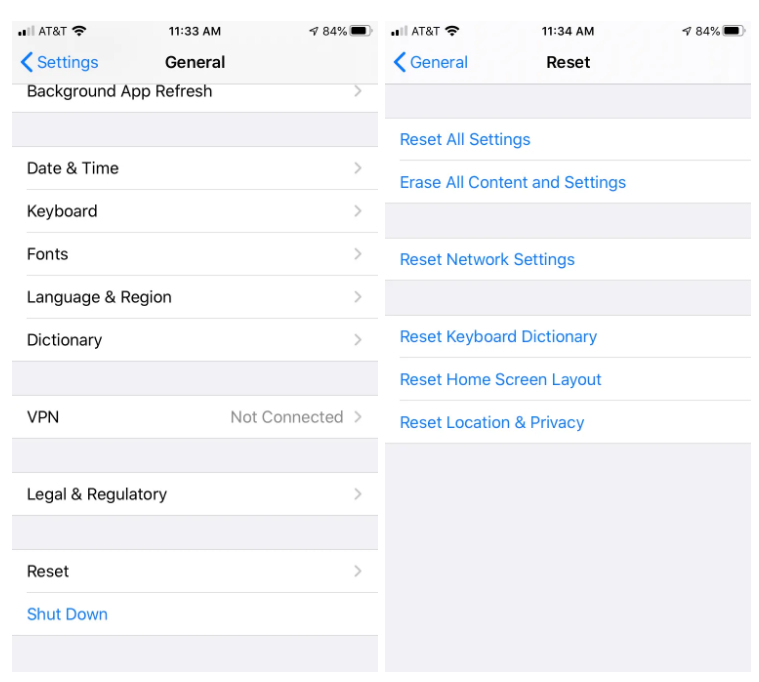
Now that you’ve made a copy of your iPhone, you can safely wipe all data on your iPhone. You should be aware that performing a factory reset will erase all data on your iPhone. When you’re ready, you can follow the steps below.

  • On your iPhone, open Settings, scroll down and tap General.
  • Scroll down and select Reset.
  • Tap Erase All Content and Settings. If you turned on Find My iPhone, you might need to enter your Apple ID and password. If your device uses eSIM, choose the option to erase your device and the eSIMP profile when asked.
3. Erase Everything from Your iPhone Completely and Permanently

Sometimes a simple factory reset won’t erase all your data completely, and the deleted files, messages, photos, or other data might easily be restored with some data recovery tools. Some apps and browsers might still store your login details and passwords. Luckily, you can turn to a professional iPhone eraser program, like Apeaksoft iPhone Eraser. It is designed for wiping iPhone data completely and permanently. And your iPhone is unrecoverable after erasing. This is what you do.

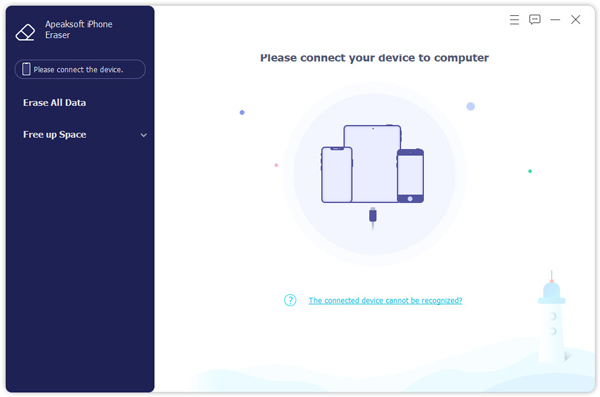
Step 1. Connect iPhone to your computer

First, head to the official website of Apeaksoft iPhone Eraser, then you need to download and install the program on your Windows PC or Mac. After the installation, launch it and you will see its main interface. Then connect your iPhone to computer via USB cable, it can identify your iPhone device within seconds.
Step 2. Choose the erasing level

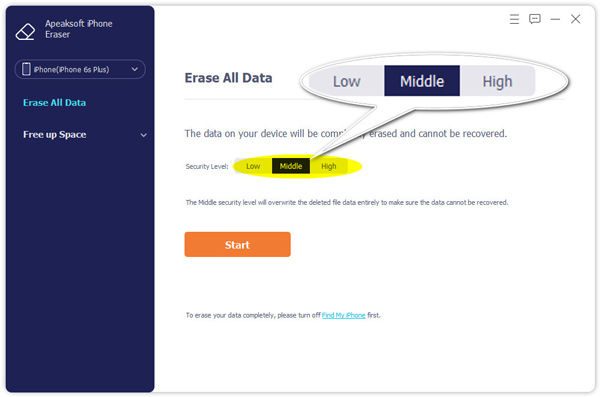
The iPhone eraser software provides 3 options: Low, Middle, and High. Select the right one you need.

  • Low: Quickly erase all the data on your device, which is twice as fast as other security levels.
  • Middle: This will overwrite the deleted data entirely to make sure the data cannot be recovered.
  • High: The High security level adopts DoD 5220.22-M wiping standard that can help you erase private data like password files and bank records.

Select the right one you need, and click the Start button.
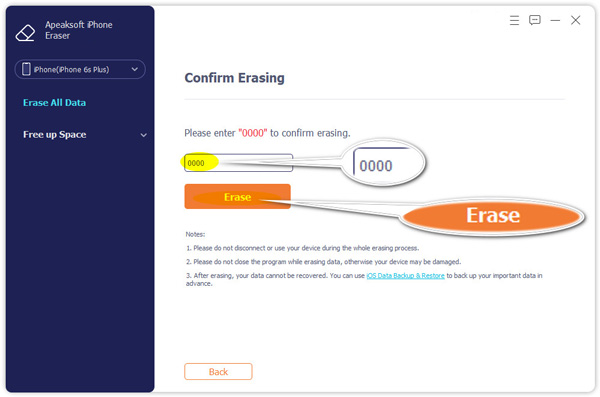
Step 3. Completely Erase your iPhone

Enter 0000 to confirm the operation. Finally, click the Erase button to wipe all data on your iPhone permanently. 
Aside from that, Apeaksoft iPhone Eraser also supports cleaning up your iPhone to free up more space in just one tap. Now, your iPhone is erased successfully and is ready to be sold. How else would you remove all data from your iPhone? Hit the comments and let us know.


Tweet54SendShare15
Previous Post

Facebook shells out a whopping $23.4m for Zuckerberg’s security

Next Post

Saudi Aramco confirms data leak, hackers demanded $50M ransom

Rohan Mathawan

Content Editor at Techstory Media | Technology | Gadgets | Written more than 5000+ articles about different niches from Tech to online real money gaming for reputed brands and companies. Get in touch Email: rohan@techstory.in For Business Enquires related to TechStory Info@techstory.in

Recommended For You

Which Printer Is Best for Scrapbook Photo Printing?

by Arundhati Kumar
August 22, 2026
0
Which Printer Is Best for Scrapbook Photo Printing?

A scrapbook looks more personal when the photos, labels, drawings and decorative elements come together neatly. That makes the printer an important part of the creative process. It...

Read more

Upstox Explores IPO Plans as User Base Crosses 2 Crore

by Ishaan Negi
August 21, 2026
0
Upstox Explores IPO Plans as User Base Crosses 2 Crore

Upstox, one of India’s biggest investment platforms, is exploring a potential initial public offering (IPO) as the online brokerage looks to raise around $350-400 million, or approximately ₹3,351-3,829...

Read more

Australia Passes News Bargaining Levy Targeting Meta and Google

by Ishaan Negi
August 21, 2026
0
Australia Passes News Bargaining Levy Targeting Meta and Google

Australia has passed a new law that could force major technology companies, including Meta and Google’s parent company Alphabet, to pay a levy if they fail to strike...

Read more
Next Post
Saudi Aramco

Saudi Aramco confirms data leak, hackers demanded $50M ransom

Please login to join discussion

Techstory

Tech and Business News from around the world. Follow along for latest in the world of Tech, AI, Crypto, EVs, Business Personalities and more.
reach us at info@techstory.in

Advertise With Us

Reach out at - info@techstory.in

Aviator Game India 2026

BROWSE BY TAG

#Crypto #howto 2024 acquisition AI amazon Apple Artificial Intelligence bitcoin Business China cryptocurrency e-commerce electric vehicles Elon Musk Ethereum facebook funding Gaming Google India Instagram Investment ios iPhone IPO Market Markets Meta Microsoft News OpenAI samsung Social Media SpaceX startup startups tech technology Tesla TikTok trend trending twitter US

© 2025 Techstory.in

No Result
View All Result
  • News
  • Crypto
  • Gadgets
  • Memes
  • Gaming
  • Cars
  • AI
  • Startups
  • Markets
  • How to

© 2025 Techstory.in

Welcome Back!

Login to your account below

Forgotten Password?

Retrieve your password

Please enter your username or email address to reset your password.

Log In
Are you sure want to unlock this post?
Unlock left : 0
Are you sure want to cancel subscription?