• Send Us A Tip
  • Calling all Tech Writers
  • Advertise
Thursday, September 24, 2026
  • Login
TechStory
  • News
  • Crypto
  • Gadgets
  • Memes
  • Gaming
  • Cars
  • AI
  • Startups
  • Markets
  • How to
No Result
View All Result
  • News
  • Crypto
  • Gadgets
  • Memes
  • Gaming
  • Cars
  • AI
  • Startups
  • Markets
  • How to
No Result
View All Result
TechStory
No Result
View All Result
Home How to

How to use HitFilm Express

by Arya Roy
July 27, 2021
in How to, Tech
Reading Time: 2 mins read
0
How to use HitFilm Express

Source: https://www.thefilmstack.com/resource/hitfilm-express/

TwitterWhatsappLinkedin

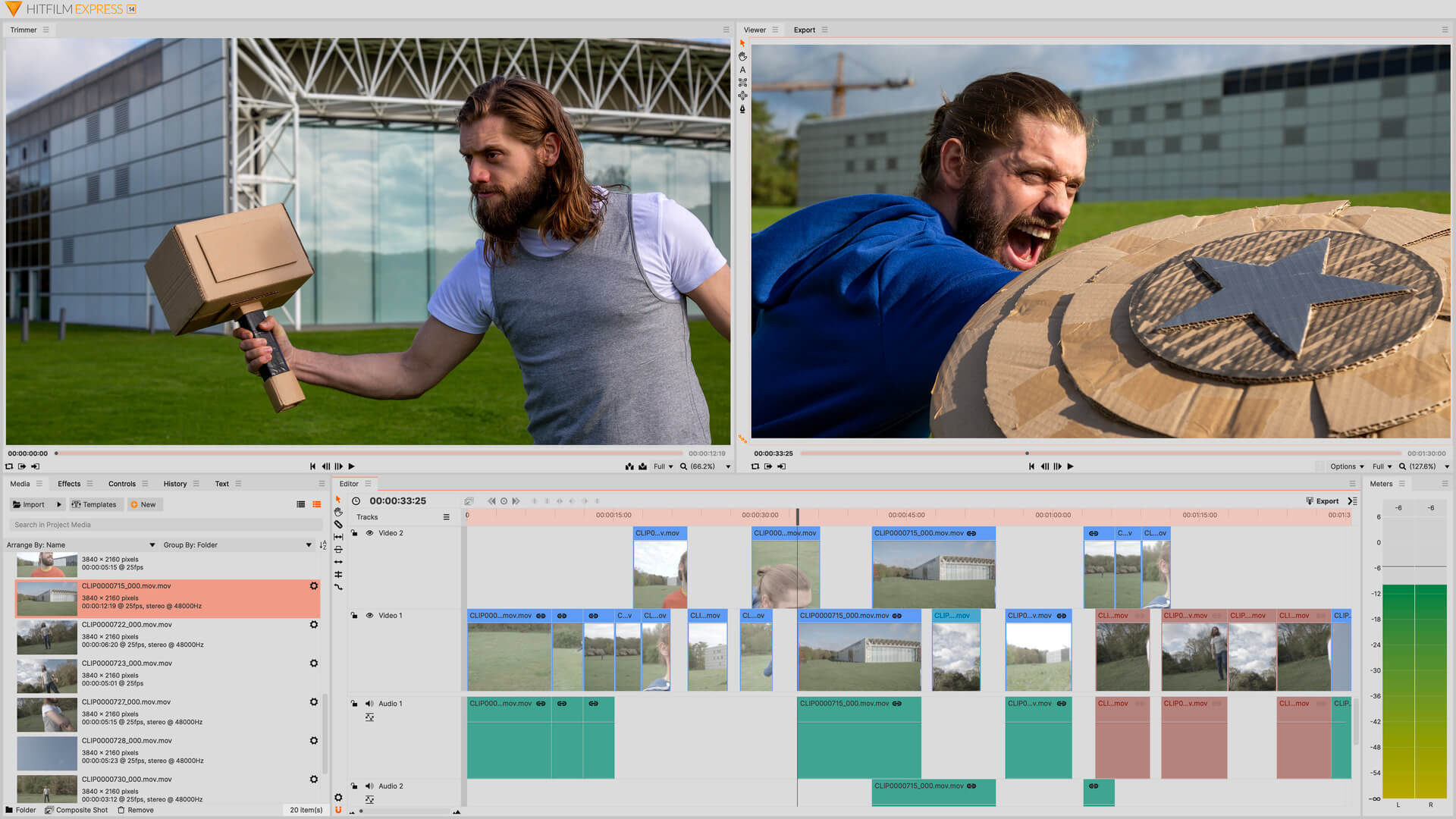
In this guide, you are going to be shown some of the basics of using the video-editing software, HitFilm Express.
You might also like

UI Design Company vs Local Product Design Firms

Best Video Downloaders 2026: Top Tools to Save Your Favorite Videos

Discord Reveals Age-Check Rollout With Major Changes to How It Works

Source: https://fxhome.com/product/hitfilm-express/features

Setting up a project

  1. Open HitFilm Express, and you will see its home workspace.
  2. On the left, you can see a list of all your projects, as well as several effects that are available to buy.
  3. Click to New to start a new project.
  4. Choose either video settings template or custom settings by picking your video width, height, frame rate, aspect ratio, and audio sample rate.
  5. Press OK and your new project will open on the editing workspace.

Importing media

  1. You can add media files by dragging and dropping them into the media panel on the left.
  2. Alternatively, go to File and import media. Then choose which media files you would like to import.

Editing on the timeline 

  1. Drag media from the media panel onto the main editor timeline. Video will automatically appear on a video track identified by its blue colour. Audio will appear on a gree audio track.
  2. Drag the media to move it along different points along your timeline.
  3. Use the player to play back your edit in real-time.
  4. Click and drag your media clips to move them around the timeline or onto different tracks. If you drag a clip onto another clip, it will automatically overwrite that portion.
  5. You can unlink video and audio which is linked together by right-clicking and choosing Unlink. You will now be able to move the video and audio separately.
  6. To adjust the duration of any clip, just click and drag from its edges.
  7. Use the slice tool to split media into independent clips. If you want to go back to your original cursor, click on the selection tool again.

On Windows, use Control + Z to undo any changes you make. On Mac, use Command + Z.

Adjusting audio 

  1. You can adjust the audio volume level by clicking and dragging the white line in the green audio bar.
  2. Hold down the Control key to add key frame points to shape the audio level over a duration of time.

Adjusting video controls

  1. Select the clip you want to adjust and use the control panel on the left to adjust properties like position, scale, rotation, and opacity.
  2. On audio clips, you can use the control panel to adjust the volume.

Adjusting effects and transitions 

  1. Use the effects panel to browse for your desired effect.
  2. Drag and drop it on your clip to apply it.
  3. You can then adjust the effect by going into the control panel, where you will now see the effect.
  4. Enable and disable each effect by clicking on the checkmark next to its name.
  5. Add transitions by dragging dropping from the effects panel onto the edges of a media clip.
  6. Change the duration of the transition by clicking and dragging on the playback bar.
  7. Adjust the properties of the transition by selecting it and using the control panel.

Tags: HitFilm Express
Tweet55SendShare15
Previous Post

Blue Origin offering NASA $2 billion discount on moon lander

Next Post

Jeff Bezos writes open letter to NASA offering to cover billions in cost for the moon-lander contract

Arya Roy

Hi, this is Arya! Writing has always been a passion of mine, regardless of the topic I choose. Besides that, I am a huge foodie and music lover, whose interests range from world politics to horror films to everything in between.

Recommended For You

UI Design Company vs Local Product Design Firms

by Rohan Mathawan
September 24, 2026
0
UI Design Company vs Local Product Design Firms

One option sells depth in interface craft. The other sells breadth and easy access. The right choice depends on which gap your team can't cover itself. Two proposals...

Read more

Best Video Downloaders 2026: Top Tools to Save Your Favorite Videos

by Rohan Mathawan
September 24, 2026
0
Best Video Downloaders 2026: Top Tools to Save Your Favorite Videos

Introduction: The Growing Trend of Video Downloading in 2026 Video consumption has changed dramatically over the past few years, and by 2026 streaming platforms, short video apps, and...

Read more

Discord Reveals Age-Check Rollout With Major Changes to How It Works

by Shailja Jha
September 24, 2026
0
Discord Reveals Age-Check Rollout With Major Changes to How It Works

Discord is rolling out a new age-checking system that will change how the platform determines a user's age and controls access to certain features and content. The company...

Read more
Next Post
NASA

Jeff Bezos writes open letter to NASA offering to cover billions in cost for the moon-lander contract

Please login to join discussion

Techstory

Tech and Business News from around the world. Follow along for latest in the world of Tech, AI, Crypto, EVs, Business Personalities and more.
reach us at info@techstory.in

Advertise With Us

Reach out at - info@techstory.in

Aviator Game India 2026

BROWSE BY TAG

#Crypto #howto 2024 acquisition AI amazon Apple Artificial Intelligence bitcoin Business China cryptocurrency e-commerce electric vehicles Elon Musk Ethereum facebook funding Gaming Google India Instagram Investment iPhone IPO Market Markets Meta Microsoft News OpenAI samsung Social Media SpaceX startup startups tech Tech news technology Tesla TikTok trend trending twitter US

© 2025 Techstory.in

No Result
View All Result
  • News
  • Crypto
  • Gadgets
  • Memes
  • Gaming
  • Cars
  • AI
  • Startups
  • Markets
  • How to

© 2025 Techstory.in

Welcome Back!

Login to your account below

Forgotten Password?

Retrieve your password

Please enter your username or email address to reset your password.

Log In
Are you sure want to unlock this post?
Unlock left : 0
Are you sure want to cancel subscription?