• Send Us A Tip
  • Calling all Tech Writers
  • Advertise
Saturday, July 25, 2026
  • Login
TechStory
  • News
  • Crypto
  • Gadgets
  • Memes
  • Gaming
  • Cars
  • AI
  • Startups
  • Markets
  • How to
No Result
View All Result
  • News
  • Crypto
  • Gadgets
  • Memes
  • Gaming
  • Cars
  • AI
  • Startups
  • Markets
  • How to
No Result
View All Result
TechStory
No Result
View All Result
Home Gaming

How to zoom in Minecraft

by Arya Roy
July 28, 2021
in Gaming, How to, Popular, Tech
Reading Time: 2 mins read
0
How to zoom in Minecraft

Source: https://www.minecraft.net/en-us/about-minecraft

TwitterWhatsappLinkedin

Here is a guide on how you can zoom in Minecraft.

You might also like

GM Bets Big on Software Subscriptions as OnStar and Super Cruise Fuel New Revenue Growth

Android vs iPhone: How the Smartphone War Changed the World

Weekly Startup Funding News: Indian startups raised $209 Mn this week

In-game FOV

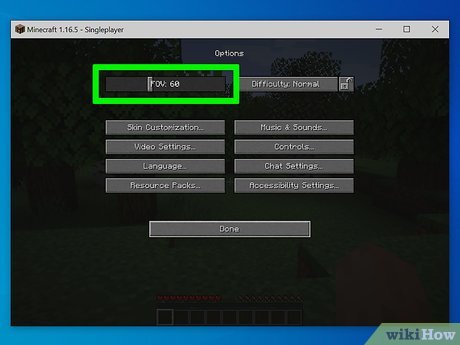
With no mods, your ability to zoom in Minecraft is limited to the FOV setting, which changes your wide or narrow your character’s point of view is.
Source: https://www.wikihow.com/Zoom-in-Minecraft
  1. In the pause menu, click on Options and you will see the FOV slider on top. By default, it will be set to Normal, which is numerically set to 70.
  2. By bringing the FOV to 30, your point of view will become much narrower and zoomed in, letting you see further but with a minimal peripheral view.
  3. You can see the opposite effect by widening the FOV to a higher number, which lets you see much more to your left and right but makes the distant objects feel even further.

OptiFine for Java 

For a more streamlined ability to zoom in-game, you will need to download a mod.

  1. For the Java edition, the mod OptiFine is hosted on Optifine.net, where you can find the latest release under Downloads.
  2. Make sure that you download a version that matches your Minecraft version.
  3. If you do not have it already, you may need to install Java SE to open the mod. Go to the Download page on the Oracle site to grab the latest version and install it on your computer.
  4. With Java installed, go to your OptiFine file and open with Java.
  5. The installer will walk you through a few simple prompts. Once finished, you will be prompted to click on OK, which will install OptiFine as a module in the game.
  6. Start the Minecraft launcher, and on the bottom left, confirm OptiFine appears or is selected where it says the latest release.
  7. Now in-game, you can confirm that your zoom mod is installed by pressing and holding the C key to zoom in and out with a simple press.
  8. If you would like to change that hotkey, navigate the game menu to Options > Controls, and then scroll to the miscellaneous section. Here, you will find an entry for zoom. From here, you can select whichever key you prefer to utilise the OptiFine functionality in-game.

Tags: JAVAMinecraftOptiFine
Tweet55SendShare15
Previous Post

Instagram will now default young teenagers’ accounts as “Private”

Next Post

Activision Blizzard employees to walkout over sexual harrassment allegations

Arya Roy

Hi, this is Arya! Writing has always been a passion of mine, regardless of the topic I choose. Besides that, I am a huge foodie and music lover, whose interests range from world politics to horror films to everything in between.

Recommended For You

GM Bets Big on Software Subscriptions as OnStar and Super Cruise Fuel New Revenue Growth

by Samir Gautam
July 25, 2026
0
GM Bets Big on Software Subscriptions as OnStar and Super Cruise Fuel New Revenue Growth

General Motors is steadily transforming its business beyond simply manufacturing and selling vehicles. As the automotive industry moves toward software-defined cars, the Detroit automaker is generating a growing...

Read more

Android vs iPhone: How the Smartphone War Changed the World

by Sneha Singh
July 25, 2026
0
Android vs iPhone: How the Smartphone War Changed the World

The Android vs iPhone saga is not simply an ongoing rivalry between two phone manufacturers. This saga is also a tale of the development of the smartphone as...

Read more

Weekly Startup Funding News: Indian startups raised $209 Mn this week

by Ishaan Negi
July 25, 2026
0
Weekly Startup Funding News: Indian startups raised $196 Mn this week; from Emiza to Leap

India's startup funding landscape lost momentum in the fourth week of July, with fewer deals and a sharper concentration of capital in a handful of large investments. While...

Read more
Next Post
Activision Blizzard employees to walkout over sexual harrassment allegations

Activision Blizzard employees to walkout over sexual harrassment allegations

Please login to join discussion

Techstory

Tech and Business News from around the world. Follow along for latest in the world of Tech, AI, Crypto, EVs, Business Personalities and more.
reach us at info@techstory.in

Advertise With Us

Reach out at - info@techstory.in

Aviator Game India 2026

BROWSE BY TAG

#Crypto #howto 2024 acquisition AI amazon Apple Artificial Intelligence bitcoin Business China cryptocurrency e-commerce electric vehicles Elon Musk Ethereum facebook funding Gaming Google India Instagram Investment ios iPhone IPO Market Markets Meta Microsoft News OpenAI samsung Social Media SpaceX startup startups tech technology Tesla TikTok trend trending twitter US

© 2025 Techstory.in

No Result
View All Result
  • News
  • Crypto
  • Gadgets
  • Memes
  • Gaming
  • Cars
  • AI
  • Startups
  • Markets
  • How to

© 2025 Techstory.in

Welcome Back!

Login to your account below

Forgotten Password?

Retrieve your password

Please enter your username or email address to reset your password.

Log In
Are you sure want to unlock this post?
Unlock left : 0
Are you sure want to cancel subscription?