
• Send Us A Tip
  • Calling all Tech Writers
  • Advertise
Friday, August 14, 2026
  • Login
TechStory
  • News
  • Crypto
  • Gadgets
  • Memes
  • Gaming
  • Cars
  • AI
  • Startups
  • Markets
  • How to
No Result
View All Result
  • News
  • Crypto
  • Gadgets
  • Memes
  • Gaming
  • Cars
  • AI
  • Startups
  • Markets
  • How to
No Result
View All Result
TechStory
No Result
View All Result
Home How to

How to send disappearing photos and videos on WhatsApp

by Srestha Roy
August 8, 2021
in How to
Reading Time: 2 mins read
0
How to send disappearing photos and videos on WhatsApp
TwitterWhatsappLinkedin

WhatsApp is one of the greatest Android messaging applications, and its focus on privacy and security makes it an especially good pick.
You might also like

How to Get SEAF Support in Helldivers 2

How to Beat the Illuminate Enemies in Helldivers 2

How to Get the Future Soldier Outfit in Ghost Recon: Wildlands

Source : https://www.androidcentral.com/sites/androidcentral.com/files/styles/large_wm_brw/public/article_images/2021/08/send-view-once-whatsapp.jpg

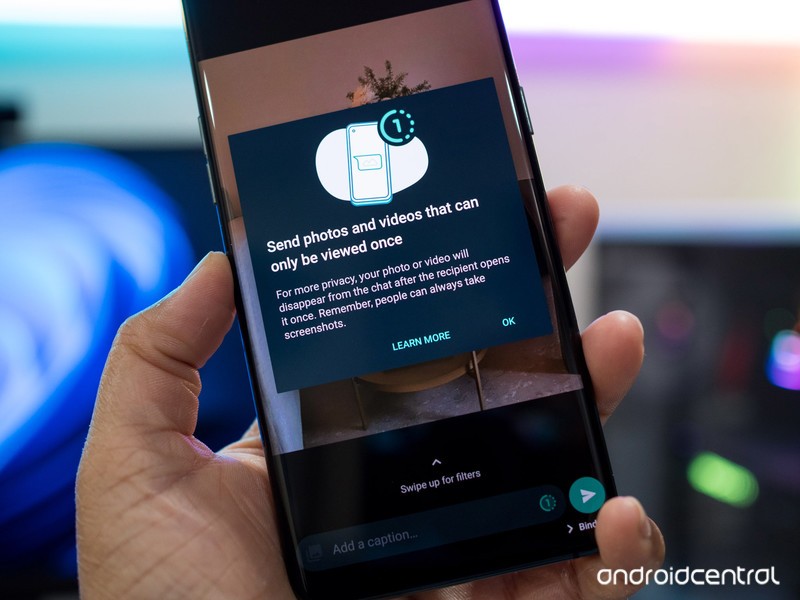
WhatsApp’s disappearing photos function has finally been enabled to the stable version of the software. The function is called ‘View Once,’ and it operates in a similar way to Instagram’s expiring media feature. When you use this function to transmit a photo, it will vanish after the recipient opens it and exits the conversation. However, each time you want to transmit a view once photo or video, you’ll have to choose View Once media.

Any photo or video you transmit using WhatsApp’s “View Once” function will not be stored to the recipient’s Photos or Gallery, according to the company. WhatsApp won’t be able to show a View Once photo or video again once you transmit it.

You won’t be able to forward, save, star, or share images or videos sent or obtained with the View Once media tool in the messaging service. If you have read receipts switched on, you can only see if a recipient has accessed a View Once photo or video.

The photo or video will expire from the conversation if you don’t access it within 14 days after receiving it, according to the Facebook-owned business. However, if the message was unread at the time of backup, the ‘View once media’ may be restored from backup. The media can not be included in the backup and therefore will not be able to be restored if it has previously been viewed.

Anyone may snap a screenshot or capture a screen recording of the media before it vanishes on WhatsApp. Furthermore, the subject will not be alerted if a snapshot or screen recording is taken. WhatsApp also advises that before the material vanishes, users can capture a photo or video of it using a camera or other device. “Encrypted media may be stored on WhatsApp’s servers for a few weeks after you’ve sent it,” the firm adds.

How do I send media through View Once on WhatsApp?

To add an attachment to WhatsApp, open the app and touch the attachment icon.

Then go to Gallery and then choose photos and videos to share with your contact.

After choosing it, a clock-like symbol will appear in the ‘Add a caption’ box; simply touch on it to activate the View Once function. The app will display a notice that says “Photo set to View Once” once you activate it. After that, you may share vanishing images to your contacts.




Tags: photosVideoswhatsapp
Tweet54SendShare15
Previous Post

How to buy Ethereum

Next Post

Crypto community slams ‘disastrous’ new amendment to Biden’s big infrastructure bill

Srestha Roy

Recommended For You

How to Get SEAF Support in Helldivers 2

by Khilav Jadav
August 14, 2026
0
How To Unlock Weapons in Helldivers 2

SEAF Support is a new battlefield feature in Helldivers 2 that allows friendly Super Earth Armed Forces troops to fight alongside you. It arrived with the Devoid of...

Read more

How to Beat the Illuminate Enemies in Helldivers 2

by Khilav Jadav
August 14, 2026
0
How To Get ODST Armor in Helldivers 2

The Illuminate are unusual enemies in Helldivers 2. Unlike the Terminids, they rely heavily on energy shields, ranged attacks, flying units, and dangerous support enemies. The key is...

Read more

How to Get the Future Soldier Outfit in Ghost Recon: Wildlands

by Khilav Jadav
August 14, 2026
0
How to Kill the Predator in Ghost Recon Wildlands

If you want to make Nomad look like a soldier from Tom Clancy's Ghost Recon Future Soldier, the Future Soldier Outfit is one of the best cosmetic options...

Read more
Next Post
Crypto community slams ‘disastrous’ new amendment to Biden’s big infrastructure bill

Crypto community slams 'disastrous' new amendment to Biden's big infrastructure bill

Please login to join discussion

Techstory

Tech and Business News from around the world. Follow along for latest in the world of Tech, AI, Crypto, EVs, Business Personalities and more.
reach us at info@techstory.in

Advertise With Us

Reach out at - info@techstory.in

Aviator Game India 2026

BROWSE BY TAG

#Crypto #howto 2024 acquisition AI amazon Apple Artificial Intelligence bitcoin Business China cryptocurrency e-commerce electric vehicles Elon Musk Ethereum facebook funding Gaming Google India Instagram Investment ios iPhone IPO Market Markets Meta Microsoft News OpenAI samsung Social Media SpaceX startup startups tech technology Tesla TikTok trend trending twitter US

© 2025 Techstory.in

No Result
View All Result
  • News
  • Crypto
  • Gadgets
  • Memes
  • Gaming
  • Cars
  • AI
  • Startups
  • Markets
  • How to

© 2025 Techstory.in

Welcome Back!

Login to your account below

Forgotten Password?

Retrieve your password

Please enter your username or email address to reset your password.

Log In
Are you sure want to unlock this post?
Unlock left : 0
Are you sure want to cancel subscription?