

• Send Us A Tip
  • Calling all Tech Writers
  • Advertise
Tuesday, July 14, 2026
  • Login
TechStory
  • News
  • Crypto
  • Gadgets
  • Memes
  • Gaming
  • Cars
  • AI
  • Startups
  • Markets
  • How to
No Result
View All Result
  • News
  • Crypto
  • Gadgets
  • Memes
  • Gaming
  • Cars
  • AI
  • Startups
  • Markets
  • How to
No Result
View All Result
TechStory
No Result
View All Result
Home How to

How To Download Or Get Aadhaar Card Without Registered Mobile Number?

by Srestha Roy
October 11, 2021
in How to
Reading Time: 2 mins read
0
How To Download Or Get Aadhaar Card Without Registered Mobile Number?
TwitterWhatsappLinkedin

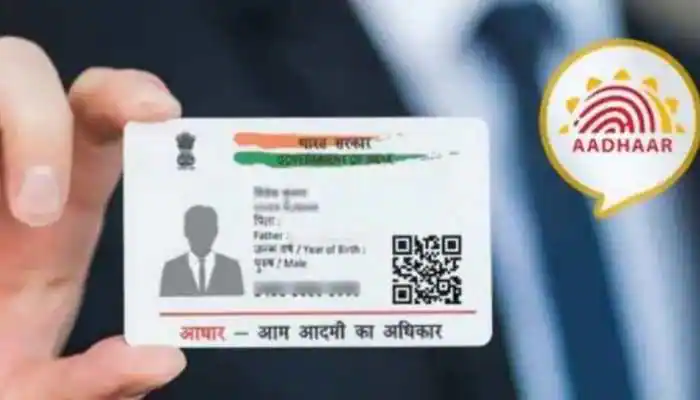
Citizens of India may now obtain their Aadhaar card without needing their registered cellphone number from the UIDAI’s official website. The Aadhaar issuing organisation, the Unique Identification Authority of India (UIDAI), has announced this to assist people who have not yet registered their number.
You might also like

How To Get Hardwood In Palworld

How to speed up Windows without changing hardware?

How To Unlock World Tree In Palworld

Source – Zee News

The Indian government, as well as state governments, finance a variety of social welfare initiatives and programmes aimed at the impoverished and most vulnerable members of society. Aadhaar and its platform provide the government with a unique chance to simplify their benefit plan delivery mechanisms, assuring transparency and efficiency. By obviating the need to provide various documents to verify one’s identification, the use of Aadhaar as an identity document allows recipients to get their entitlements immediately in a convenient and seamless way.

After de-duplicating their demographic and biometric characteristics against the UIDAI’s complete database, citizens are given Aadhaar numbers. Seeding Aadhaar allows for the removal of duplication under various programmes, resulting in significant savings for the government. It also gives reliable data on recipients to the government and allows for the implementation of direct benefit transfer (DBT) programmes.

To download the Aadhaar, customers had to have a registered phone number that was connected to the Aadhaar. Continue reading to learn how to obtain an Aadhaar card over the internet.

  • Step 1: Go to the UIDAI’s official website and choose “My Aadhaar.”
  • Step 2: Select ‘Order Aadhaar Reprint’ from the drop-down menu.
  • Step 3: You will then be prompted to input your 12-digit Aadhaar number. Users can also provide a 16-digit Virtual Identification Number (VID) rather than their Aadhaar card number.
  • Step 4: When you’re finished, you’ll be prompted to input a security or captcha code.
  • Step 5: If you don’t want to use your registered mobile number to download the card, select the ‘My Mobile number is not registered’ option.
  • Step 6: After that, you’ll be prompted to input your alternate or unregistered phone number.
  • Step 7: Finally, press the ‘Send OTP’ button. The alternate number you just entered will then receive a One Time Password (OTP). Users will also be prompted to choose the ‘terms and conditions’ checkbox before pressing the’submit’ button.
  • Step 8: You will now be routed to a new website where you may ‘Preview Aadhaar Letter’ for additional verification before reprinting. After then, you must choose the ‘Payment’ option.

Keep your digital signature handy since you’ll need to submit it in order to get the PDF. An SMS will be sent with a Service Request Number. You can use that number to follow the status of your application till the Aadhaar letter arrives.

 

Tags: AadharAadhar CardGovt. of IndiaUIDAI
Tweet55SendShare15
Previous Post

Storj: Everything you need to know

Next Post

“Mechazilla” to catch Starships & Boosters almost ready to join launches

Srestha Roy

Recommended For You

How To Get Hardwood In Palworld

by Khilav Jadav
July 14, 2026
0
How to Level Up Quickly in Palworld

Hardwood is one of the most useful crafting materials in Palworld, the open-world survival and monster-collecting game developed by Pocketpair. While regular Wood is easy to gather from...

Read more

How to speed up Windows without changing hardware?

by Afeefa Ansari
July 14, 2026
0
Windows

Is Windows feeling stuck? We've got your back. Here are a few things you can try to speed up the performance of your Windows on PC without having...

Read more

How To Unlock World Tree In Palworld

by Khilav Jadav
July 14, 2026
0
How To Get Anti-Gravity Belt in Palworld

The World Tree is one of the biggest mysteries in Palworld, the open-world survival, crafting, and creature-collecting game developed by Pocketpair. From the moment players first notice the...

Read more
Next Post
“Mechazilla” to catch Starships & Boosters almost ready to join launches

"Mechazilla" to catch Starships & Boosters almost ready to join launches

Please login to join discussion

Techstory

Tech and Business News from around the world. Follow along for latest in the world of Tech, AI, Crypto, EVs, Business Personalities and more.
reach us at info@techstory.in

Advertise With Us

Reach out at - info@techstory.in

Aviator Game India 2026

BROWSE BY TAG

#Crypto #howto 2024 acquisition AI amazon Apple Artificial Intelligence bitcoin Business China cryptocurrency e-commerce electric vehicles Elon Musk Ethereum facebook funding Gaming Google India Instagram Investment ios iPhone IPO Market Markets Meta Microsoft News OpenAI samsung Social Media SpaceX startup startups tech technology Tesla TikTok trend trending twitter US

© 2025 Techstory.in

No Result
View All Result
  • News
  • Crypto
  • Gadgets
  • Memes
  • Gaming
  • Cars
  • AI
  • Startups
  • Markets
  • How to

© 2025 Techstory.in

Welcome Back!

Login to your account below

Forgotten Password?

Retrieve your password

Please enter your username or email address to reset your password.

Log In
Are you sure want to unlock this post?
Unlock left : 0
Are you sure want to cancel subscription?