On iPhones running iOS 13 or later, this article describes how to disable Optimized Battery Charging.
Is it possible to disable the Optimized Battery Charging feature?
Optimized Battery Charging was developed by Apple to reduce wear and tear on an iPhone’s battery and extend its life. When you don’t use your phone for a long time, it keeps it charged at 80%.
When it is no longer useful, here’s how to disable it.
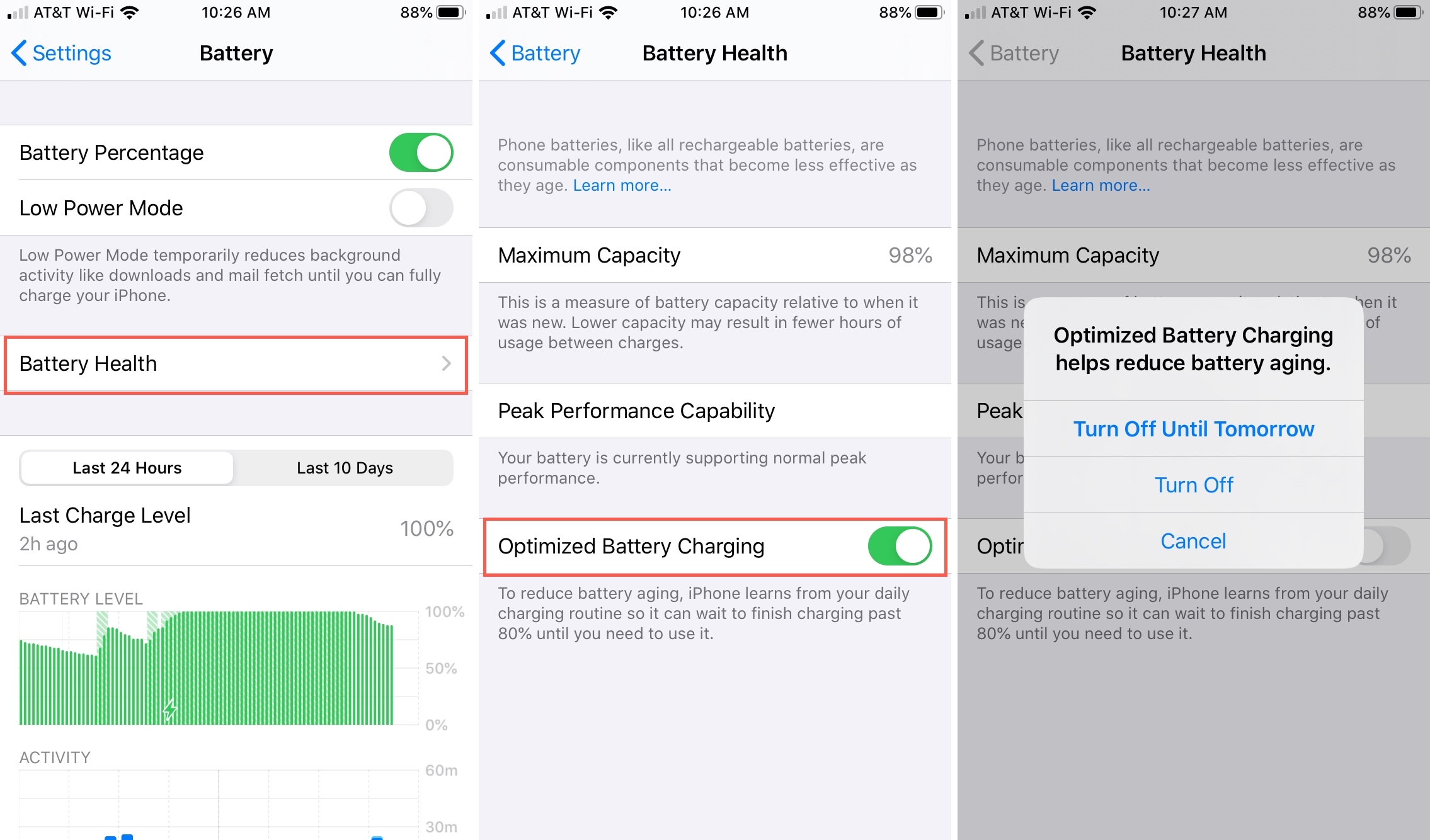
- Open the Settings app on your phone.
- Swipe down the list to find Battery.
- To proceed to the next screen, select Battery Health.
- Turn off the default setting by toggling the Optimized Battery Charging button. Toggle it back to the green position to enable it.
- Depending on your preference, select Turn Off Until Tomorrow or Turn Off.
Is Optimized Battery Charging Beneficial or Harmful?
When lithium-ion batteries are left fully charged for an extended period of time and heat up, they can degrade faster. Even a slow charge forces the battery to work harder to maintain a full charge.
This feature keeps the battery at 80% charge and postpones a full charge until you wake up. The preventive feature is turned on by default, and it’s recommended for longer battery life.
Is it necessary to disable Optimized Battery Charging?
When you disable Optimized Battery Charging, the iPhone will charge from 0% to 100% without pausing at 80%. You can disable the optimised mode, but Apple recommends that you leave it on to help the battery last longer.
However, It must learn your charging habits on a daily basis. It won’t work if your habits are inconsistent. For example, if you have irregular sleeping hours or don’t charge your phone overnight, you can disable it.
The feature also uses location tracking to automatically engage in places where you spend the most time and are more likely to leave your phone charging for long periods of time. You can disable the battery management feature if you have turned off location services.
For Optimized Battery Charging to work, these location settings must be enabled:
- Settings > Privacy > Location Services > Location Services;
- Settings > Privacy > Location Services > System Services > System Customization;
- Settings > Privacy > Location Services > System Services > Significant Locations > Significant Locations;
- Settings > Privacy > Location Services > System Services > Significant Locations > Significant Locations.
Why does Optimized Battery Charging continue to activate?
It uses machine learning to learn about your habits and location tracking to predict where you spend the most time, such as at work during the day and at home at night. However, there could be a number of reasons why It reactivates after being turned off.
With the Turn Off Until Tomorrow option, you were able to disable it for a single day.
The feature was enabled by Location Services in a location where you spend the most time.
The battery-saving feature has been re-enabled thanks to an iOS update.
To permanently disable the feature, select Turn Off. You can also try turning off Location Services to see if that helps. Turning off your iPhone’s ability to track your location, on the other hand, is a good idea.