• Send Us A Tip
  • Calling all Tech Writers
  • Advertise
Wednesday, July 8, 2026
  • Login
TechStory
  • News
  • Crypto
  • Gadgets
  • Memes
  • Gaming
  • Cars
  • AI
  • Startups
  • Markets
  • How to
No Result
View All Result
  • News
  • Crypto
  • Gadgets
  • Memes
  • Gaming
  • Cars
  • AI
  • Startups
  • Markets
  • How to
No Result
View All Result
TechStory
No Result
View All Result
Home How to

How to hide comments on TikTok live

by Khushi Sethi
March 19, 2022
in How to, Tech
Reading Time: 2 mins read
0
How to hide comments on TikTok live
TwitterWhatsappLinkedin

TikTok’s social media dominance is undeniable these days. The short video-sharing app has amassed hundreds of millions of users worldwide (689 million as of January 2021) and has influenced the content strategy of virtually every other social media app.
You might also like

HTTP/3 Explained: Everything You Need to Know

What Is Public Key Infrastructure (PKI)? The Technology That Keeps the Internet Secure

What Are Chiplets? The Tiny Building Blocks Revolutionizing Modern Processors

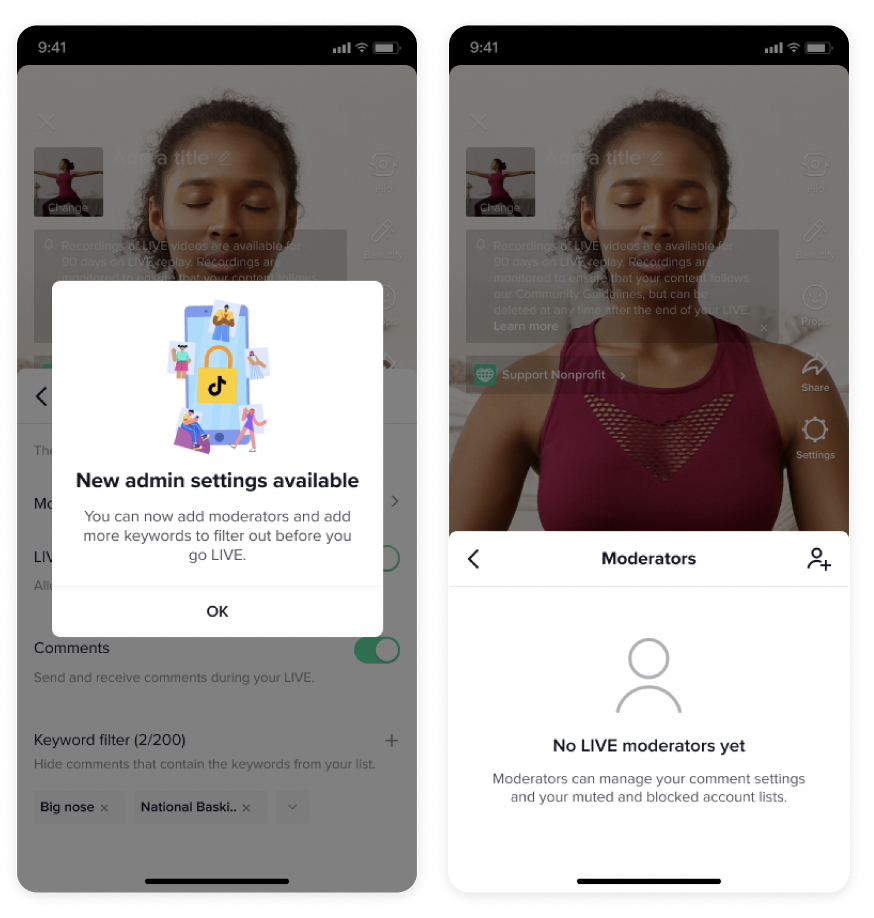
TikTok Adds Several Features for Live Videos
Source: Adweek

Although TikTok has had an impact on several other popular social media apps in various ways, it has also had an impact on its older peers. TikTok was unique in that it allowed content creators to live-stream themselves within the app. Of course, this has resulted in some incredible content, but there are a few aspects of the app’s live interface that could be improved.

There is a way to remove the stream of comments that appear beneath your live video. To learn how to hide comments beneath a TikTok Live video, keep reading.

The creators of some live broadcasts want their viewers to be able to comment and interact with them. However, if it isn’t you, it’s understandable! Sometimes all you want to do is broadcast your live stream without having to deal with a never-ending flood of other users’ thoughts.

TikTok, thankfully, has built-in controls that allow you to turn the feature on and off. Logging in to your TikTok account is the first step. Press the “+” symbol in the main toolbar when you’re on the main screen.

The in-app camera is the next feature to appear. Then select the Live tab from the bottom menu. When the Live menu appears, press “settings,” which should appear on the right-hand side of the screen. A slider will appear, and if you disable it, other people will be unable to comment on your live streams at all.

Don’t worry if you ever want to change it back! The change isn’t permanent, and by repeating the steps and returning the slider to its previous position, you can quickly re-enable comments on Live videos.

TikTok’s new feature provides a significantly higher level of depth and detail when it comes to living stream settings than its competitors, demonstrating once again why the prodigy video-sharing app is at the top of the social media game.

There doesn’t appear to be a way to turn off the comments that appear at the bottom and side of standard TikTok videos that are widely available. When future updates to the app are released, stay tuned for more information about those capabilities.


 

Tags: Social MediatechtechnologyTikTokTikTok Live
Tweet55SendShare15
Previous Post

Elon Musk’s Starlink satellites giving Ukraine as edge over the war

Next Post

How to check internet speed from Google homepage

Khushi Sethi

Recommended For You

HTTP/3 Explained: Everything You Need to Know

by Sneha Singh
July 7, 2026
0
HTTP/3 Explained: Everything You Need to Know

The internet has come a long way over the years. Websites have grown to be more complex, applications have been made to be more interactive, and there is...

Read more

What Is Public Key Infrastructure (PKI)? The Technology That Keeps the Internet Secure

by Ishaan Negi
July 7, 2026
0
What Is Public Key Infrastructure (PKI)? The Technology That Keeps the Internet Secure

Every day, billions of people shop online, log into bank accounts, send emails, join video meetings, and access cloud services. While these activities feel almost instantaneous, there's a...

Read more

What Are Chiplets? The Tiny Building Blocks Revolutionizing Modern Processors

by Ishaan Negi
July 7, 2026
0
What Are Chiplets? The Tiny Building Blocks Revolutionizing Modern Processors

For years, the semiconductor industry had one simple goal: fit more transistors onto a single piece of silicon. This approach gave us faster computers, more powerful smartphones, and...

Read more
Next Post
How to check internet speed from Google homepage

How to check internet speed from Google homepage

Please login to join discussion

Techstory

Tech and Business News from around the world. Follow along for latest in the world of Tech, AI, Crypto, EVs, Business Personalities and more.
reach us at info@techstory.in

Advertise With Us

Reach out at - info@techstory.in

Aviator Game India 2026

BROWSE BY TAG

#Crypto #howto 2024 acquisition AI amazon Apple Artificial Intelligence bitcoin Business China cryptocurrency e-commerce electric vehicles Elon Musk Ethereum facebook funding Gaming Google India Instagram Investment ios iPhone IPO Market Markets Meta Microsoft News OpenAI samsung Social Media SpaceX startup startups tech technology Tesla TikTok trend trending twitter US

© 2025 Techstory.in

No Result
View All Result
  • News
  • Crypto
  • Gadgets
  • Memes
  • Gaming
  • Cars
  • AI
  • Startups
  • Markets
  • How to

© 2025 Techstory.in

Welcome Back!

Login to your account below

Forgotten Password?

Retrieve your password

Please enter your username or email address to reset your password.

Log In
Are you sure want to unlock this post?
Unlock left : 0
Are you sure want to cancel subscription?