Some of the most prevalent causes of iPhone boot loop issues affecting many iPhone models include a loose battery connection or a defective battery, a faulty iOS update, and a failed jailbreak.
There are usually two symptoms that show that your iPhone is stuck in a boot loop. The first is when your iPhone intermittently restarts, and the second is when your iPhone becomes stuck in a restart loop. With the first symptom, you may be able to use your iPhone normally for a short period of time before it abruptly restarts. The second symptom will be worse because your iPhone will constantly restart, rendering it unusable. In the second scenario, you will most likely see the Apple logo on your iPhone display for a few seconds before it abruptly disappears and repeats.
With your iphone stuck in boot loop, it is evident that the root cause is a deeper software issue. In this scenario, iToolab FixGo is the ideal tool for repairing your iPhone. This tool is meant to quickly and easily resolve this and other iOS software issues such as the iPhone not turning on, the iPhone stuck on the update screen, and so forth.
Apple will release the latest iOS version, iOS 16, this year. iOS 16 will be the successor to iOS 15 and will include various new features and enhancements. According to Bloomberg’s Apple expert Mark Gurman, the operating system will have new methods of interacting with the device as well as some “fresh Apple apps.”
According to Gurman’s claim in the “Power On” newsletter, iOS 16 will feature new methods to interact with the system as well as some “fresh Apple apps.” Gurman has also provided some further information on what Apple has in store for the future version of iOS and iPadOS, which will be unveiled in the coming weeks at the company’s Worldwide Developer Conference (WWDC).
iToolab FixGo not only fixes iPhones stuck in boot loops but also other issues that iOS users encounter. iToolab FixGo, as a robust iOS system recovery software, can easily repair iPhone update difficulties such as iPhone black screen, iPhone stuck on Apple logo, and so on. FixGo will assist you in resolving all issues, regardless of the situation. iToolab FixGo will appeal to the upcoming launch of iOS16 as well. The software is quite easy to use as well. Regardless of the situation, iToolab FixGo can help you reset iOS devices without entering a password. You will have access to your phone again in as little as 5 minutes.
Some of its features are –
- With a single click, you can enter and exit recovery mode.
- Resolve iPhone/iPad/Apple TV system issues with no data loss including iPhone stuck in boot loop
- Without wiping data, you can downgrade iOS 15 to any supported version.
- Unresponsive iOS devices can be reset without the use of a passcode.
- Resolve frequent iPhone/iPad errors such as error 4013, error 4005, and so on.
- All iOS devices and versions are supported, including iPhone 13 models and iOS 15
It is a powerful software for Apple mobile customers to resolve practically all software difficulties with their device while powering on, upgrading, resetting, restoring, and so on.
To fix your iPhone stuck in a boot loop with iToolab FixGo, follow the steps below –
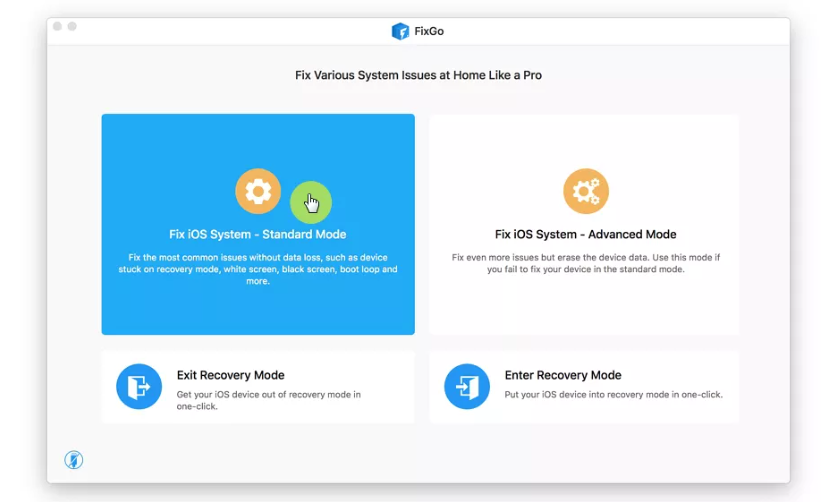
- Open it and then, in the main window, pick “Standard Mode.” Using USB cables, plug the iPhone into the PC. When the application recognizes your iPhone, click “Fix Now” to get started.
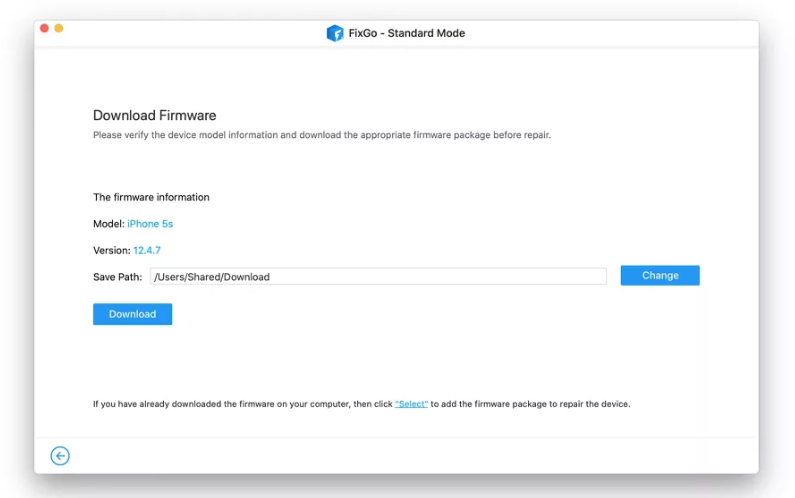
- To expedite the repair procedure, the software will require you to download the most recent firmware for your iPhone. To begin downloading the firmware package, simply click “Download.”
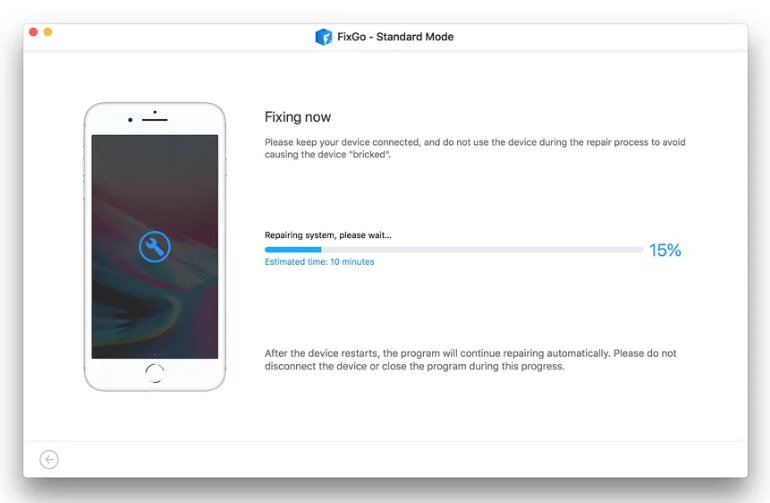
- Once the firmware has been downloaded, select “Repair Now,” and FixGo will immediately begin repairing your iPhone’s software to terminate the boot loop. You only need to keep your iPhone linked to the computer until the process is finished.
Some other potential solutions to your iPhone stuck in a boot loop are: –
Reset your iPhone
If your iPhone is stuck in a boot loop due to minor software malfunctions and issues, forcing it to restart may be the solution. Since this will not delete any of your iPhone data, it is a safe and effective method, to begin with.
If the problem persists, you should attempt a hard reset of the iPhone.
- To hard reset, an iPhone 6 or previous model, hold the Power and Home buttons together until the screen turns blank and the Apple logo displays.
- Press and hold the Power and Volume Down keys simultaneously on an iPhone 7 or iPhone 7 Plus until the Apple Logo appears.
- On an iPhone 8, 8 Plus, or later model: Press and hold the Volume Up button, then the Volume Down button, and finally the Side button until the Apple logo shows.
- Regardless of the iPhone model, make sure you hold the buttons down for at least 20 seconds.
A factory reset will delete all of your iPhone’s data and settings and install the most recent version of iOS 15. After that, you can restore your iPhone from a previous backup. Here’s how to go about it:
- Connect the iPhone to your computer and launch iTunes or Finder.
- Follow the steps to allow iTunes or Finder to detect your iPhone if you receive a message asking you to Trust This Computer.
- When the iPhone shows in the Finder or iTunes, click “Restore.” To confirm, click “Restore” once again.
- When the process is finished, you will be able to reset your iPhone to factory settings and then restore it from a recent backup.
Back up your iPhone.
The first thing you should do before attempting to troubleshoot your iPhone is to backup all of its data. This is because there is a potential that the boot loop will worsen and you will not be able to save the data on your iPhone again. You may also need to restore your iPhone to solve it (if the problem is software-related), and you will need to have a recent backup to avoid losing any fresh data on your iPhone. As a result, take a few moments to connect your iPhone to your computer and create a backup.
To unlock iToolab FixGo’s all features, you can purchase the software on the iToolab website.