• Send Us A Tip
  • Calling all Tech Writers
  • Advertise
Friday, September 18, 2026
  • Login
TechStory
  • News
  • Crypto
  • Gadgets
  • Memes
  • Gaming
  • Cars
  • AI
  • Startups
  • Markets
  • How to
No Result
View All Result
  • News
  • Crypto
  • Gadgets
  • Memes
  • Gaming
  • Cars
  • AI
  • Startups
  • Markets
  • How to
No Result
View All Result
TechStory
No Result
View All Result
Home How to

How to Change the Watch Face in Apple Watch

by Priyansh Sidhwani
November 22, 2022
in How to, Tech
Reading Time: 2 mins read
0
How to Change the Watch Face in Apple Watch
TwitterWhatsappLinkedin

You might also like

Apple Increases Battery Replacement Fee for iPhone 18 Pro and Pro Max

T-Mobile Adds Monthly Fee to a New iPhone Feature for Customers

The Reddit Playbook for Early-Stage Startups: What Actually Works in 2026

This article focuses on how to change the watch face in Apple Watch. Apple Watch is a wearable device that comes with a variety of watch faces. You can change the watch face for your Apple Watch on the watch or in the Watch app on your iPhone by selecting a new one from the list of installed watch faces. The Apple Watch is a great device, but it can be hard to find the perfect watch face. Fortunately, there are plenty of options for changing your Apple Watch face.How to Change the Watch Face in Apple Watch
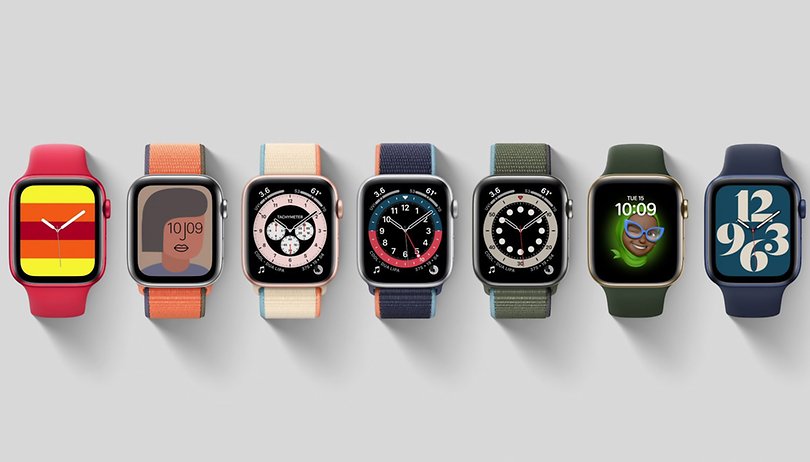
You can change your watch face in three ways:

– Change it on the iPhone

– Change it on the Apple Watch

– Use third-party apps

If you’re using a current-gen Apple Watch you can also choose from third-party watch faces that are available from the App Store. To change your current watch face:

1. Open the Watch app on your iPhone and tap My Watch > Face Gallery > Select a New Face

2. Swipe left or right until you find one that you like

3. Tap it to select it and it will appear on your Apple Watch.How to Change the Watch Face in Apple Watch
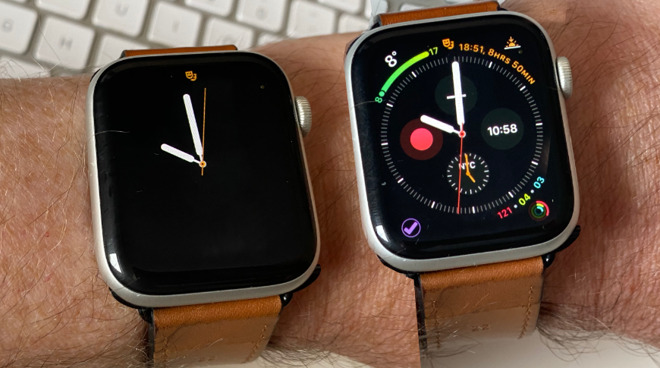
Apple Watch is a smartwatch developed by Apple Inc. It has a circular display with touchscreen capabilities and is able to show various notifications from a connected iPhone. Apple Watch can be used to control the music from your phone, as well as receive and respond to text messages and other notifications. The watch is also able to track fitness data such as distance walking, calories burned, and heart rate. It can also be used for tracking outdoor workouts like running or cycling with the addition of third-party apps.

The Apple Watch is a must-have device for people who are always on the go. It is an extension of the iPhone and it can be used to make calls, send texts, check emails, and much more. The Apple Watch was first released in April 2015. The watch has a rectangular display with rounded corners and different screen sizes. It also has a touch screen that allows you to swipe through apps or scroll through text messages.

Apple Watch’s battery life can last up to 18 hours when using it for exercise tracking, or up to 36 hours when it is not being used at all. The watch connects wirelessly with your iPhone via Bluetooth 4.0 and Wi-Fi 802.11b/g/n 2.4GHz frequency bands. Apple Watch has been the best-selling smartwatch in the world for years.


Tags: Apple watchHow to Change the Watch Face in Apple WatchWatch Faces in Apple Watch
Tweet54SendShare15
Previous Post

How To Find Tera In Pokemon Scarlet & Violet

Next Post

‘SingleDebt protect its clients from Creditor harassment’ – Harish Parmar, Founder of SingleDebt

Priyansh Sidhwani

Hi! I'm Priyansh, I write articles about gaming news here at Techstory. To get in touch E-mail: Priyansh@connasys.com.

Recommended For You

Apple Increases Battery Replacement Fee for iPhone 18 Pro and Pro Max

by Shailja Jha
September 18, 2026
0
Apple Increases Battery Replacement Fee for iPhone 18 Pro and Pro Max

Apple has increased the out-of-warranty battery replacement cost for its latest premium smartphones in the United States. Customers who own an iPhone 18 Pro or iPhone 18 Pro...

Read more

T-Mobile Adds Monthly Fee to a New iPhone Feature for Customers

by Shailja Jha
September 18, 2026
0
T-Mobile Adds Monthly Fee to a New iPhone Feature for Customers

T-Mobile is giving iPhone users another way to stay connected across multiple devices, but the convenience comes with an unexpected monthly cost. The wireless carrier has introduced support...

Read more

The Reddit Playbook for Early-Stage Startups: What Actually Works in 2026

by Rohan Mathawan
September 18, 2026
0
Photo by Ralph Olazo on Unsplash

Something changed about Reddit over the past two years, and most founders have not adjusted to it yet. Search for almost any software category today and Reddit threads...

Read more
Next Post
Harish Parmar, Founder of SingleDebt

'SingleDebt protect its clients from Creditor harassment' - Harish Parmar, Founder of SingleDebt

Please login to join discussion

Techstory

Tech and Business News from around the world. Follow along for latest in the world of Tech, AI, Crypto, EVs, Business Personalities and more.
reach us at info@techstory.in

Advertise With Us

Reach out at - info@techstory.in

Aviator Game India 2026

BROWSE BY TAG

#Crypto #howto 2024 acquisition AI amazon Apple Artificial Intelligence bitcoin Business China cryptocurrency e-commerce electric vehicles Elon Musk Ethereum facebook funding Gaming Google India Instagram Investment iPhone IPO Market Markets Meta Microsoft News OpenAI samsung Social Media SpaceX startup startups tech Tech news technology Tesla TikTok trend trending twitter US

© 2025 Techstory.in

No Result
View All Result
  • News
  • Crypto
  • Gadgets
  • Memes
  • Gaming
  • Cars
  • AI
  • Startups
  • Markets
  • How to

© 2025 Techstory.in

Welcome Back!

Login to your account below

Forgotten Password?

Retrieve your password

Please enter your username or email address to reset your password.

Log In
Are you sure want to unlock this post?
Unlock left : 0
Are you sure want to cancel subscription?