

• Send Us A Tip
  • Calling all Tech Writers
  • Advertise
Monday, June 22, 2026
  • Login
TechStory
  • News
  • Crypto
  • Gadgets
  • Memes
  • Gaming
  • Cars
  • AI
  • Startups
  • Markets
  • How to
No Result
View All Result
  • News
  • Crypto
  • Gadgets
  • Memes
  • Gaming
  • Cars
  • AI
  • Startups
  • Markets
  • How to
No Result
View All Result
TechStory
No Result
View All Result
Home How to

How to transfer an e-SIM to a new phone?

by Afeefa Ansari
June 22, 2026
in How to
Reading Time: 2 mins read
0
ESIM

Credits - europeesim.com

TwitterWhatsappLinkedin

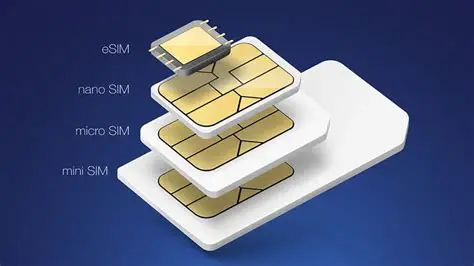
Do you have an e-SIM you want to transfer to a new phone? Here is how you can do that! Follow the guide to know how you can transfer your e-SIM in a few steps. So, let’s get started.

You might also like

How to cancel a 24 Hour Fitness Membership?

How to freeze your credit for free?

How To Optimize Windows For Gaming

Steps to transfer an e-SIM to a new phone

If you want to transfer an e-SIM to a new phone, this is what you should do.

  • To begin, we have to first make sure both of your phones are connected to a strong Wi-Fi network and have Bluetooth turned on. You will also have to ensure that both devices are updated to their latest software versions, as the outdated versions often trigger glitches.
  • If you are moving from an old iPhone to a new one, or between two Android devices, the process is built right into the setup assistant, and that is pretty much where you find everything. During the initial setup of your new phone, you can choose the option to transfer data from your nearby old device. When prompted about your cellular plan, you can simply select your phone number and follow the on-screen prompts to confirm the transfer on your old phone.
  • But particularly if you are switching brands, you will likely need to scan a QR code provided by your carrier. This is important, and one cannot dodge this step. So, log in to your carrier app or website on a computer or your old phone, find the eSIM section, and request a transfer. This will generate a new QR code. On your new phone, go to settings, networks, and select the option to add an eSIM or mobile network, then scan that code.

What happens after we transfer the e-SIM?

What happens is rather straightforward. Once the transfer finishes, your old phone will instantly lose its cellular signal. It will not use the mobile data anymore, and you can pretty much use it for Wi-Fi.

On your new phone, it might take a couple of minutes for the new eSIM to activate, and when it does, you can access everything. Your screen will notify you that there’s a signal and that you can connect to the mobile data. Also, it is usually a good idea to restart your new phone right after the transfer to make sure everything registers correctly and starts anew. Once that is done, try making a quick phone call and turning off Wi-Fi to test that your mobile data is working perfectly. Otherwise, you can restart.

Tags: #howtoe-SIMHow to transfer an e-SIM to a new phone?transfer an e-SIMtransfer sim
Tweet54SendShare15
Previous Post

How to freeze your credit for free?

Next Post

How to cancel a 24 Hour Fitness Membership?

Afeefa Ansari

Recommended For You

How to cancel a 24 Hour Fitness Membership?

by Afeefa Ansari
June 22, 2026
0
24 Hour Fitness

Want to take a break from the gym? It's alright, we've got you. Follow the guide to know how you can cancel the 24 Hour fitness membership and...

Read more

How to freeze your credit for free?

by Afeefa Ansari
June 22, 2026
0
Freeze credit

Do you want to freeze your credit for free? Here is how you can do it in no time at all! It is a simple process that lets...

Read more

How To Optimize Windows For Gaming

by Khilav Jadav
June 20, 2026
0
Microsoft’s 10-Year Call of Duty Deal Raises Questions About Performance Parity

Modern Windows computers are powerful enough to run demanding games, but poor settings and unnecessary background tasks can still affect performance. A few simple adjustments can help improve...

Read more
Next Post
24 Hour Fitness

How to cancel a 24 Hour Fitness Membership?

Please login to join discussion

Techstory

Tech and Business News from around the world. Follow along for latest in the world of Tech, AI, Crypto, EVs, Business Personalities and more.
reach us at info@techstory.in

Advertise With Us

Reach out at - info@techstory.in

Aviator Game India 2026

BROWSE BY TAG

#Crypto #howto 2024 acquisition AI amazon Apple Artificial Intelligence bitcoin Business China cryptocurrency e-commerce electric vehicles Elon Musk Ethereum facebook funding Gaming Google India Instagram Investment ios iPhone IPO Market Markets Meta Microsoft News OpenAI samsung Social Media SpaceX startup startups tech technology Tesla TikTok trend trending twitter US

© 2025 Techstory.in

No Result
View All Result
  • News
  • Crypto
  • Gadgets
  • Memes
  • Gaming
  • Cars
  • AI
  • Startups
  • Markets
  • How to

© 2025 Techstory.in

Welcome Back!

Login to your account below

Forgotten Password?

Retrieve your password

Please enter your username or email address to reset your password.

Log In
Are you sure want to unlock this post?
Unlock left : 0
Are you sure want to cancel subscription?