Creating high-quality visual assets can require substantial time, labor, and money for Indian startups, indie game studios, and other digital creators. Concept art, advertising visuals, characters, props, environments, and 3D prototypes all involve specialist skills and multiple stages. AI-assisted tools can help a small team move from a written idea to reference art and then to a draft textured model, but review and post-processing remain essential.
1. Meshy — Best Overall AI-to-3D Workflow
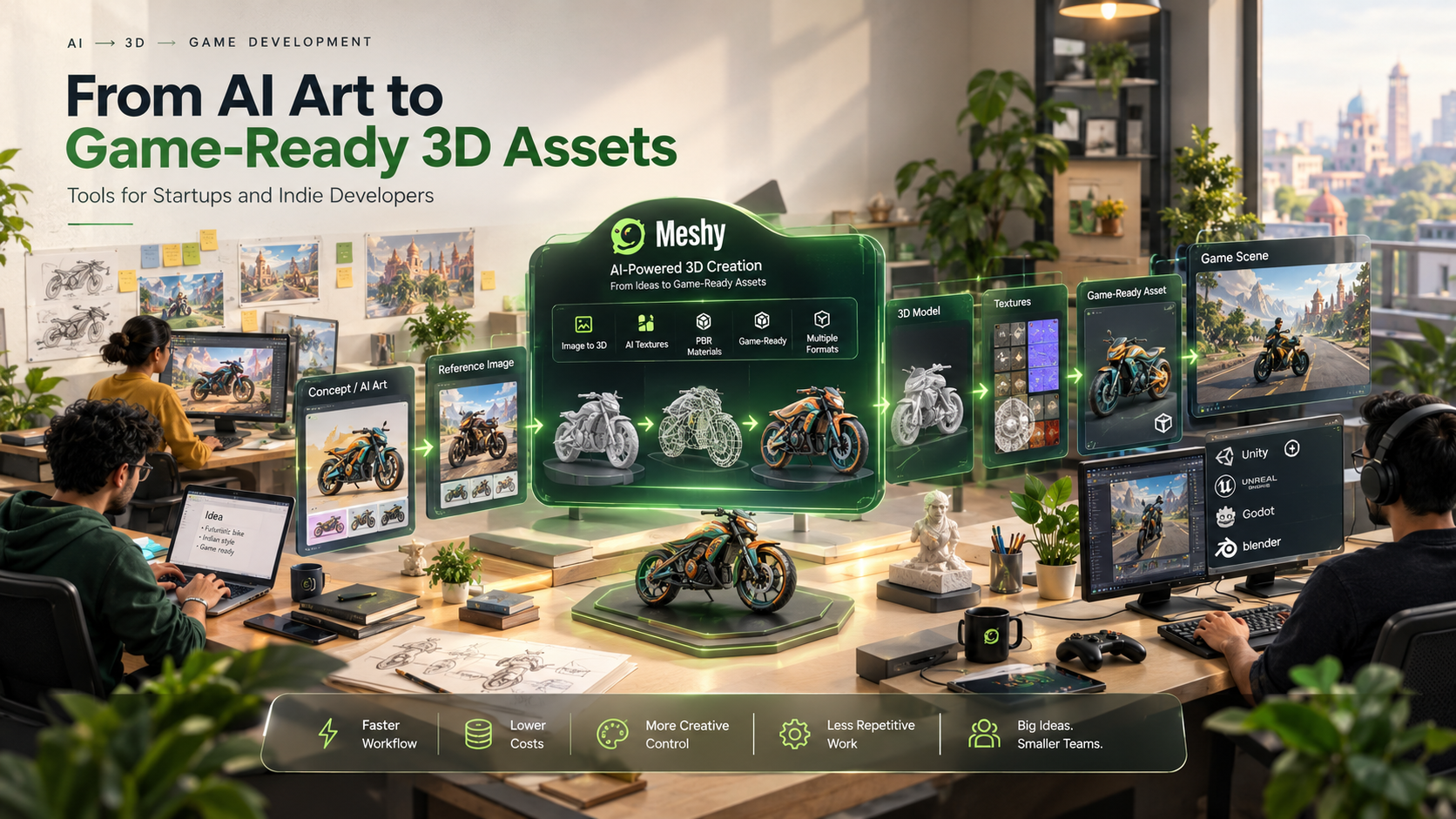
Meshy appears first because it connects AI image creation with 3D asset generation in one workflow. This can reduce handoffs during early concept development, although teams still need conventional tools for detailed cleanup and production integration.
A designer can begin with a text prompt for a futuristic character, fantasy weapon, stylized environment, or product idea. Rapid image generation can help teams compare visual directions before using an AI art generator for game development workflow to develop the strongest concept further.
After a concept is approved, the team can move into 3D generation and then refine textures and geometry for easier downstream editing. Automating repetitive early steps can leave more time for creative decisions, but generated assets still require inspection and cleanup.
Budget-conscious teams should compare several workflows. Tools such as Adobe Firefly or Stable Diffusion can support 2D concept exploration; Sloyd or Rodin offer alternative 3D-generation approaches; and Blender remains important for manual refinement. Meshy’s advantage is consolidating several early stages, while specialized tools may offer more control in a narrower task.
From Prompt to Reference Image
Concept development is stage 1 of an AI-assisted production process. Using a text prompt, a creator can communicate an idea – whether subject matter, style, materials, colors, setting, or atmosphere. AI-powered image generation then allows for reference artwork to be created and visualized before expensive production takes place.
This approach works across multiple use cases:
- Game development: characters, creatures, weapons, vehicles, props, and landscapes
- Product development: mockups and early prototypes
- Advertising: campaign concepts, promotional graphics, and visual variations
- Digital creations: graphics, social media illustrations, creative materials
An AI art generator for game development, can help a small team explore character designs and game worlds before committing to full production.
Approved Artwork → Textured 3D Assets
Generating a reference image is only one stage. Games, interactive applications, e-commerce experiences, and virtual environments may also require a usable 3D model, and increasingly, a voice layer as well, with tools like an ai voice agent handling in-game dialogue, NPC interactions, or customer-facing conversations once the visual assets are in place.
Once a concept is approved, an AI-assisted pipeline can produce a draft 3D representation. The amount of cleanup depends on the final application.
Review polygon count, topology, texture resolution, UVs, materials, scale, and game-engine compatibility. Production use may require geometry optimization, texture edits, and material adjustments.
Cost, Commercial Rights, and File Formats
The cost of AI tools is the main worry for startup businesses and freelancers. It can eliminate some manual tasks, which is especially relevant in the first stages of creation, however, businesses should research the cost plans and license terms of each service before making their decision. Commercial rights are crucial if AI-generated assets will be part of paid games, ads, applications or products. Creators should review the applicable licensing terms for their plan and intended commercial use.
File format is another practical factor. Development teams need formats that integrate with their 3D software and game engines, while web and e-commerce teams may prioritize lightweight, browser-friendly assets. Export capability can be as important as generation because the model must remain editable.
Post-Processing Still Matters
AI can reduce asset-creation time, but quality control remains essential. Generated models may need retopology, geometry cleanup, texture edits, UV adjustments, rigging, animation preparation, and other optimization.
Thus, for instance, a high detail model intended for a promo render could need many steps of optimization to work inside a real time game. Or a character could be posed with bones and then animated to become operational in a game:
Therefore, the best workflow is not simply “generate and publish.” It is generated, reviewed, refined, optimised, and integrated.
Why should AI-to-3D Tools Be Important for Indian Creators
India’s growing ecosystem of startups, indie game developers, agencies, and digital creators often works with tight budgets. AI-assisted platforms can help small teams test more concepts and shorten the turnaround from idea to prototype.
Meshy is most useful when a team wants to connect visual ideation and early 3D production in one place. A creator can develop reference images, compare directions, and move a selected concept toward a draft 3D model.
For startups exploring whether a new product could actually work, an indie game developer creating a quick game prototype, or a digital creator attempting to create visual assets for a marketing campaign – experimental approaches could simply be faster.
In conclusion
AI has made it easier for startups and indie developers to test concepts before committing a large production budget. Teams can use image generation and 3D tools to compare visual directions, build prototypes, and increase iteration speed. Meshy offers a convenient integrated workflow, while specialized alternatives may provide stronger control for individual stages. Combined with post-processing, rights checks, format validation, and optimization, these tools can help Indian startups and indie developers turn concepts into usable digital assets more efficiently.