With the mysteries of metaverses and virtual reality being unfolded continuously and their destinies intertwined, new avenues are opening up everyday for people not just to entertain themselves, but also to experience a world never thought of. Building up a digital community has never been easier, but with the advent of metaverse, experts claim that it will be soon when the virtual reality has the same number of communities as real life.

Today, we’ll take you on a journey to one such metaverse, which despite all ups and downs, lives deep inside the hearts of the people. The Voxels Metaverse.
Voxels Metaverse Explained
The Voxels Metaverse, formerly known as Cryptovoxels, is a metaverse or a virtual world as some people might say, which has been built upon the Ethereum blockchain. The players of the Voxels metaverse can create customized avatars and then in turn use those avatars to buy digital land, interact with other players on the server and have an active digitally social life.
Voxels lets you build up your own art gallery which you can fill with a number of NFTs. Players can buy and sell lands as per their convenience. The lands can in turn be used to establish all kinds of things including stores, parks, commercial plants, etc. The best part about the Voxel Metaverse is that you can not just play it in normal first person and third person mode but also connect it with a VR headset and enjoy it as if you are a part of it.
The Voxel Metaverse more or less looks like the classic game Minecraft which is loved by every gamer. Not just in graphics, but also in a sense of gameplay, the Voxel metaverse is pretty close to Minecraft. The land of the Voxel metaverse is broken into little fragments called spaces. Each space has its own unique address. A space is usually prohibited for public use but if you want to share it with your friends, you can convert the space address into a link which you can in turn share with other people and they can gain access to it. This lets you connect with people who are living far away and gives you a sense of proximity with them. You can organize events in your space and invite your friends to attend those events with you. For example, lets say there’s an open mic event you and your friends have been wanting to go for a very long time but are not able to because you live in different cities. The Voxel Metaverse will bring all your friends in one place along with your favorite artists.
How to Access Voxels Metaverse (Formerly Cryptovoxels) ?
You must already have a cryptocurrency wallet in order to access the Voxels Metaverse. Even though you may link your social media accounts like Google, Facebook (Meta), or Twitter, we advise creating an account using a cryptocurrency wallet for the best experience. One of the very few metaverses that also allows for Discord sign-in is Voxels. Additionally, you may link your Reddit, Twitch, and Torus accounts. Below are some simple steps that will show you how to access the voxels metaverse:
Step 1: Open the web browser on your system and type www.voxels.com in the address bar or click here. You will be redirected to the Voxels Metaverse home page.
Step 2: On the top right corner of the website’s home page, you will find the Sign In Button. Click on it and wait for it to load.
Step 3: Select a way you wish to sign in using. Verify the required details and your account will be ready in no time.
Step 4: Once your account is created, it is time to create your username. Your username can be a maximum of 16 characters and may contain Letters (uppercase or lowercase), numbers, hyphen and underscore.
Once you’ve chosen a good name, click on Register name and verify the same with your wallet/social you signed in using.
Setting up a Space on Voxels Metaverse
Once you’ve created an account on the Voxels Metaverse, it is now time to edit your profile and create a space. You can do that in these easy steps:
Step 1: Once you are logged into your account, on the top right corner of your account’s homepage, you will see your username. Click on it and select the Profile option.
Step 2: In the profiles section, click on the Spaces button. You will be redirected to the space creation section.
Step 3: Supply a name to your space and specify its dimensions (height, length and width) and click create.
Step 4: Provide a valid description to your space. It will help others identify it better. Once you are done, click the save button which looks like an old floppy. You will receive a confirmation of your description being successfully saved.
Step 5: Then, click the Build button. You can choose to build a Park, Outline, Three Towers, House Pyramid or Scaffold.
Step 6: Once you’ve built your space, you can visit it alone or with your friends. You can invite up to 5 users to hang out with you in your space.
You can add pictures, towers, pool, and other elements to your space.
How to get a Free Wearable for Your Digital Avatar in the Voxels Metaverse?
The Voxels metaverse gives all of its new users a free wearable. Here’s how you can claim yours:
Step 1: Log in to your Voxels account and go to your profile section.
Step 2: On your profile avatar, you will find the edit costume option. Click on it. You will be redirected to the avatar editing page.
Step 3: On the page, you will see three options, Costumes, Wearables and Skin. Click on Wearables.
Step 4: Click on the empty area in the Wearables tab. You will see the option to Claim a free wearable. Click on it and your free wearable will be added to your inventory.
(Note: You don’t get to choose the wearable you’re getting. The game automatically supplies you a wearable on its own. You’ll have to wait 5 minutes for it to reflect in your account.)
Step 5: After waiting for 5 minutes, refresh the web page. Go to wearables again and you will find it in your inventory. Click on the wearable to put it on your avatar.
Conclusion
Metaverses are unarguably the future of technology as well as community building. In that sense, Voxels Metaverse is even more special. With its feature rich world and the ability to gain a first hand virtual reality experience, Voxels is bound to rule the Metaverse world. As they have merged various real-world objects that link users in the virtual world, augmented reality will very soon be added to improve the metaverse experience. In the Cryptovoxels, you may also buy collectibles that are virtual replicas of actual objects, avatars, accessories, merchandise, and other opulent goods.
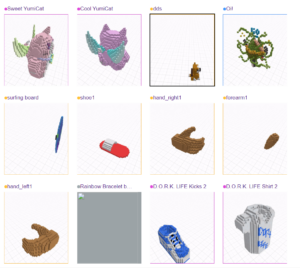
The marketplace is rich in NFTs and players can browse through it category wise. So, for example, if you have to buy a surfing board, you wouldn’t have to browse through a number of pages to finally arrive at the surfing board. You can simply just search for it, or look into the associated category for better choices.
What do you think of the Voxels Metaverse? What, according to you, makes it special? Do share your valuable feedback with us in the comments box. If you have any problems in the Voxels metaverse, you know where to come. Our comment box is always open for you.