

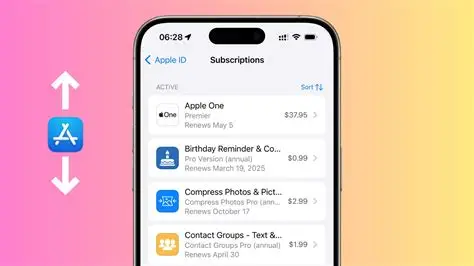
Here is how you can cancel literally any subscription on your iPhone. Follow the guide to get the right method of doing so, which will only take a few minutes. So, let’s get started.
Steps to cancel a subscription on an iPhone
If you want to cancel the subscription on an iPhone, then these are the steps that you can follow.
- You just have to start with your phone Settings app, located on your home screen. You have to begin by tapping on it to open up your main configuration menu.
- Just look at the very top of the page where your profile picture and name are displayed. Here is what we’ll get. This is your Apple ID banner that you put on your name to open your account control panel.
- This will bring you to the next screen. Here, just look down a few options until you find the button that says Subscriptions. You have to tap on that to load the list of services attached to your payment profile.
- After this, you may be required to wait a brief second for the list to load. You will see a section at the top dedicated to your Active subscriptions. So, keep on scrolling through the list that opens up until you find the specific app or service you want to stop paying for.
- You just have to select the app or service that you wish to discontinue. This page shows your billing history, next payment date, and price for the subscription.
- Look for the button that says Cancel Subscription at the bottom of the screen. Tap on it if you have really made up your mind. Confirm it. But don’t worry, you will still have access to the premium features until the final day of your current billing period.
How relevant is Apple ID in this matter?
Your Apple ID is basically the gatekeeper for almost every subscription you sign up for on your iPhone. When you download an app from the App Store and purchase a premium plan inside it, Apple is the one that handles the transaction through the credit card or payment method linked to your Apple account, rather than passing your card info to the app developer. This is what makes it all the more important.
Because of this, your Apple ID acts as a centralized dashboard that contains all the information. It brings all those different bills into one single place, allowing you to manage and turn them off with just a couple of taps on your phone. If you are signed into the wrong Apple ID, or if you bought a service directly through a website instead of the App Store, it will not show up here, and you may have to deal with them individually.



