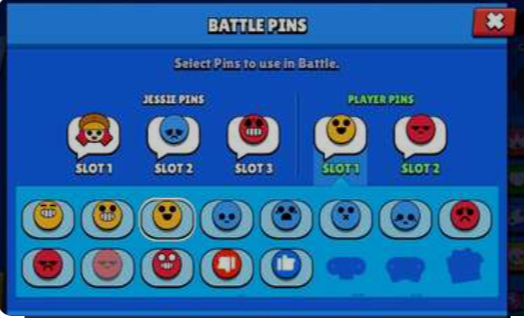
Players are drawn to Supercell’s fast-paced multiplayer online battle game Brawl Stars because of its vibrant characters, thrilling gameplay, and frequent updates. Using pins is one of the entertaining elements that gives your brawlers identity and flair. Emoticons known as pins are used in battles to express yourself, make fun of rivals, or just rejoice over a win. The 2024 update has made equipping and utilising pins even more simple and accessible. This is a comprehensive guide explaining how to equip pins in Brawl Stars after the 2024 update.
Pins: What Are They?
You can utilise pins as collected emotes throughout the game. They are available in several configurations, such as joyful, melancholic, furious, and unique pins for particular occasions. Every brawler has an exclusive collection of pins that allow you to express your feelings throughout a bout in a way that is unique to you.
KEYPOINTS:
- Go to the ‘Brawlers’ area after opening Brawl Stars.
- Select the Brawler for whom you wish to equip pins.
- Click on ‘Pins’ to view your assortment.
- Just choose the pin you want to use, and it’s done! A Pin is equipped by you.
Opening Pins
You must unlock pins before you may equip them. Pins can be acquired by:
Pins may be found in both Standard and Big Brawl Boxes.
- Pin Packs: Can be bought via the in-game store.
- Special Events: You can win exclusive pins by taking part in challenges and events specifically designed for that purpose.
- Brawl Pass: Pins are frequently given out as prizes for the seasonal Brawl Pass.
Setting up pins is a simple procedure. To outfit your preferred pins, take the following actions:
- Step 1: Launch Brawl Stars on your device to access the Game Start: For access to all features and updates, make sure you are online.
- Step 2: Access the Brawler Menu: Press the “Brawlers” button from the home screen. This will bring up the customisation screen where you can select the brawler you wish to personalise.
- Step 3: Pick a Fighter: Select the fighter you wish to equip pins for. To access the brawler’s profile screen, tap on their icon.
- Step 4: Navigate to the Pins Menu: You may adjust the brawler’s profile screen in a number of ways. Locate the button labelled “Pins.” Typically, this button is represented by a little icon that looks like an emote or pin. To access the pins customisation menu, tap on it.
- Step 5: Select the Pins: You may view every pin you’ve unlocked for the chosen brawler in the pins menu. Six pins can be equipped at once. Usually, these are separated into groups like:
- Default Pins: Simple emotions such as joy, sorrow, or rage.
- Special Pins: Exclusive to the brawler or obtained at particular occasions.
- Animated Pins: Pins that include movements to give your expressions more pzazz.
To equip a pin, simply tap on it. Drag and drop them into the available slots.
- Step 6: Conserve Your Choice: Make sure to save your changes after selecting the pins you want. A “Save” or “Confirm” button is typically located at the bottom of the screen. To complete your pin arrangement, tap on it.
Using Pins in Combat
It is simple to use your pins in combat once you have equipped them. Press and hold the pin button next to your control buttons while in a match. The pins menu will appear as a result. When you tap on the pin you want to utilise, both your opponents and teammates can see it on the screen.
Advice on How to Use Pins
- Timing is everything. To get the most out of pins, use them shortly after a critical kill or goal in Brawl Ball.
- Sportsmanship: Although pins can be used for mockery, it’s preferable to utilise them in a lighthearted and courteous manner.
- Customisation: To keep your expressions current and pertinent to the events or meta, make frequent updates to your equipped pins.
In summary
In Brawl Stars, equipping and utilising pins gives the game an additional layer of strategy and excitement. Supercell has made it simpler than ever to add expressive pins to your brawlers with the 2024 update. To arm your pins and give your battles more personality, refer to this tutorial. Whether you’re rejoicing over a victory or communicating with teammates, pins are the perfect way to express yourself in the fast-paced world of Brawl Stars.