

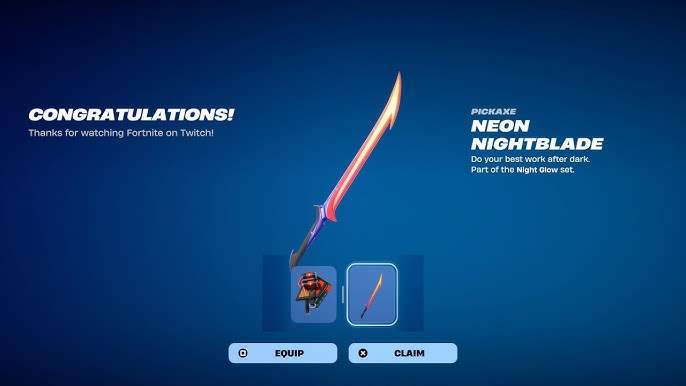
Fortnite’s latest season has been packed with exciting rewards, and the free Neon Nightblade Pickaxe is one of the coolest cosmetics up for grabs. If you love glowing, futuristic gear, this pickaxe is a must-have for your locker. The best part? You don’t have to spend a single V-Buck to get it—if you know how.
What Is the Neon Nightblade Pickaxe?
The Neon Nightblade Pickaxe is a sleek, glowing harvesting tool with a vibrant neon design. It first appeared as a compensation reward for players who had issues claiming previous Twitch Drops, but Epic Games has brought it back for a limited time. Whether you missed it the first time or just want a second chance to grab it, now’s your opportunity.
This pickaxe stands out with its bright colors and smooth animations, making it a favorite among players who love flashy cosmetics. Since it’s free, there’s no reason not to add it to your collection.
How to Claim the Neon Nightblade Pickaxe
Getting the Neon Nightblade Pickaxe isn’t complicated, but you’ll need to follow a few steps carefully. Here’s the breakdown:
Step 1: Link Your Epic and Twitch Accounts
Before you can earn any Twitch Drops, your Epic Games and Twitch accounts must be connected. If you’ve done this before for other rewards, you can skip ahead. If not, here’s how to link them:
- Go to the official Epic Games website and log in to your account.
- Navigate to the “Connected Accounts” section in your account settings.
- Find the Twitch option and click “Link Account.”
- Sign in to your Twitch account when prompted to complete the connection.
Once linked, you’re ready to start earning rewards by watching Fortnite streams.
Step 2: Watch the FNCS Major 3 Streams
The Neon Nightblade Pickaxe is available as a Twitch Drop during the FNCS Major 3 Group Stage broadcasts. You’ll need to watch at least 60 minutes of an eligible stream to unlock it. Here’s what you need to know:
- When to Watch: The streams are live on July 26 and 27.
- Where to Watch: Tune in to the official Fortnite Twitch channel or other approved streams with Drops enabled.
- How Long: You only need to watch for one hour, but make sure your viewing time is tracked by checking the Twitch Drops menu.
Once you’ve hit the required watch time, the pickaxe will appear in your Twitch Drops inventory. Don’t forget to manually claim it—otherwise, you won’t receive the reward.
Step 3: Check Your Fortnite Locker
After claiming the pickaxe on Twitch, it should automatically appear in your Fortnite locker. However, some players report delays, so don’t panic if it doesn’t show up right away. Epic Games states it can take up to 14 days to process, but most players get it within a few hours.
If you’ve waited longer than two weeks and still don’t see it, double-check that your accounts are properly linked and that you claimed the reward on Twitch. If everything looks correct but the pickaxe is missing, contacting Epic Games support might be your best option.
Why Is the Neon Nightblade Pickaxe Free?
Epic Games often rewards players for engaging with Fortnite’s competitive events. The Neon Nightblade Pickaxe was originally given out to make up for technical issues during an earlier FNCS Twitch Drop campaign. Bringing it back gives more players a chance to earn it, especially those who missed the first opportunity.
Since Fortnite’s competitive scene is a big part of the game, watching FNCS streams helps support the esports community while giving fans exclusive goodies. It’s a win-win.




