Feeling stuck with slow Wi-Fi? You can fix it right away. Follow the guide to improve the Wi-Fi coverage at your home and stream your favorite stuff. Let’s dive in and see what can be done about it.
Ways to improve Wi-Fi coverage at home
If your Wi-Fi is feeling slow, here are a few things you can try.
- The first thing to try is to move your router to a central, elevated location. This often works instantly. Most people hide the router in a hiding place, a corner, or down in the basement to keep it out of sight, but it is bad for the signal strength, which gets masked somehow. Placing it on a high shelf or a table right in the middle of your living space allows the signal to expand outward uniformly in a bubble.
- Another thing is to keep the range unhindered. Keep the router away from heavy obstacles and appliances. Things like thick concrete walls, brick chimneys, massive metal kitchen appliances, and even large mirrors can bounce or absorb wireless signals, creating immediate dead zones directly on the other side of them. You will face weak signals over there.
- You can also adjust the external antennas if your router has them. Pointing one antenna straight up vertically and another one flat horizontally helps ensure that the signal can reach your devices. It is much like trying to find a network, as one does with a phone.
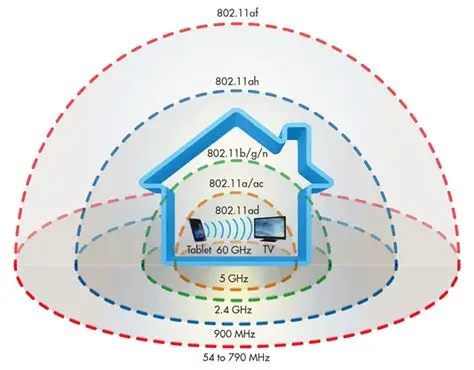
- This is technical, but hear us out! Use the right frequency band for the right distance. Your router broadcasts a slower 2.4 GHz network and a faster 5 GHz network. The 2.4 GHz band has longer waves that travel much further and pass through walls easily, while the 5 GHz band is incredibly fast but quite weak at cutting through physical obstructions. So, choose better.
- Change your wireless channel to escape the load on it. If you live in an apartment building, your neighbors’ routers might be fighting for the exact same wireless highway as yours. Logging into your router settings to select an automated, less congested channel can help to stabilize your network, which works right away.
- You can also choose to upgrade to a mesh Wi-Fi system for large homes. Instead of relying on one single box to push a signal through multiple floors, a mesh system uses several nodes placed around the house that talk to each other, thickening the network range that works well everywhere.
- Try to hardwire your stationary electronics using Ethernet cables. Taking your smart TV, gaming console, or desktop computer off the wireless bands totally makes it work.