Minecraft is a game of endless possibilities. From building towering castles to crafting intricate machines, the game offers something for everyone. One of the key elements that allows players to create complex contraptions is redstone. Among the various redstone components, the redstone repeater stands out as a vital tool for managing redstone signals. In this article, we’ll explore what a redstone repeater is, how to craft one, and how to use it effectively in your Minecraft creations.
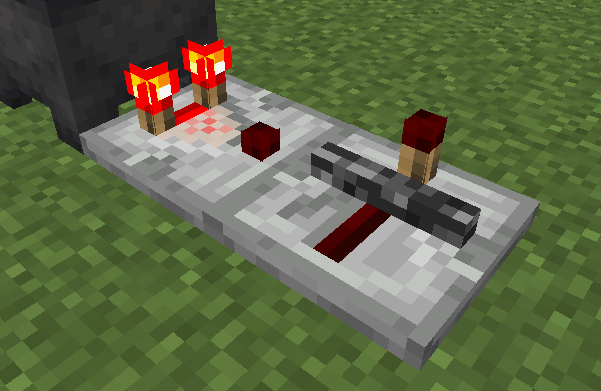
Before diving into the crafting process, it’s essential to understand what a redstone repeater does. In simple terms, a redstone repeater is a device that extends the range of redstone signals. Normally, a redstone signal can only travel 15 blocks from its source. After that, the signal becomes too weak to activate devices like doors or pistons. This is where the redstone repeater comes into play. By placing a repeater in the path of the signal, you can boost it back to full strength, allowing it to travel another 15 blocks.
But that’s not all. Redstone repeaters also have the ability to delay signals. This means you can control the timing of your redstone circuits, which is crucial for creating synchronized mechanisms. Additionally, repeaters can act as diodes, ensuring that signals only travel in one direction. This prevents unwanted feedback loops in your circuits.
Crafting a Redstone Repeater
Now that you understand the purpose of a redstone repeater, let’s look at how to craft one. The recipe is straightforward, but you’ll need to gather a few specific materials:
- 3 Stone Blocks: These are the smooth, gray blocks that are created by smelting cobblestone in a furnace. Make sure not to confuse them with cobblestone, as the recipe requires the smooth variant.
- 2 Redstone Torches: To craft a redstone torch, you’ll need one stick and one piece of redstone dust. Place the stick in the bottom slot of the crafting grid and the redstone dust directly above it.
- 1 Redstone Dust: This is obtained by mining redstone ore, which is commonly found deep underground, typically between levels 1 and 15.
Once you have these materials, open your crafting table and arrange them as follows:
- Place the three stone blocks in the bottom row.
- Position the two redstone torches on either side of the middle row.
- Place the redstone dust in the center slot of the middle row.
After arranging the items correctly, you’ll see a redstone repeater appear in the result box. Drag it into your inventory, and you’re ready to start building!
Using the Redstone Repeater
With your newly crafted redstone repeater in hand, it’s time to put it to use. As mentioned earlier, repeaters serve multiple functions in redstone circuits. Let’s explore some of the most common applications:
- Extending Signal Range: If you have a redstone circuit that needs to travel more than 15 blocks, place a repeater after the 15th block to boost the signal. This allows the signal to continue for another 15 blocks. You can chain multiple repeaters together to cover even greater distances.
- Delaying Signals: Right-clicking on a redstone repeater cycles through four different delay settings. Each setting adds a slight delay to the signal, measured in game ticks. This feature is useful for creating timed mechanisms, such as doors that open after a short pause or traps that activate with a delay.
- Preventing Backflow: In complex circuits, signals can sometimes travel in unintended directions, causing malfunctions. By placing a repeater facing the desired direction, you can ensure that the signal only moves forward, preventing any backflow.
- Creating Pulse Circuits: Redstone repeaters can be used to create pulse circuits, which are essential for devices like clocks or blinking lights. By combining repeaters with redstone dust and other components, you can design circuits that emit signals at regular intervals.
- Synchronizing Mechanisms: When building multi-part machines, it’s crucial to ensure that all components operate in harmony. By strategically placing repeaters with specific delay settings, you can synchronize different parts of your contraption, ensuring smooth operation.