

• Send Us A Tip
  • Calling all Tech Writers
  • Advertise
Monday, July 6, 2026
  • Login
TechStory
  • News
  • Crypto
  • Gadgets
  • Memes
  • Gaming
  • Cars
  • AI
  • Startups
  • Markets
  • How to
No Result
View All Result
  • News
  • Crypto
  • Gadgets
  • Memes
  • Gaming
  • Cars
  • AI
  • Startups
  • Markets
  • How to
No Result
View All Result
TechStory
No Result
View All Result
Home How to

How to send Certified Mail

by Srestha Roy
September 24, 2021
in How to
Reading Time: 2 mins read
0
How to send Certified Mail
TwitterWhatsappLinkedin

Certified Mail is a USPS service that gives an official receipt to the person sending the mailpiece as confirmation that it was delivered. The mail carrier demands a signature from the receiver when the package is delivered. Customers can optionally add an electronic or physical Return Receipt service to their Certified Mail mailpiece, which will give the sender a copy of the recipient’s signature. The Electronic Return Receipt option sends an email with the recipient’s signature. The physical Return Receipt option is a postcard that is addressed to the sender and contains the signature of the actual receiver, proving that the mailing was delivered or that a delivery attempt was undertaken.
You might also like

How to view instants on Instagram?

How to get coin bags in Pokémon Go?

How to request money on X?

Source – Wikihow

The cost of Certified Mail is $3.35. This cost is in addition to the delivery fee for sending the mailpiece by First Class Mail or Priority Mail. Return Receipt is an optional feature for Certified Mail. Return Receipt costs $2.75 for a postal receipt and $1.45 for an electronic receipt sent to you through email.

The time it takes for Certified Mail to arrive is determined on the mail class to which it is added. The delivery time for a First-Class Mail letter is generally 2 to 5 business days. Priority Mail typically takes 2-3 business days to arrive.

Send Certified Mail from the Post Office

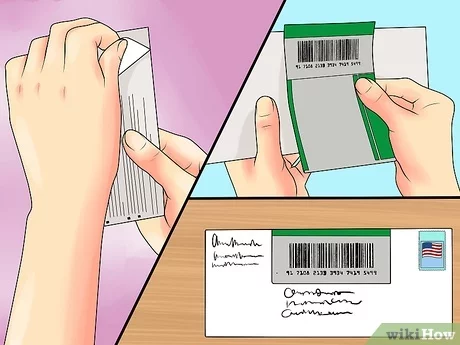
  • Obtain a Certified Mail Form 3800 at a nearby post office.
  • This form includes a green and white sticker with a barcode that will allow you to trace your mail through the United States Postal Service.
  • A perforated receipt is included in the form as confirmation that you mailed the item.
    Fill out the form with all of the needed information, including the recipient’s name and address.
  • Remove the backing and put the sticker immediately to the right of the return address space on the top edge of the envelope you’re mailing.
  • Pay the correct amount for the kind of mail delivery requested, as well as any additional services that may be required. Choose whether or not you wish to pay for a restricted delivery service.
  • Use the receipt service.
  • Keep track of everything. Receipts with the shipping date imprinted on them should be collected and kept. You may check the status of your mail delivery online using a number that is unique to your mailing.
  • Look at the delivery details. To find out when and to whom the certified mail was delivered, go to the postal service’s website.

Send Certified Mail Online

  • Create a free account. There are a number of websites that provide USPS Certified Mail delivery. You shouldn’t have to pay any account fees on a monthly basis.
  • Make sure your letter is ready to be mailed.
  • Using a scanner, scan the document.
  • Upload your document file to your mailing service’s website.
  • Keep a copy of both your proof of mailing and the proof of delivery from the USPS.

Tags: Certified MailEmailHow tolettermailUSPSWiki how
Tweet55SendShare15
Previous Post

Freshworks IPO turned 500 Indian employees crorepatis with 70 of them aged under 30

Next Post

Freshworks Stock gained 32% after raising $1 billion in IPO

Srestha Roy

Recommended For You

How to view instants on Instagram?

by Afeefa Ansari
July 6, 2026
0
Instants

Receiving instant messages from friends on Instagram? Here is how you can receive and open them when sent. Let us see how it can be done and how...

Read more

How to get coin bags in Pokémon Go?

by Afeefa Ansari
July 6, 2026
0
Coin Bags

Do you want to get a coin bag in Pokémon Go? Follow the guide to know how you can get this item in the game and then use...

Read more

How to request money on X?

by Afeefa Ansari
July 6, 2026
0
X

Want to ask for money from someone on X? Let us assist you. Follow the guide to know how you can judge someone to get money if you're...

Read more
Next Post
Freshworks – Fresh on the Block

Freshworks Stock gained 32% after raising $1 billion in IPO

Please login to join discussion

Techstory

Tech and Business News from around the world. Follow along for latest in the world of Tech, AI, Crypto, EVs, Business Personalities and more.
reach us at info@techstory.in

Advertise With Us

Reach out at - info@techstory.in

Aviator Game India 2026

BROWSE BY TAG

#Crypto #howto 2024 acquisition AI amazon Apple Artificial Intelligence bitcoin Business China cryptocurrency e-commerce electric vehicles Elon Musk Ethereum facebook funding Gaming Google India Instagram Investment ios iPhone IPO Market Markets Meta Microsoft News OpenAI samsung Social Media SpaceX startup startups tech technology Tesla TikTok trend trending twitter US

© 2025 Techstory.in

No Result
View All Result
  • News
  • Crypto
  • Gadgets
  • Memes
  • Gaming
  • Cars
  • AI
  • Startups
  • Markets
  • How to

© 2025 Techstory.in

Welcome Back!

Login to your account below

Forgotten Password?

Retrieve your password

Please enter your username or email address to reset your password.

Log In
Are you sure want to unlock this post?
Unlock left : 0
Are you sure want to cancel subscription?