AI video generation has moved quickly from demos to production. Marketing tools, social apps, e-commerce platforms and creative software now include features that turn a written prompt or a still image into a short video clip. Behind most of those features is a video model accessed through an API, and one of the more flexible options in late 2026 is Wan 3.0, the latest generation of Alibaba Cloud’s Wan video family.
This article explains what Wan 3.0 does, how its different generation modes work, which parameters matter and how a developer typically integrates it. It is written for engineers and technical product managers who want to understand the model before deciding whether it fits their product.
What makes Wan 3.0 different
Earlier video models were usually specialised. One model handled text-to-video, another image-to-video, and a third might handle editing. Wan 3.0 takes an all-in-one approach: a single model identifier covers three generation entries, and the same asynchronous endpoint accepts all of them.
- General generation. Create a video from a prompt alone, or add reference material: up to 10 images, up to 5 video clips with a combined length of 15 seconds, and up to 5 audio clips with a combined length of 15 seconds.
- First-and-last-frame generation. Supply a required first frame and an optional last frame, and the model generates the motion in between.
- File or webpage generation. Use a document or webpage as the source material for a video.
One rule is worth knowing early: frame inputs cannot be mixed with reference images, videos, audio, files or webpages in the same request. You choose either the frame lane or the reference lane for each task.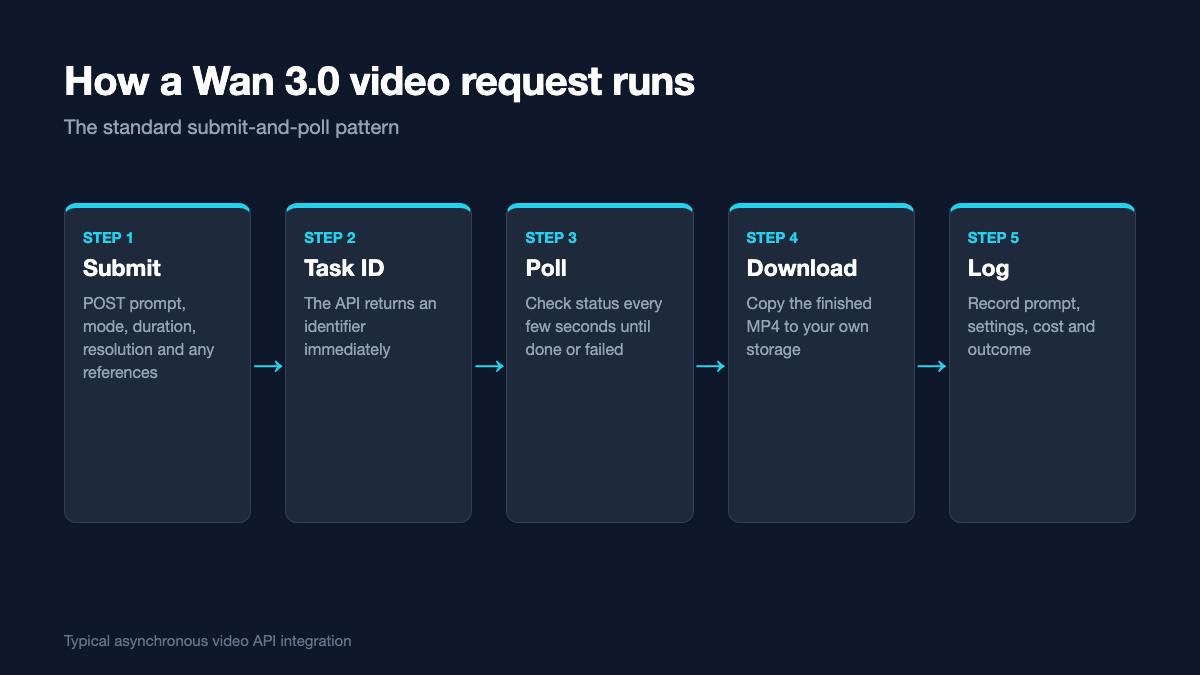
The main request options for Wan 3.0, as documented in October 2026.
Duration, resolution and audio
Clips can run from 2 to 30 seconds, or you can let the model choose with an automatic duration setting. When a reference video is supplied, the input duration plus the output duration cannot exceed 30 seconds. Output resolution is 480P, 720P or 1080P, with 1080P as the default and highest-priced tier. An aspect ratio setting can be fixed or left adaptive, and a seed parameter makes results reproducible when you need to iterate on the same idea.
Wan 3.0 can also generate an audio track. It is on by default, and turning it off does not change the price, so the decision is purely creative. A provider watermark can be enabled or disabled per request.
How the request flow works
Like most video APIs, Wan 3.0 is asynchronous. Generating a 30-second clip can take a while, and holding an HTTP connection open for that long is fragile, so the API returns a task identifier immediately and the client checks back for the result.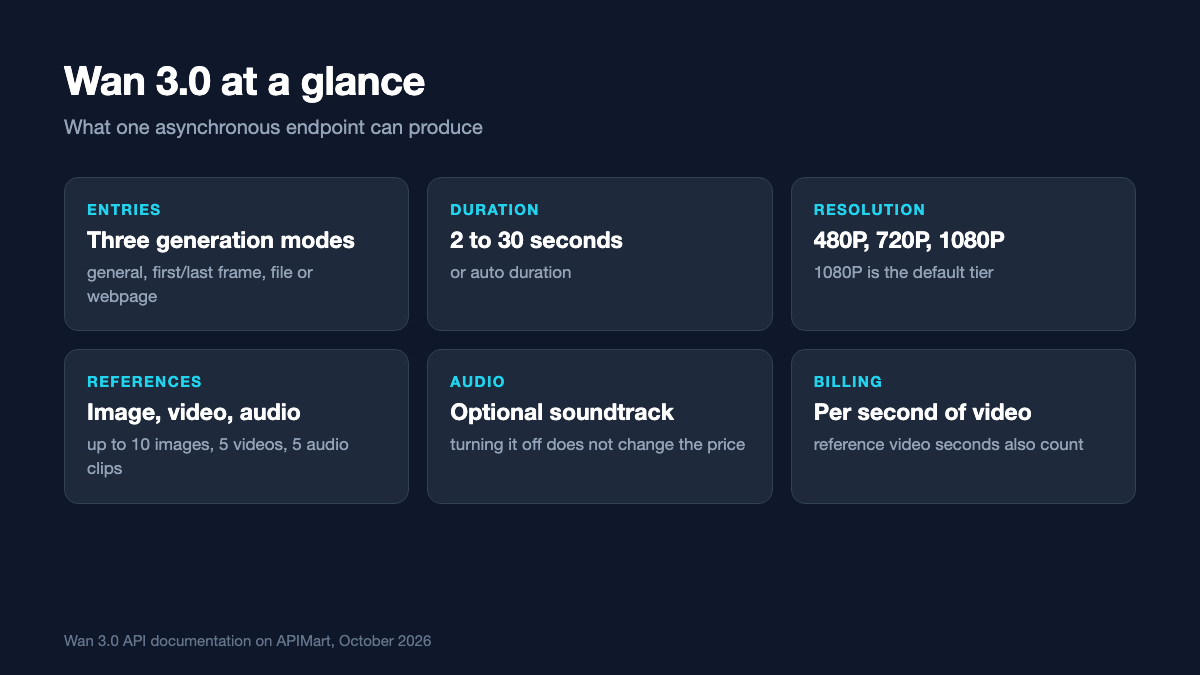
The submit-and-poll pattern used by Wan 3.0 and most video generation APIs.
- Send a POST request with the model identifier, the prompt, the generation mode, duration, resolution and any references.
- Store the returned task ID together with the user and request parameters.
- Poll the task endpoint every few seconds until the status is completed or failed.
- Download the finished MP4 to your own storage, because result links are temporary.
- Log the prompt, settings, reported cost and outcome for debugging and budgeting.
Pricing and how to estimate it
Wan 3.0 is billed per second of video, and resolution is the main variable. Through the Wan API on APIMart, listed pay-as-you-go rates are about $0.033 per second at 480P, $0.066 at 720P and $0.13 at 1080P, around 20 percent below the official list prices of roughly $0.041, $0.082 and $0.164. When you include a reference video, its duration is added to the generated duration for billing. The listed numbers are planning estimates, and the final charge follows actual output.
| Clip length | 480P | 720P | 1080P |
| 5 seconds | ≈ $0.16 | ≈ $0.33 | ≈ $0.66 |
| 10 seconds | ≈ $0.33 | ≈ $0.66 | ≈ $1.32 |
| 30 seconds | ≈ $0.99 | ≈ $1.97 | ≈ $3.95 |
A useful rule for product teams is to generate previews at 480P and only render the final at 1080P once a user has chosen the version they want. The preview is cheap and fast, and the expensive render happens once.
Choosing between the generation modes
Each entry suits a different kind of product feature. General generation with references is the most flexible and works well for marketing clips, where a product photo or brand image anchors the style. First-and-last-frame generation gives the most control over composition and is ideal for transitions, animated product reveals or turning a pair of still images into motion. File or webpage generation suits products that summarise existing content, such as turning an article or product page into a short promotional clip.
In practice, many applications expose two or three of these modes behind simple user-facing choices like “animate this photo” or “make a video from this page”, and handle the API differences internally.
Designing the user experience around waiting
Because generation is asynchronous, the interface has to handle a wait that can last from several seconds to a few minutes for longer clips. That sounds minor, but it shapes how a feature feels. A frozen screen or an endless spinner makes users assume something is broken, and many will press the button again, creating duplicate tasks and doubling the cost.
Good video features handle the wait deliberately. Show a clear progress state, let users keep working while the clip is created in the background and notify them when it is ready. If several clips are requested together, display each one as it finishes instead of waiting for the whole batch. On the server, persist every task ID before polling starts, so a restart does not lose work in progress, and use the same records to show users a history of their generations. Many people want to return to an earlier variant once they have seen a few options.
Previews also deserve attention. Offering a fast, low-resolution preview first, with an explicit “render in full quality” step, sets expectations about time and cost and keeps your own bill predictable.
Engineering tips
- Validate inputs early. Check reference file sizes, formats and durations before submitting. Audio references must be WAV or MP3, up to 15 MB each.
- Handle failures clearly. Tasks can fail because of moderation filters or upstream issues. Show a plain-language message and allow one retry.
- Prevent duplicate submissions. Disable the generate button while a task is running, otherwise impatient users double the cost.
- Keep the model ID in configuration. Video models update often, and switching versions should not need a code release.
- Moderate user prompts. If end users write prompts or upload references, filter inputs and review flagged outputs.
Where Wan 3.0 fits
Wan 3.0 is not the only capable video model available, and the right choice depends on clip length, control requirements, resolution needs and budget. Its strengths are flexibility, since one model covers several generation styles, a usable 30-second maximum, multimodal references including audio, and per-second pricing that stays modest at 480P and 720P. Teams that need 4K output or very long single takes may look elsewhere.
For most product teams, the hard part of video generation is no longer quality. It is building a reliable workflow around asynchronous tasks, costs and review.
Once you understand the task pattern and the handful of parameters that drive cost, integrating a model like Wan 3.0 is a few days of engineering rather than a research project. The more important decisions are about product design: which modes to expose, how to preview cheaply, and how to keep generated content accurate and appropriate for your users.