• Send Us A Tip
  • Calling all Tech Writers
  • Advertise
Tuesday, June 23, 2026
  • Login
TechStory
  • News
  • Crypto
  • Gadgets
  • Memes
  • Gaming
  • Cars
  • AI
  • Startups
  • Markets
  • How to
No Result
View All Result
  • News
  • Crypto
  • Gadgets
  • Memes
  • Gaming
  • Cars
  • AI
  • Startups
  • Markets
  • How to
No Result
View All Result
TechStory
No Result
View All Result
Home Tech

Microsoft’s Blue Screen of Death (BSOD) gets changed to Black in Windows 11

by Chhavideep Singh
July 3, 2021
in Tech, World
Reading Time: 2 mins read
0
BSOD
TwitterWhatsappLinkedin
BSOD
Source: SocietyAlert.com

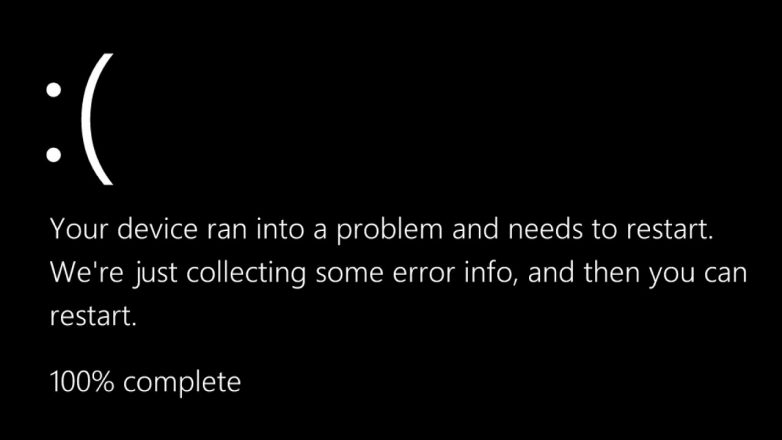
Microsoft has recently unveiled its Windows 11, the next generation windows for which, of course, everyone is excited. The tech giant recently launched the Windows 11 insider preview for users and developers to download and review for bugs and other improvements. In the preview version of Windows 11, it is noted that the company has literally changed everything about Windows except for its original build structure. Windows 11 is here with a complete visual overhaul from top to bottom, with a new Start button, new icons, and features like the introduction of Android apps on your Windows Operating System. One of these changes is the Windows Blue Screen of Death (BSOD) which has now been changed to Black.

You might also like

The Screenless Biometric Battle Fitbit Air vs. Amazfit Helio & Helio Strap Pro

Largest Chip Manufacturers in the World

Screenless Fitness Sovereignty A Deep Dive Review of Whoop vs Fitbit Air

Yes, the (BSOD) will now stand for Black Screen of Death in Windows 11 instead of Blue but unfortunately, in the Insider Preview version of Windows, the black screen hasn’t been fully enabled yet. The Windows-maker has changed the entire personalization experience in Windows 11 to give Windows a more refreshed and modern look which, honestly, everyone was craving after the visually boring Windows 10.

Having said that, the Black Screen of Death will now match the Windows 11 black log-on screen and shut-down screen, according to a report by The Verge. The report further mentions that Microsoft added the sad face on the Blue Screen of Death in Windows 8 that launched in 2012 and then added the QR Code to the screen in 2016.

“The device ran into a problem…..” error a.k.a. the Blue Screen of Death was first introduced by Microsoft in Windows 3.0 and it offered developers and Information Technology professionals a support page to diagnose any issues with the memory and hardware of the system. The BSOD has become a key part of the Windows Operating System as it helps the technicians to check the system for any faults with complete system scan for hardware and software, finding the root cause for the Blue Screen of Death.

Anyhow, apart from the color switch from Blue to Black, nothing has changed on the screen, everything remains the same including the error message, the sad face, and the QR Code. The question remains why?

Why would Microsoft change its Blue Screen of Death, is it that important?

Well, in my opinion, that matches with hundreds of other opinions on Twitter, Microsoft is visually changing Windows 11 and BSOD is an important part of the OS. Windows 11 Operating System is given a complete visual makeover with a new Start Menu, File Explorer page and the company must have thought that Black Screen of Death would match the overall color scheme of the system, and honestly, it is not that bad.

Tags: Back Screen of DeathBlue Screen of DeathMicrosoftWindows 11
Tweet54SendShare15
Previous Post

Ransomware attack reportedly paralyzed hundreds of U.S. companies

Next Post

How to change Siri’s voice on an iPhone and iPad

Chhavideep Singh

Hi! I'm Chhavideep, If you like reading about technology, business and start-ups, you've come to the right place. Catch me: chhavideep@connasys.com

Recommended For You

The Screenless Biometric Battle Fitbit Air vs. Amazfit Helio & Helio Strap Pro

by Anochie Esther
June 23, 2026
0
The Screenless Biometric Battle Fitbit Air vs. Amazfit Helio & Helio Strap Pro

The consumer health technology market has reached a critical architectural turning point. For over a decade, the dominant wearable design paradigm relied on miniature wristbound touchscreens that constantly...

Read more

Largest Chip Manufacturers in the World

by Sneha Singh
June 23, 2026
0
Largest Chip Manufacturers in the World

Semiconductors have enabled the present-day world. The existence of all smartphones, laptops, servers, electric vehicles, and AI systems depends on semiconductors used to process information, keep data, and...

Read more

Screenless Fitness Sovereignty A Deep Dive Review of Whoop vs Fitbit Air

by Anochie Esther
June 23, 2026
0
Screenless Fitness Sovereignty A Deep Dive Review of Whoop vs Fitbit Air

The wearable technology landscape is witnessing a radical architectural purge. For the past decade, smartwatches and fitness trackers consistently relied on bright, power-hungry displays designed to buzz, flash,...

Read more
Next Post
How to change Siri’s voice on an iPhone and iPad

How to change Siri's voice on an iPhone and iPad

Please login to join discussion

Techstory

Tech and Business News from around the world. Follow along for latest in the world of Tech, AI, Crypto, EVs, Business Personalities and more.
reach us at info@techstory.in

Advertise With Us

Reach out at - info@techstory.in

Aviator Game India 2026

BROWSE BY TAG

#Crypto #howto 2024 acquisition AI amazon Apple Artificial Intelligence bitcoin Business China cryptocurrency e-commerce electric vehicles Elon Musk Ethereum facebook funding Gaming Google India Instagram Investment ios iPhone IPO Market Markets Meta Microsoft News OpenAI samsung Social Media SpaceX startup startups tech technology Tesla TikTok trend trending twitter US

© 2025 Techstory.in

No Result
View All Result
  • News
  • Crypto
  • Gadgets
  • Memes
  • Gaming
  • Cars
  • AI
  • Startups
  • Markets
  • How to

© 2025 Techstory.in

Welcome Back!

Login to your account below

Forgotten Password?

Retrieve your password

Please enter your username or email address to reset your password.

Log In
Are you sure want to unlock this post?
Unlock left : 0
Are you sure want to cancel subscription?