• Send Us A Tip
  • Calling all Tech Writers
  • Advertise
Wednesday, August 26, 2026
  • Login
TechStory
  • News
  • Crypto
  • Gadgets
  • Memes
  • Gaming
  • Cars
  • AI
  • Startups
  • Markets
  • How to
No Result
View All Result
  • News
  • Crypto
  • Gadgets
  • Memes
  • Gaming
  • Cars
  • AI
  • Startups
  • Markets
  • How to
No Result
View All Result
TechStory
No Result
View All Result
Home News

How to delete (hear) any conversation that Virtual assistant has recorded

by Smriti Sharma
July 24, 2018
in News
Reading Time: 2 mins read
0
How to delete (hear) any conversation that Virtual assistant has recorded
TwitterWhatsappLinkedin

You might also like

Hugging Face Could Be Heading for a $13 Billion Sale

SoftBank Sells 2.58% Stake in Lenskart

Skyroot Aerospace Gears Up for Vikram-1’s Second Flight

24 July, 2018

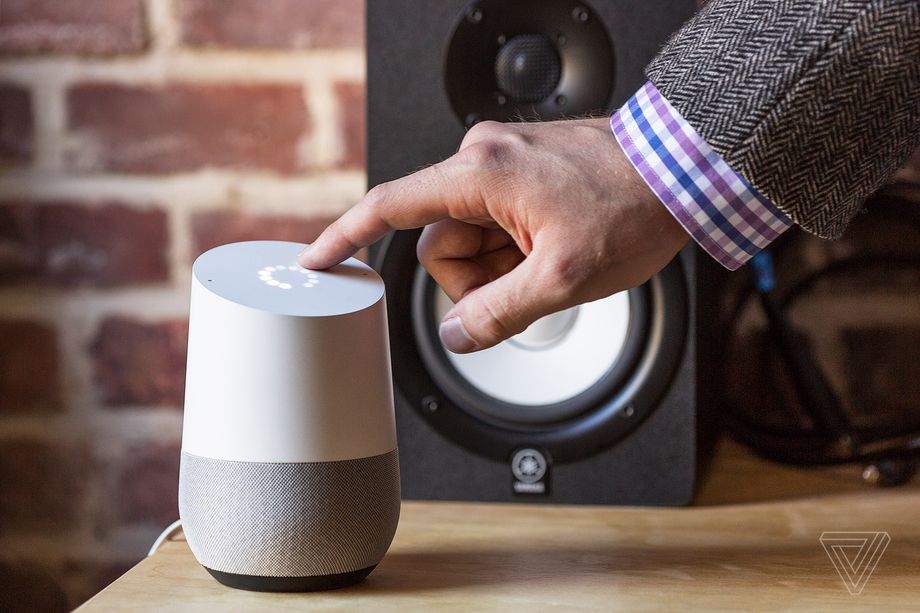
It’s important to keep in mind that devices like Google Home and Amazon Alexa are designed to listen. This includes recording and learning the tone of your voice and improving voice recognition and features for the virtual assistant. It’s supposed to be a feature and not a bug, but it’s landed Amazon’s Echo speakers in hot water after they spontaneously erupted in laughter.

Amazon claimed the affected Echo speakers were triggered by false positive commands. If you’re an Alexa user, it’s possible to delete all of your recorded queries. On the flip side, Google Home hasn’t yet had a similar crisis — at least not to public knowledge — but before it does, it’s good to know how to play back, delete, and organize the queries you’ve made.

To get started, log in to your Google account via a web browser. Click your profile picture in the top right, click on “Google Account,” and afterward you’ll be taken to an overview page. Look for the “Personal info & privacy” column centered in the overview page, then click on “Manage your Google activity.” Once you’re there, scroll down until you reach the “Review activity” section — this is what you’re looking for — and click on the “Go to my activity” link.

If you’re using your phone, the process is similar, but the appearance of the options change a little. To get there, log in to your Google account in the browser and tap the following: your profile picture > Manage Accounts > Google Activity Controls > Manage Activity. You’ll be greeted by a full list of all queries that can be sorted and deleted.

Clicking on “Details” on the left, under each query allows you to see which of your devices received the query (including multiple Google Homes), as well as the coordinate location. Hitting the “Play” button lets you hear the full voice command, including the Google Home activation trigger “Hey, Google” — ironically, while testing this, my Home heard this over my PC speakers and triggered the weather report again.

If you want to delete all queries within a certain period of time (such as a day, a month, or a a full year), click the hamburger icon on the “Today” header, or the “Delete activity by” link on the left-hand side of the page on desktop. From there, you can delete by the day, set a data range, or select “all time” and delete all inquires you’ve made on your Google account since the beginning.

(Image:- theverge.com) 

Tags: Amazon EchoGoogle Minivirtual assiastant
Tweet54SendShare15
Previous Post

EdTech Startup Kidovators raises $180,000 in Seed Funding

Next Post

Quantum Katas: Microsoft’s new learning portal

Smriti Sharma

Recommended For You

Hugging Face Could Be Heading for a $13 Billion Sale

by Ishaan Negi
August 26, 2026
0
Hugging Face Could Be Heading for a $13 Billion Sale

Hugging Face, one of the most important platforms in the open-source artificial intelligence ecosystem, is reportedly exploring a potential sale that could value the company at $13 billion...

Read more

SoftBank Sells 2.58% Stake in Lenskart

by Ishaan Negi
August 26, 2026
0
Lenskart IPO Day 2: Investor Frenzy Pushes Subscription Over 2x Despite Valuation Concerns

SoftBank Group is trimming its investment in Lenskart Solutions, with its affiliate SVF II Lightbulb (Cayman) selling a 2.58 percent stake in the omnichannel eyewear company through block...

Read more

Skyroot Aerospace Gears Up for Vikram-1’s Second Flight

by Ishaan Negi
August 25, 2026
0
Skyroot Aerospace Gears Up for Vikram-1’s Second Flight

India’s private space sector is preparing for another important milestone as Skyroot Aerospace gets ready to launch its Vikram-1 rocket once again. Following the vehicle’s successful debut, the...

Read more
Next Post
Quantum Katas: Microsoft’s new learning portal

Quantum Katas: Microsoft’s new learning portal

Please login to join discussion

Techstory

Tech and Business News from around the world. Follow along for latest in the world of Tech, AI, Crypto, EVs, Business Personalities and more.
reach us at info@techstory.in

Advertise With Us

Reach out at - info@techstory.in

Aviator Game India 2026

BROWSE BY TAG

#Crypto #howto 2024 acquisition AI amazon Apple Artificial Intelligence bitcoin Business China cryptocurrency e-commerce electric vehicles Elon Musk Ethereum facebook funding Gaming Google India Instagram Investment ios iPhone IPO Market Markets Meta Microsoft News OpenAI samsung Social Media SpaceX startup startups tech technology Tesla TikTok trend trending twitter US

© 2025 Techstory.in

No Result
View All Result
  • News
  • Crypto
  • Gadgets
  • Memes
  • Gaming
  • Cars
  • AI
  • Startups
  • Markets
  • How to

© 2025 Techstory.in

Welcome Back!

Login to your account below

Forgotten Password?

Retrieve your password

Please enter your username or email address to reset your password.

Log In
Are you sure want to unlock this post?
Unlock left : 0
Are you sure want to cancel subscription?