

• Send Us A Tip
  • Calling all Tech Writers
  • Advertise
Saturday, September 5, 2026
  • Login
TechStory
  • News
  • Crypto
  • Gadgets
  • Memes
  • Gaming
  • Cars
  • AI
  • Startups
  • Markets
  • How to
No Result
View All Result
  • News
  • Crypto
  • Gadgets
  • Memes
  • Gaming
  • Cars
  • AI
  • Startups
  • Markets
  • How to
No Result
View All Result
TechStory
No Result
View All Result
Home Business

The Best Screen Recorder – RecordAnyVid Has Updated for Bringing Better Services

by Rohan Mathawan
April 24, 2020 - Updated On June 20, 2022
in Business
Reading Time: 2 mins read
0
The Best Screen Recorder – RecordAnyVid Has Updated for Bringing Better Services
TwitterWhatsappLinkedin

 February 18, 2020

You might also like

Weekly Tech News: Everything from xAI’s Minnesota Court Setback to OpenAI’s Astra Launch

Weekly Business News: From Tata Motors’ Iveco Bid to Air India’s Pilot Sacking

Weekly Funding News: Indian Startup Funding Falls to $196 Mn as Big Deals Remain Elusive

RecordAnyVid has been launched way back in January, 2020. Since its release, the simplified and helpful features of the program have attracted many users to experience. Last week, RecordAnyVid enhanced itself in the latest update. Let’s first grasp the changes the program has made.

Latest Updated in RecordAnyVid V1.0.12

* Administration notification has been added while project adjustment failed;

* Enhanced the microphone/webcam mode on Windows 10;

* Fixed Intel initialization failure;

* Enhanced video recording quality;

* Fixed the high CPU occupation issue;

* Fixed bugs.

So in RecordAnyVid V1.0.12, you can actually enjoy the better enhanced screen capturing services. If you are new to RecordAnyVid, scroll down and grasp some general features of this outstanding program.

Also check: getcloudapp

What Is RecordAnyVid?

RecordAnyVid is a professional and user-friendly screen capturing tool that allows user to record any screen activity simultaneously. In addition, it supports instant previewing and preference tools to customized the recordings in users needs. The intuitive design of RecordAnyVid also makes the program easy to use. Therefore, it should be the most light-weight but reliable screen recorder to help capture the screen.

Features of RecordAnyVid

* Various output formats supported – MP4, WMV, MOV, F4V, AVI, TS, GIF, MP3, WMA, AAC, M4A;

* Webcam recording and snapshot feature are both available;

* Recording area can be customized to any size in users’ preferences;

* Hotkeys and other preferences settings are allowed to enable more convenient user experience;

* Mouse effect is available to create video tutorials, and real-time editing is also offered.

>> Try RecordAnyVid for Free <<

How to Record Screen with RecordAnyVid

Steps to capture computer screen with RecordAnyVid is simple. You only need to follow this 4-step-guide to get the process done.

STEP 1. Launch RecordAnyVid and select Video Recorder. (To record audio-only, select Audio Recorder).

STEP 2. Adjust the recording area to fit the activity you are going to record. You can also set the system as well as microphone volume to be an ideal one.

STEP 3. Click on the REC button to start capturing the screen.

STEP 4. End the recording by clicking on the stop button. Then submit Save in the previewing window and you can get the recording outputted.
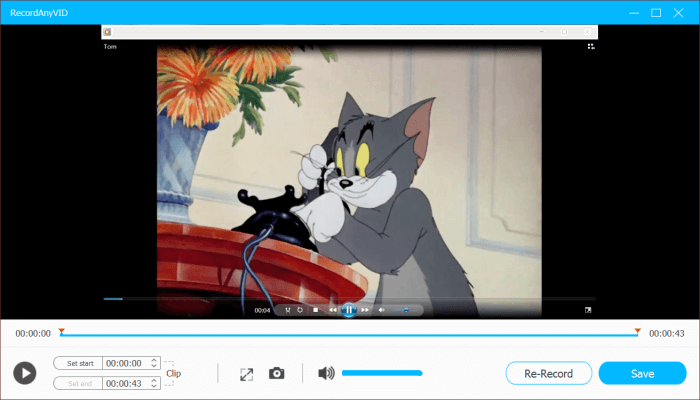
If you meet any technical problem while using RecordAnyVid, you are welcome to reach the technical team through support@vidpaw.com for help. Thank you for your support!

Tweet54SendShare15
Previous Post

EVERYTHING YOU WANTED TO KNOW ABOUT INDIA’S BIGGEST DIGITAL WALLET – MOBIKWIK!

Next Post

Emirati Police Employ Medtech Solution To Tackle COVID Spread

Rohan Mathawan

Content Editor at Techstory Media | Technology | Gadgets | Written more than 5000+ articles about different niches from Tech to online real money gaming for reputed brands and companies. Get in touch Email: rohan@techstory.in For Business Enquires related to TechStory Info@techstory.in

Recommended For You

Weekly Tech News: Everything from xAI’s Minnesota Court Setback to OpenAI’s Astra Launch

by Ishaan Negi
September 4, 2026
0
Weekly Tech Updates: Everything from Cloudfare Outage to X’s ‘Chat’ Debut

xAI Loses Court Bid Against Minnesota AI Nudification Ban Elon Musk’s artificial intelligence company xAI has failed to convince a federal judge to block a new Minnesota law...

Read more

Weekly Business News: From Tata Motors’ Iveco Bid to Air India’s Pilot Sacking

by Ishaan Negi
September 4, 2026
0
Weekly Business News: Top business updates in this week

Tata Motors Subsidiary Gets CONSOB Nod for Iveco Offer Italy’s market regulator CONSOB has approved the offer document submitted by a step-down subsidiary of Tata Motors for the...

Read more

Weekly Funding News: Indian Startup Funding Falls to $196 Mn as Big Deals Remain Elusive

by Ishaan Negi
September 4, 2026
0
Weekly Startup Funding News: Indian startups raised $447 Mn this week; from Techjockey to Physics Wallah

Venture capital funding into Indian startups slipped in the first week of September, highlighting a challenge that continues to weigh on the country’s startup ecosystem: the difficulty of...

Read more
Next Post
Emirati Police Employ Medtech Solution To Tackle COVID Spread

Emirati Police Employ Medtech Solution To Tackle COVID Spread

Please login to join discussion

Techstory

Tech and Business News from around the world. Follow along for latest in the world of Tech, AI, Crypto, EVs, Business Personalities and more.
reach us at info@techstory.in

Advertise With Us

Reach out at - info@techstory.in

Aviator Game India 2026

BROWSE BY TAG

#Crypto #howto 2024 acquisition AI amazon Apple Artificial Intelligence bitcoin Business China cryptocurrency e-commerce electric vehicles Elon Musk Ethereum facebook funding Gaming Google India Instagram Investment ios iPhone IPO Market Markets Meta Microsoft News OpenAI samsung Social Media SpaceX startup startups tech technology Tesla TikTok trend trending twitter US

© 2025 Techstory.in

No Result
View All Result
  • News
  • Crypto
  • Gadgets
  • Memes
  • Gaming
  • Cars
  • AI
  • Startups
  • Markets
  • How to

© 2025 Techstory.in

Welcome Back!

Login to your account below

Forgotten Password?

Retrieve your password

Please enter your username or email address to reset your password.

Log In
Are you sure want to unlock this post?
Unlock left : 0
Are you sure want to cancel subscription?