
• Send Us A Tip
  • Calling all Tech Writers
  • Advertise
Friday, September 18, 2026
  • Login
TechStory
  • News
  • Crypto
  • Gadgets
  • Memes
  • Gaming
  • Cars
  • AI
  • Startups
  • Markets
  • How to
No Result
View All Result
  • News
  • Crypto
  • Gadgets
  • Memes
  • Gaming
  • Cars
  • AI
  • Startups
  • Markets
  • How to
No Result
View All Result
TechStory
No Result
View All Result
Home Story

How to Recover Deleted Emails From Gmail?

by Priyanka Chaubey
December 21, 2020
in Story, Tech
Reading Time: 2 mins read
0
USERS COMPLAIN- GOOGLE’S NEW ICONS LOOK TOO SIMILAR TO DIFFERENTIATE
TwitterWhatsappLinkedin

Get your missing email right back in your account. We’re here to tell you how to get back all the ways to recover deleted emails from your Gmail inbox.

You might also like

Manus AI Targets $4 Billion Valuation After Meta Split

Flock Cameras Stored Millions of Images Locally Despite Company’s Claims, Hackers Find

AI Giant Anthropic Signs Agreement for $32 Billion Queensland Data Centre

Did you accidentally delete a mail you didn’t intend to delete? Well, worry not! There a number of ways with which you can recover your deleted emails.

 How to Recover Deleted Emails From Gmail Using the Trash

Just like how Windows and Mac give it, Gmail also comes with a trash option. If you deleted your mail it is highly possible that it is in your trash folder. You can retrieve any mail from the Trash until and unless you haven’t permanently deleted it. Recover any mail that you delete from the trash within 30 days of deletion. One thing you must note that Gmail only stores deleted mails in Trash for 30 days, after this period mails are automatically deleted.

Here’s how to recover deleted emails from Trash 

  1. Open the Gmail website on your computer.
  2. You will only be able to find the option of Trash when you click on the option of ‘More’ which appears on the left section of the screen.
  3. As soon as your Trash box you will be able to see the mails that you deleted. Retrieve them or even empty the Trash box by deleting them all.
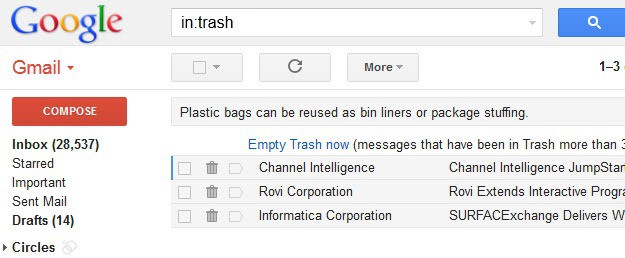
Recover deleted mails
source- Ghacks

How to recover deleted Emails from Gmail using Gmail search

If you can find the mail you have been searching for in the Trash of Gmail, its well and good. In case that you can’t, don’t feel disheartened. It can be a gruesome task to find a mail from Trash section with a sea of mails there already.

Save yourself all the time an effort when looking for to recover deleted Emails in Gmail. Search for your lost mail in the Gmail Search. The fastest way to get to your mail is to search with Advanced search. The more information you give Gmail, higher the chances for your mail to be found.

Enter all the details you can remember and then hit on search button. The perk of using Gmail search is it narrows down all the fields of searches and takes you to the exact result.


How to finally recover the Deleted mail from Trash

Once you get your missing mail either from the Trash or the Advance search, the path after that is pretty clear. To recover the mail, all you have to to is click on the checkbox present at the right side of the screen.

As soon as you click on the checkbox, you will find a button of ‘Move to Inbox’. Click on it, and that is how you recover deleted emails from Gmail.


 

Tags: How to Recover Deleted Emails From Gmail
Tweet54SendShare15
Previous Post

Microsoft Edge- How to Add, Edit, or Delete Saved Passwords

Next Post

Creating a Sustainable Environment for Sports May Prove Useful for Studying Covid-19

Priyanka Chaubey

Recommended For You

Manus AI Targets $4 Billion Valuation After Meta Split

by Khilav Jadav
September 17, 2026
0
Manus AI Targets $4 Billion Valuation After Meta Split

China’s AI startup Manus is preparing for a major new funding round that could double its valuation to $4 billion. The company, known for building AI agents that...

Read more

Flock Cameras Stored Millions of Images Locally Despite Company’s Claims, Hackers Find

by Ishaan Negi
September 17, 2026
0
Flock Cameras Stored Millions of Images Locally Despite Company’s Claims, Hackers Find

Flock’s automated license plate reader cameras are designed to capture vehicles and identify important details such as license plates, colours, makes and models. But a recent discovery by...

Read more

AI Giant Anthropic Signs Agreement for $32 Billion Queensland Data Centre

by Shailja Jha
September 16, 2026
0
Sony, Warner Sue Anthropic, Allege “Blatant Theft” of Intellectual Property

Artificial intelligence company Anthropic has signed an agreement linked to a proposed $32 billion data centre development in Queensland, Australia, marking a major potential investment in the country's...

Read more
Next Post
Creating a Sustainable Environment for Sports May Prove Useful for Studying Covid-19

Creating a Sustainable Environment for Sports May Prove Useful for Studying Covid-19

Please login to join discussion

Techstory

Tech and Business News from around the world. Follow along for latest in the world of Tech, AI, Crypto, EVs, Business Personalities and more.
reach us at info@techstory.in

Advertise With Us

Reach out at - info@techstory.in

Aviator Game India 2026

BROWSE BY TAG

#Crypto #howto 2024 acquisition AI amazon Apple Artificial Intelligence bitcoin Business China cryptocurrency e-commerce electric vehicles Elon Musk Ethereum facebook funding Gaming Google India Instagram Investment iPhone IPO Market Markets Meta Microsoft News OpenAI samsung Social Media SpaceX startup startups tech Tech news technology Tesla TikTok trend trending twitter US

© 2025 Techstory.in

No Result
View All Result
  • News
  • Crypto
  • Gadgets
  • Memes
  • Gaming
  • Cars
  • AI
  • Startups
  • Markets
  • How to

© 2025 Techstory.in

Welcome Back!

Login to your account below

Forgotten Password?

Retrieve your password

Please enter your username or email address to reset your password.

Log In
Are you sure want to unlock this post?
Unlock left : 0
Are you sure want to cancel subscription?