• Send Us A Tip
  • Calling all Tech Writers
  • Advertise
Friday, September 4, 2026
  • Login
TechStory
  • News
  • Crypto
  • Gadgets
  • Memes
  • Gaming
  • Cars
  • AI
  • Startups
  • Markets
  • How to
No Result
View All Result
  • News
  • Crypto
  • Gadgets
  • Memes
  • Gaming
  • Cars
  • AI
  • Startups
  • Markets
  • How to
No Result
View All Result
TechStory
No Result
View All Result
Home Tech

How to disable Siri Suggestions in Spotlight Search on iPhone and iPad?

by Priyanka Chaubey
January 2, 2021
in Tech
Reading Time: 2 mins read
0
Apple Inc. acquires a video AI start-up for USD 50 million to improve Siri & other applications
TwitterWhatsappLinkedin

 Disable Siri Suggestions in Spotlight Search on iPhone and iPad using simple easy steps- 

You might also like

Sony Says It Won’t Pass Tariff Refunds Back to PlayStation Customers, Dismissing Fan Arguments as “Speculative and Illogical”

Apple’s New CEO John Ternus Scores $58 Million Annual Pay Package as Tim Cook Steps Aside

Uber Lays Off 200-250 Employees in India Amid Global Restructuring

It’s no surprise that the all-in-demand Siri on iOS enables you a much more intelligent Spotlight Search with super- active and helpful suggestions. With a feature like that, your device definitely works a few taps faster. When you swiping down on any Home screen, Siri-powered suggestions come to your save automatically in the Spotlight. These suggestions might help you to not miss a task by suggesting to launch apps that you usually do at that specific time of the day. Siri Suggestions in Spotlight Search on iPhone also tells you who you contact with or vice-versa. Sometimes, it may also happen that you feel famished and as soon as you come to your home screen you discover options of food joints nearby your location- All thanks to Siri Suggestions in Spotlight Search.

Well as helpful as this feature can turn out to be for a person, no one is to blame in case users find it slightly irritating as well. If you’re one of those people who believe that Siri Suggestions in Spotlight Search on iPhone and iPad is distracting and kind of useless, you might be wanting to disable it too. Here we are with a simple guide to tell How to disable Siri Suggestions in Spotlight Search on iPhone and iPad.
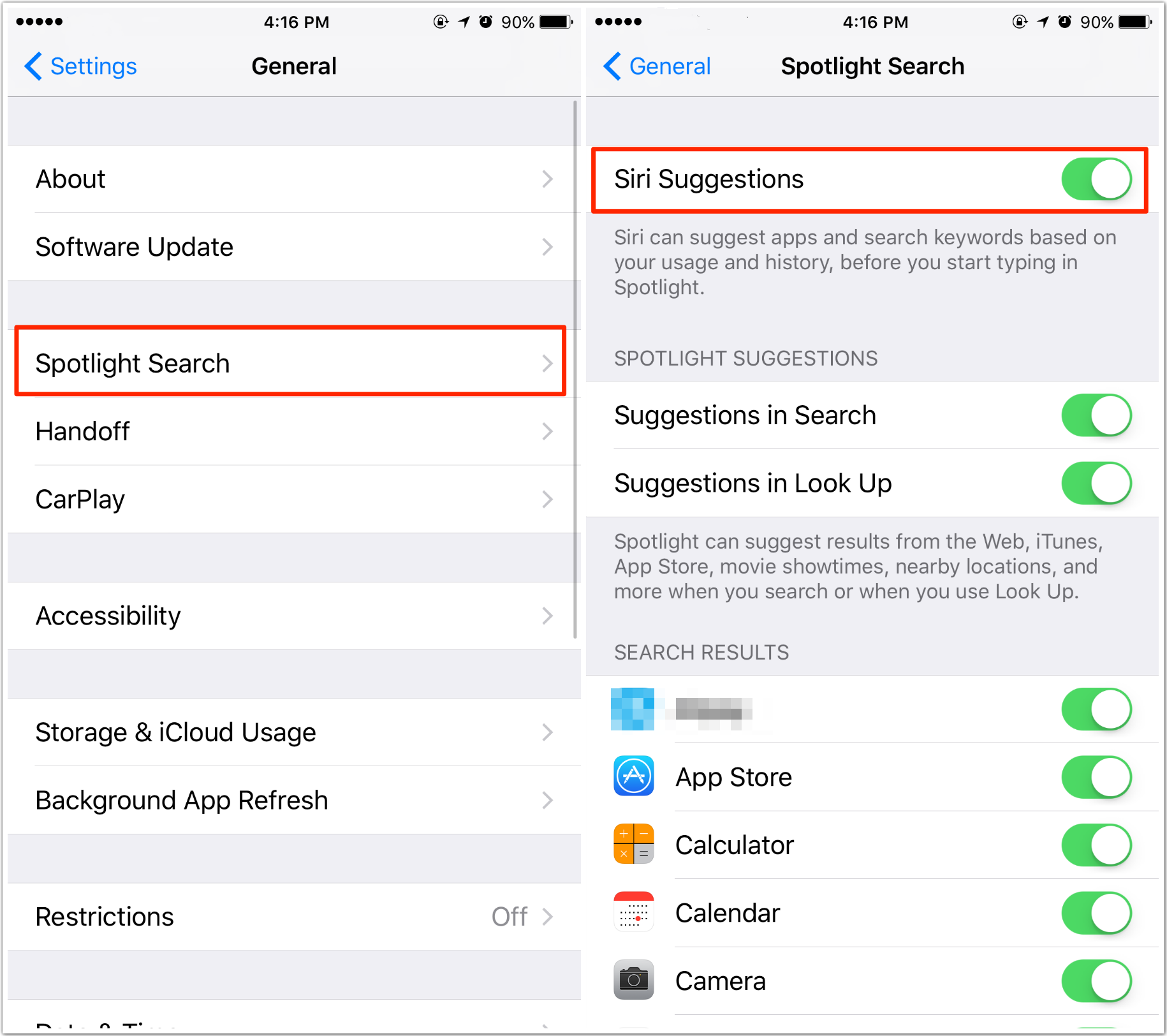
disable Siri Suggestions in Spotlight Search on iPhone and iPad
source- imobie


Here is How to disable Siri Suggestions in Spotlight Search on iPhone and iPad

  1. Head straight to the settings section of your iOS device- iPhone or iPad.
  2. Keep scrolling down the screen until you discover the option of Siri and Search. Once you do tap on it.
  3.  When you fina; y navigate to the Siri Suggestions section, turn the toggle off for the Suggestion in the Search option. When you turn the toggle off, you disable Siri Suggestions in Spotlight Search on iPhone and iPad.

This is all you have to do in case you wish to turn off the Siri Suggestions in Spotlight search.


Tweet54SendShare15
Previous Post

Is Bitcoin Mining a Profitable in 2020?

Next Post

How to Rotate Text in Microsoft PowerPoint

Priyanka Chaubey

Recommended For You

Sony Says It Won’t Pass Tariff Refunds Back to PlayStation Customers, Dismissing Fan Arguments as “Speculative and Illogical”

by Shailja Jha
September 3, 2026
0
Sony Says It Won’t Pass Tariff Refunds Back to PlayStation Customers, Dismissing Fan Arguments as “Speculative and Illogical”

Sony is refusing to promise refunds to PlayStation customers who paid higher prices for PS5 consoles following tariff-related price increases, arguing that the purchases were voluntary and that...

Read more

Apple’s New CEO John Ternus Scores $58 Million Annual Pay Package as Tim Cook Steps Aside

by Shailja Jha
September 3, 2026
0
Apple’s New CEO John Ternus Scores $58 Million Annual Pay Package as Tim Cook Steps Aside

Apple has officially entered a new chapter in its leadership history. After 15 years at the helm, Tim Cook has stepped down as chief executive officer, handing control...

Read more

Uber Lays Off 200-250 Employees in India Amid Global Restructuring

by Ishaan Negi
September 3, 2026
0
Uber reaches record high after unveiling first-ever $7 bln share buyback

Uber has laid off around 200-250 employees in India across different functions and offices as part of a major global restructuring that will eliminate about 3,300 jobs worldwide....

Read more
Next Post
How to Rotate Text in Microsoft PowerPoint

How to Rotate Text in Microsoft PowerPoint

Please login to join discussion

Techstory

Tech and Business News from around the world. Follow along for latest in the world of Tech, AI, Crypto, EVs, Business Personalities and more.
reach us at info@techstory.in

Advertise With Us

Reach out at - info@techstory.in

Aviator Game India 2026

BROWSE BY TAG

#Crypto #howto 2024 acquisition AI amazon Apple Artificial Intelligence bitcoin Business China cryptocurrency e-commerce electric vehicles Elon Musk Ethereum facebook funding Gaming Google India Instagram Investment ios iPhone IPO Market Markets Meta Microsoft News OpenAI samsung Social Media SpaceX startup startups tech technology Tesla TikTok trend trending twitter US

© 2025 Techstory.in

No Result
View All Result
  • News
  • Crypto
  • Gadgets
  • Memes
  • Gaming
  • Cars
  • AI
  • Startups
  • Markets
  • How to

© 2025 Techstory.in

Welcome Back!

Login to your account below

Forgotten Password?

Retrieve your password

Please enter your username or email address to reset your password.

Log In
Are you sure want to unlock this post?
Unlock left : 0
Are you sure want to cancel subscription?