• Send Us A Tip
  • Calling all Tech Writers
  • Advertise
Monday, July 6, 2026
  • Login
TechStory
  • News
  • Crypto
  • Gadgets
  • Memes
  • Gaming
  • Cars
  • AI
  • Startups
  • Markets
  • How to
No Result
View All Result
  • News
  • Crypto
  • Gadgets
  • Memes
  • Gaming
  • Cars
  • AI
  • Startups
  • Markets
  • How to
No Result
View All Result
TechStory
No Result
View All Result
Home Fitness Tech

How to Customize the Apple Watch Faces

by Amandeep Suter
January 21, 2021 - Updated On March 11, 2021
in Fitness Tech, Future Tech, Gadgets, Tech
Reading Time: 3 mins read
0
How to Customize the Apple Watch Faces
TwitterWhatsappLinkedin

The art of personalization

There’s something about customizing which makes the product more personal and unique. Not only is the personalized product more unique, but according to Content Stack, the appeal of the product increases up to 80% when users have to option to personalize it. Hence, keeping in mind the benefits of personalization for user experience, the tech giants, Apple, have introduced customizable faces in their Apple Watch.

You might also like

Why Home Charging Is Cheaper Than Public Charging

OpenID Connect Explained: A Simple Guide to How Modern Login Systems Work

The Silicon Decay Why SSD Health Declines

The watch of the future – Apple watch

Apple watches gives you the option to not only alter the looks based on your preference but also gives a choice to change the functions based on your requirement. Adjust colors, select the design and modify features, then store them in your collection. You can switch to different looks based on the occasion or maybe try a new look.

The easiest way to see all the available watch faces is through the Face Gallery. You can customize them and then add them to your saved collections. Moreover, you can also customize the faces directly on your watch.

Follow the steps to know how to –

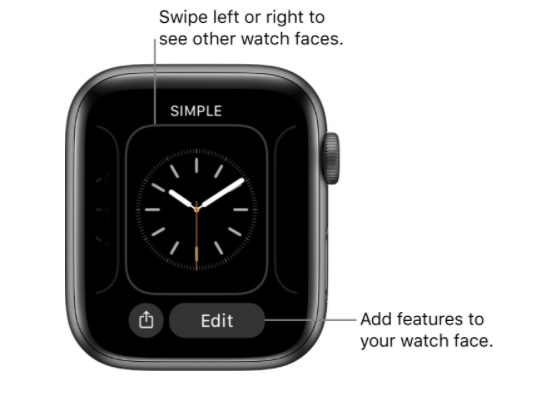
Choosing a different apple watch faces
Apple watch

  • Swipe on the screen to view the various faces available in your collection.
  • To see all the available options, select and hold the watch face you like and then tap it.

Adding special features

Apple watches gives you an edge over the others by giving you the option to include special features called complications. These features allow you to directly check the weather report, stock prices, or other information you require in your day-to-day life.
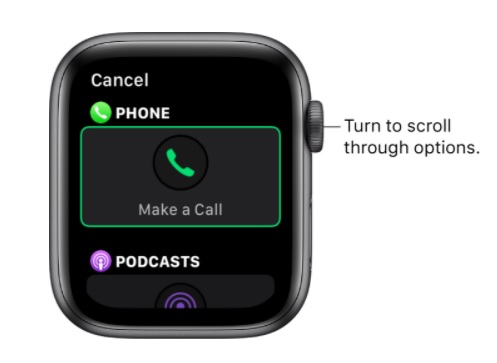
  1. Touch and hold the display of the watch face and then tap “Edit.”
  2. Swipe left to go to the last screen. This is where the complications are shown.
  3. Select the complication based on your need. Once you have selected it, turn the Digital Crown to choose the new feature.
  4.  When you have finalized it, press the digital crown to save the changes.

Saving the watch face to your collection
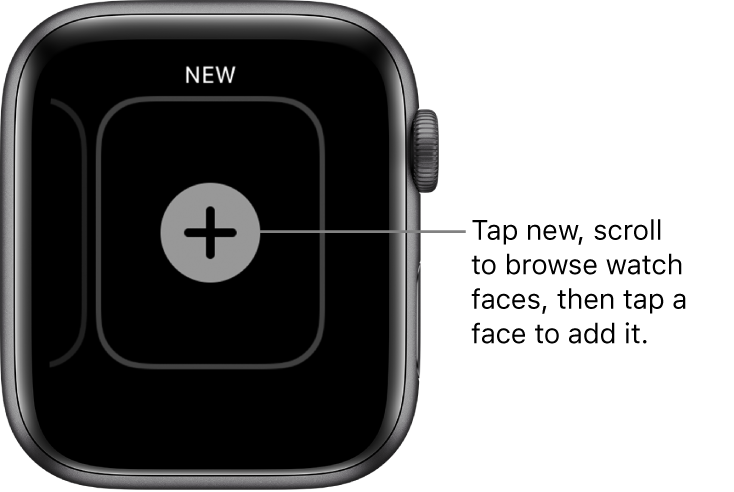
New watch face screen, with a plus button in the middle. Tap to add a new watch face.

Once you are done with the modification, now is the time to add them to your collection.
You can also have multiple varieties of the identical design.

  1. Touch and hold the display of the watch face.
  2. Swipe left to go to the end, where you will notice a + symbol.
  3. You can browse through your personalized collection by turning the Digital Crown and then tapping on the one you want to add.

After you add it, you can customize it further if needed.

That concludes the tutorial on how you can personalize your Apple Watch face and enjoy its features.

Also check: watches for women



Tags: AppleApple watchCustomizeFaceswatch
Tweet54SendShare15
Previous Post

Reliance Industries and Future Group’s $3.4B deal approved by the Indian stock exchanges

Next Post

How to Video and Voice Calling through Telegram

Amandeep Suter

A son, a brother and a friend who loves to write!

Recommended For You

Why Home Charging Is Cheaper Than Public Charging

by Samir Gautam
July 6, 2026
0
Why Home Charging Is Cheaper Than Public Charging

The rapid growth of electric vehicles has transformed the way people think about mobility. Instead of stopping at fuel stations every week, many EV owners now begin each...

Read more

OpenID Connect Explained: A Simple Guide to How Modern Login Systems Work

by Sneha Singh
July 6, 2026
0
OpenID Connect Explained: A Simple Guide to How Modern Login Systems Work

Nowadays, most websites and applications allow you to authenticate yourself through your Google, Microsoft, Apple, or Facebook account. Thus, there is no need to come up with a...

Read more

The Silicon Decay Why SSD Health Declines

by Anochie Esther
July 5, 2026
0
why SSD health declines

The widespread transition from mechanical hard disk drives (HDDs) to solid-state drives (SSDs) is one of the most significant leaps in consumer and enterprise computing history. By replacing...

Read more
Next Post
Telegram

How to Video and Voice Calling through Telegram

Please login to join discussion

Techstory

Tech and Business News from around the world. Follow along for latest in the world of Tech, AI, Crypto, EVs, Business Personalities and more.
reach us at info@techstory.in

Advertise With Us

Reach out at - info@techstory.in

Aviator Game India 2026

BROWSE BY TAG

#Crypto #howto 2024 acquisition AI amazon Apple Artificial Intelligence bitcoin Business China cryptocurrency e-commerce electric vehicles Elon Musk Ethereum facebook funding Gaming Google India Instagram Investment ios iPhone IPO Market Markets Meta Microsoft News OpenAI samsung Social Media SpaceX startup startups tech technology Tesla TikTok trend trending twitter US

© 2025 Techstory.in

No Result
View All Result
  • News
  • Crypto
  • Gadgets
  • Memes
  • Gaming
  • Cars
  • AI
  • Startups
  • Markets
  • How to

© 2025 Techstory.in

Welcome Back!

Login to your account below

Forgotten Password?

Retrieve your password

Please enter your username or email address to reset your password.

Log In
Are you sure want to unlock this post?
Unlock left : 0
Are you sure want to cancel subscription?