• Send Us A Tip
  • Calling all Tech Writers
  • Advertise
Wednesday, July 22, 2026
  • Login
TechStory
  • News
  • Crypto
  • Gadgets
  • Memes
  • Gaming
  • Cars
  • AI
  • Startups
  • Markets
  • How to
No Result
View All Result
  • News
  • Crypto
  • Gadgets
  • Memes
  • Gaming
  • Cars
  • AI
  • Startups
  • Markets
  • How to
No Result
View All Result
TechStory
No Result
View All Result
Home Gaming

How to raid on Twitch

by Arya Roy
May 14, 2021
in Gaming, How to, Tech
Reading Time: 2 mins read
0
How to raid on Twitch

Source: https://techcrunch.com/2020/01/16/twitchs-loss-of-top-streamers-impacts-hours-watched-and-streamed-in-q4-2019-report-says/?guccounter=1&guce_referrer=aHR0cHM6Ly93d3cuZ29vZ2xlLmNvbS8&guce_referrer_sig=AQAAAAGQ8Lrv7kcBOWUorazPG-7x9kPV6tJWMNspMijPg8wap_QukcW6gh4TcCH2NANutPZB1hqzA17Rn8NPcR-CatYjiEprdREWCBCExh6PjnfbDz94sWeCE4JVUy9YuiuMRbkkt4OycpkRiB1dg5zjmN5cUrk-gof2a-TvBRoof-a7

TwitterWhatsappLinkedin

Building a Twitch account is hard. It can take a very long time to create a loyal community of viewers who will be ready to support you and your content as it expands. Much like YouTube and other streaming platforms, Twitch is not a place where you can make a significant mark easily. It requires time, patience, and effort.

You might also like

How to stop spam calls?

How to build an Emergency Fund?

How to cancel forgotten subscriptions?

One way to achieve that is by using a common Twitch promotional trick called Twitch raiding. This act helps to promote other Twitch streamers who will most likely return the favour.

When a streamer on Twitch ends their stream, they will have two options. First, they can close the stream, which will force any viewers to switch to another channel by themselves. The second option for the streamer is to raid another stream. This will have the effect of forwarding the audience into that channel and boosting the audience of the second stream in the process.

Many Twitch streamers, especially those who are new to the platform, heavily rely on Twitch raids to increase their audience numbers. If you only get a limited number of viewers per stream, then a raid can significantly boost that number, especially if a bigger streamer raids a new streamer. This increases exposure and helps to grow the number of followers.

Besides being a kind gesture, it is also a two-way street. If you regularly raid other Twitch streamers, you will most likely receive the same raids back when their stream ends, and your stream is still active.

Furthermore, you do not need to worry about your raids being forgotten about. The Twitch interface allows streamers to view who raided their channel in the last 24 hours. This list can come in handy, especially if you are a streamer who wants to help a new channel grow.
Source: https://www.online-tech-tips.com/gaming/how-to-raid-on-twitch/

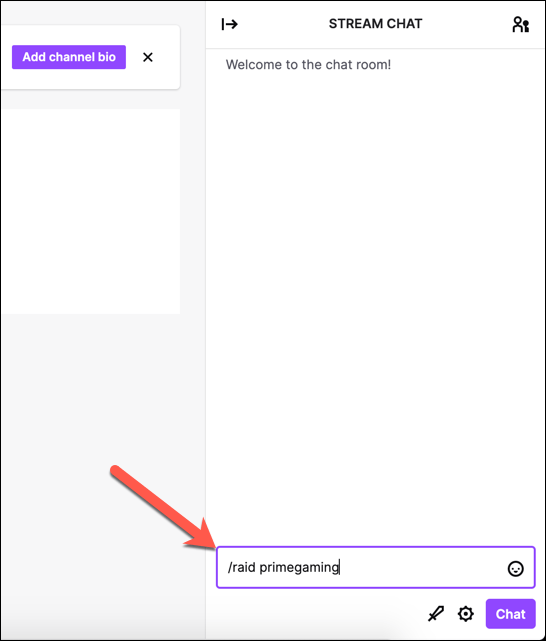
To raid someone on Twitch, use the following steps:

  1. Type ‘/raid channel’ and replace ‘channel’ with the username of the Twitch streamer whose stream you want to raid.
  2. When you begin a new raid, a pop-up control box will appear on your screen. Click on the ‘Raid Now’ button to begin the raid immediately or select ‘Cancel’ to cancel it. If you choose to ignore the box, the raid will automatically begin after 80 seconds.

Once the raid has begun, your channel will now repeat that streamer’s content. Users who visit your channel will now be able to see the raided stream and chatbox, along with a pop-up alert to inform them.


Tags: TwitchYoutube
Tweet54SendShare15
Previous Post

Tatas Now Hold 65% Of The Stakes Of e-Pharma Company- 1mg

Next Post

Discord tweaked their Logo and these 15 Reactions sum up what users think about it.

Arya Roy

Hi, this is Arya! Writing has always been a passion of mine, regardless of the topic I choose. Besides that, I am a huge foodie and music lover, whose interests range from world politics to horror films to everything in between.

Recommended For You

How to stop spam calls?

by Afeefa Ansari
July 22, 2026
0
block-spam-calls

One with spam calls on your phone every day? What if it could be stopped altogether? It is possible! Follow the guide to learn how you can stop...

Read more

How to build an Emergency Fund?

by Afeefa Ansari
July 22, 2026
0
Emergency funds

Emergency funds can be really helpful! Whether it is something you are intending to buy and are short of cash, or you need to fund an immediate matter...

Read more

How to cancel forgotten subscriptions?

by Afeefa Ansari
July 22, 2026
0
Cancel subscriptions

Ever wondered why the autopay is deducting and for what? That happens. Let's learn how to cancel some subscriptions that we have long forgotten about! Follow the guide...

Read more
Next Post
Discord new logo

Discord tweaked their Logo and these 15 Reactions sum up what users think about it.

Please login to join discussion

Techstory

Tech and Business News from around the world. Follow along for latest in the world of Tech, AI, Crypto, EVs, Business Personalities and more.
reach us at info@techstory.in

Advertise With Us

Reach out at - info@techstory.in

Aviator Game India 2026

BROWSE BY TAG

#Crypto #howto 2024 acquisition AI amazon Apple Artificial Intelligence bitcoin Business China cryptocurrency e-commerce electric vehicles Elon Musk Ethereum facebook funding Gaming Google India Instagram Investment ios iPhone IPO Market Markets Meta Microsoft News OpenAI samsung Social Media SpaceX startup startups tech technology Tesla TikTok trend trending twitter US

© 2025 Techstory.in

No Result
View All Result
  • News
  • Crypto
  • Gadgets
  • Memes
  • Gaming
  • Cars
  • AI
  • Startups
  • Markets
  • How to

© 2025 Techstory.in

Welcome Back!

Login to your account below

Forgotten Password?

Retrieve your password

Please enter your username or email address to reset your password.

Log In
Are you sure want to unlock this post?
Unlock left : 0
Are you sure want to cancel subscription?