• Send Us A Tip
  • Calling all Tech Writers
  • Advertise
Thursday, September 10, 2026
  • Login
TechStory
  • News
  • Crypto
  • Gadgets
  • Memes
  • Gaming
  • Cars
  • AI
  • Startups
  • Markets
  • How to
No Result
View All Result
  • News
  • Crypto
  • Gadgets
  • Memes
  • Gaming
  • Cars
  • AI
  • Startups
  • Markets
  • How to
No Result
View All Result
TechStory
No Result
View All Result
Home How to

How to change your name on Google Meet

by Arya Roy
June 4, 2021
in How to, Tech
Reading Time: 2 mins read
0
How to change your name on Google Meet

Source: https://arstechnica.com/gadgets/2020/04/google-meet-googles-third-video-chat-service-is-now-free-for-everyone/

TwitterWhatsappLinkedin

Google Meet, a video-communication service developed by Google, is becoming one of the most used platforms for digitally communicating with each other. Being a subsidiary of Google, it basically uses the account name you use on Google, much like all other Google platforms, such as YouTube and Drive. When you change your name in your Google account, it simultaneously changes your name on Google Meet, as well. Through this method, you can fix any possible errors in the name you use for your Google account, or even add your initials, middle names, and surname.

You might also like

Apple Event Live Updates: iPhone 18 Pro Gets $100 Price Hike, New Camera and Handoff Feature Announced

Hunter Biden Launches $LAPTOP Cryptocurrency Inspired by Controversial Laptop

Cognizant Faces US Green Card Sponsorship Suspension Amid Visa Fraud Probe

Changing your name on your Google account is quite simple and easy to do on any of your devices, whether it is your laptop, desktop, and mobile device. 

How to change your Google Meet name on a computer
  1. If you are using a desktop/laptop, go to meet.google.com and log in with your Google account.
  2. Click on your profile picture, which can be found on the top right corner of the screen. Click on the option that reads “Manage your Google.”
  3. This will open the Google Account Settings page in a separate tab on the browser. Press the “Personal Info” option from the menu. This menu will be on the left side of your screen.
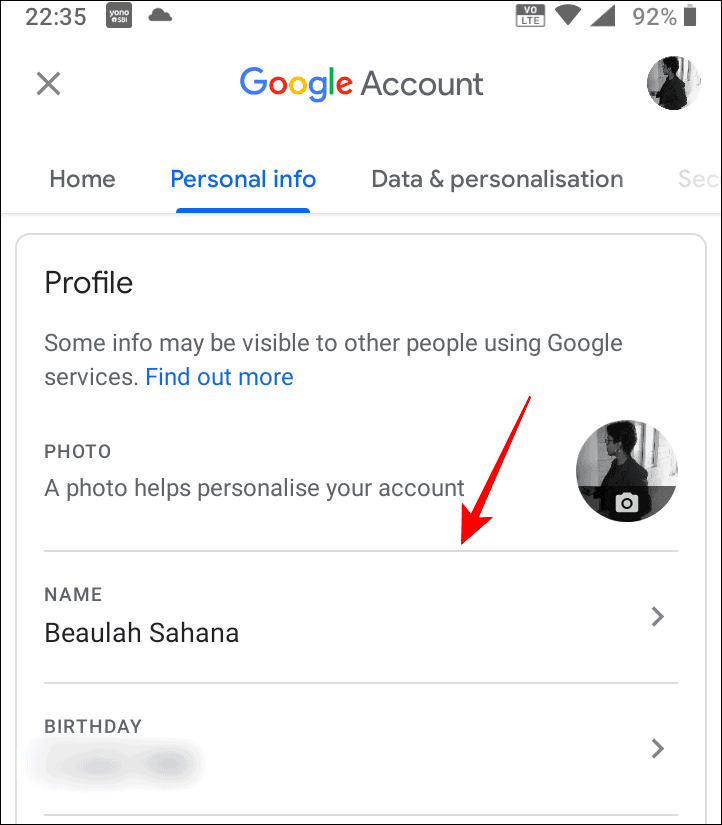
  4. After the page will reload, tap on your ‘Name’ in the profile section to edit it.
  5. Change your first and last name on the next screen and click on the Save button when you are satisfied with all the changes you have made.
Source: https://allthings.how/how-to-change-your-name-on-google-meet/
How to change your Google Meet name from the app
  1. If you do not have access to a computer, you can even use the Google Meet application on your mobile phone.
  2. Open the app on your phone, and press the three-bar menu button. This is located on the top-left corner of your phone screen.
  3. Click on your name in the menu and then tap on the option that says “Manage your Google account”.
  4. Open your Google Settings page, choose the Personal Info tab and, click on the name under the profile section on the screen. You can change your name here. After you are satisfied with your changes, click on the Save button.

Tweet55SendShare15
Previous Post

SucSEED INVESTS IN Str8bat

Next Post

The Specification For Successors To Qualcomm Snapdragon 888 Leaked Online

Arya Roy

Hi, this is Arya! Writing has always been a passion of mine, regardless of the topic I choose. Besides that, I am a huge foodie and music lover, whose interests range from world politics to horror films to everything in between.

Recommended For You

Apple Event Live Updates: iPhone 18 Pro Gets $100 Price Hike, New Camera and Handoff Feature Announced

by Shailja Jha
September 9, 2026
0
Apple Event Live Updates: iPhone 18 Pro Gets $100 Price Hike, New Camera and Handoff Feature Announced

Apple has officially unveiled the iPhone 18 Pro and iPhone 18 Pro Max, introducing a series of upgrades across cameras, performance, battery life, artificial intelligence and the overall...

Read more

Hunter Biden Launches $LAPTOP Cryptocurrency Inspired by Controversial Laptop

by Ishaan Negi
September 9, 2026
0
Hunter Biden Launches $LAPTOP Cryptocurrency Inspired by Controversial Laptop

Hunter Biden, the son of former US President Joe Biden, is entering the cryptocurrency world with a digital token inspired by one of the most controversial objects associated...

Read more

Cognizant Faces US Green Card Sponsorship Suspension Amid Visa Fraud Probe

by Ishaan Negi
September 9, 2026
0
Cognizant Faces US Green Card Sponsorship Suspension Amid Visa Fraud Probe

Indian-founded technology giant Cognizant is facing growing scrutiny in the United States after the US Department of Labor suspended the company’s ability to file new green card sponsorship...

Read more
Next Post
The Specification For Successors To Qualcomm Snapdragon 888 Leaked Online

The Specification For Successors To Qualcomm Snapdragon 888 Leaked Online

Please login to join discussion

Techstory

Tech and Business News from around the world. Follow along for latest in the world of Tech, AI, Crypto, EVs, Business Personalities and more.
reach us at info@techstory.in

Advertise With Us

Reach out at - info@techstory.in

Aviator Game India 2026

BROWSE BY TAG

#Crypto #howto 2024 acquisition AI amazon Apple Artificial Intelligence bitcoin Business China cryptocurrency e-commerce electric vehicles Elon Musk Ethereum facebook funding Gaming Google India Instagram Investment ios iPhone IPO Market Markets Meta Microsoft News OpenAI samsung Social Media SpaceX startup startups tech technology Tesla TikTok trend trending twitter US

© 2025 Techstory.in

No Result
View All Result
  • News
  • Crypto
  • Gadgets
  • Memes
  • Gaming
  • Cars
  • AI
  • Startups
  • Markets
  • How to

© 2025 Techstory.in

Welcome Back!

Login to your account below

Forgotten Password?

Retrieve your password

Please enter your username or email address to reset your password.

Log In
Are you sure want to unlock this post?
Unlock left : 0
Are you sure want to cancel subscription?