• Send Us A Tip
  • Calling all Tech Writers
  • Advertise
Thursday, November 12, 2026
  • Login
TechStory
  • News
  • Crypto
  • Gadgets
  • Memes
  • Gaming
  • Cars
  • AI
  • Startups
  • Markets
  • How to
No Result
View All Result
  • News
  • Crypto
  • Gadgets
  • Memes
  • Gaming
  • Cars
  • AI
  • Startups
  • Markets
  • How to
No Result
View All Result
TechStory
No Result
View All Result
Home How to

How to install the watchOS 8 developer beta

by Arya Roy
June 12, 2021
in How to, Tech
Reading Time: 2 mins read
0
How to install the watchOS 8 developer beta

Source: https://9to5mac.com/2021/06/11/how-to-install-watchos-8-beta/

TwitterWhatsappLinkedin

Apple has revealed the next major version of watchOS at the WWDC keynote and made the developer beta available for testing on the Apple Watch. The first public beta of watchOS 8 will be made available in July. Through this, you will be able to test out several new features, such as multiple timers, Focus mode, the new Mindfulness app, Photo watch faces with Portrait mode, and AssistiveTouch.

You might also like

IBM Ends H-1B and Green Card Sponsorship for Most Consulting Roles in US

Who Could Replace Jensen Huang as Nvidia CEO? 7 Names in the Spotlight

Sarvam AI Appoints Former Google Cloud India MD Sashikumar Sreedharan as President and CBO

How to install watchOS 8 developer beta

  1. Enroll as an Apple Developer over here, with a fee of $99 per year. Another option is to patiently wait for the free public beta program that will be released next month.
  2. Make a fresh backup of your Apple Watch, which occurs when you back up your iPhone. However, you should keep in mind that Apple does not allow downgrades from watchOS 8 to watchOS 7.
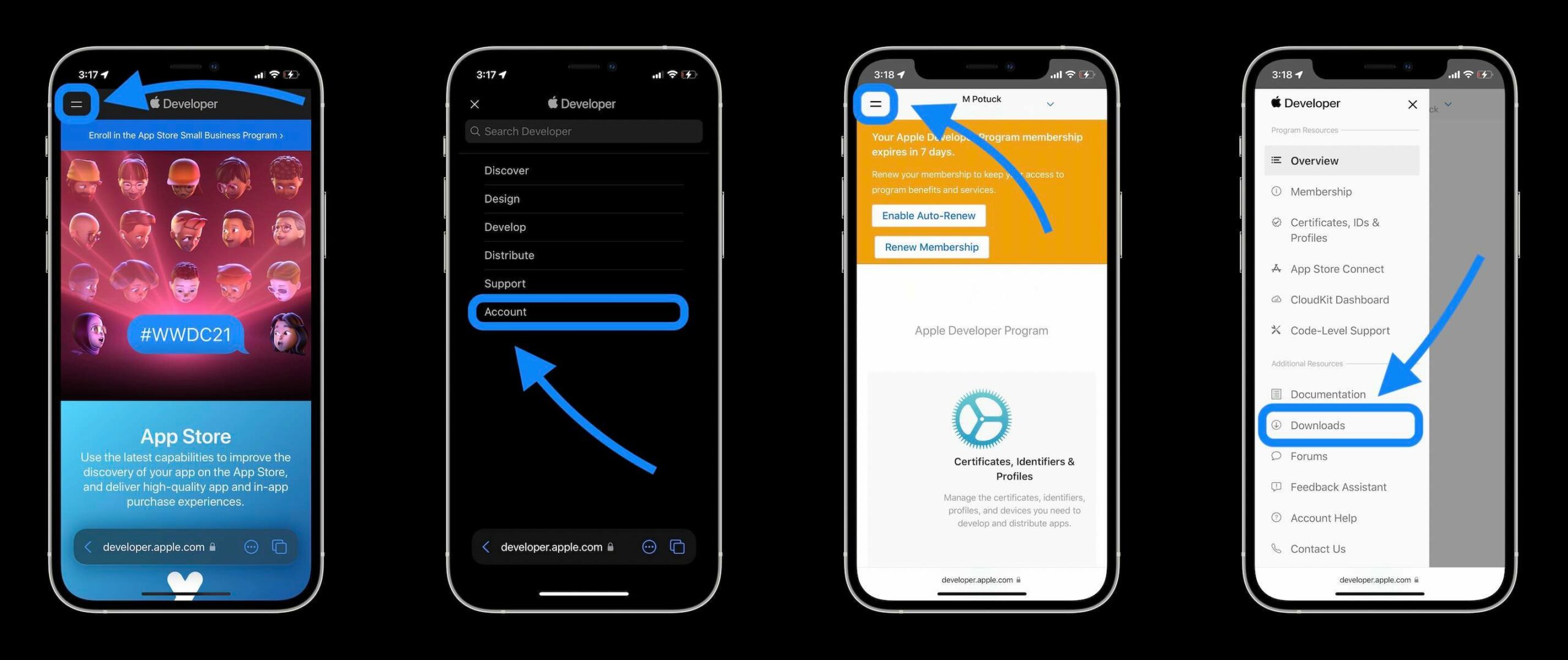
  3. On your iPhone that runs either the iOS 15 beta or 14.7 beta, go to the Apple’s Developer Website.
  4. Tap on the two-line icon in the top-left corner of your screen. Sign in if you are not already under Account.
  5. Tap on the two-line icon in the top-left corner and choose Downloads.
  6. Scroll down below iOS 14.7 beta and tap on Install Profile. This can be found next to watchOS 8 beta.
  7. Press Allow to download the profile, and then click on Close.
  8. Tap on Install, which can be found in the top-right corner, and type in your passcode if you are required to do so.
  9. Go through the consent agreement, and tap on Install twice.
  10. Your iPhone will prompt you to restart your Apple Watch so that the changes can be completed.
  11. After the reboot is done, head back to the iPhone application for Apple Watch > General > Software Update.
  12. You should be able to see that watchOS 8 is available. Press Download and Install.

Throughout this process, make sure that your iPhone is being charged with a minimum battery of 50%.
Source: https://9to5mac.com/2021/06/11/how-to-install-watchos-8-beta/
Tags: ApplewatchOS
Tweet54SendShare15
Previous Post

Doge meme’s NFT sold for a record breaking $4 million in auction

Next Post

Bohra faces 26 months in prison over Amazon insider trading

Arya Roy

Hi, this is Arya! Writing has always been a passion of mine, regardless of the topic I choose. Besides that, I am a huge foodie and music lover, whose interests range from world politics to horror films to everything in between.

Recommended For You

IBM Ends H-1B and Green Card Sponsorship for Most Consulting Roles in US

by Ishaan Negi
November 11, 2026
0
IBM Ends H-1B and Green Card Sponsorship for Most Consulting Roles in US

International Business Machines (IBM) is ending immigration and green card sponsorship for the majority of roles in its largest division, IBM Consulting, as the Donald Trump administration tightens...

Read more

Who Could Replace Jensen Huang as Nvidia CEO? 7 Names in the Spotlight

by Ishaan Negi
November 11, 2026
0
Who Could Replace Jensen Huang as Nvidia CEO? 7 Names in the Spotlight

Nvidia's leadership structure is facing renewed scrutiny as its board investigates allegations that CEO Jensen Huang was targeted by a foreign intelligence operation. The developments have also brought...

Read more

Sarvam AI Appoints Former Google Cloud India MD Sashikumar Sreedharan as President and CBO

by Ishaan Negi
November 11, 2026
0
Sarvam AI Appoints Former Google Cloud India MD Sashikumar Sreedharan as President and CBO

India's artificial intelligence (AI) start-up ecosystem is witnessing another significant leadership development as Sarvam AI has appointed Sashikumar Sreedharan as its President and Chief Business Officer (CBO). The...

Read more
Next Post
Amazon

Bohra faces 26 months in prison over Amazon insider trading

Please login to join discussion

Techstory

Tech and Business News from around the world. Follow along for latest in the world of Tech, AI, Crypto, EVs, Business Personalities and more.
reach us at info@techstory.in

Advertise With Us

Reach out at - info@techstory.in

Aviator Game India 2026

BROWSE BY TAG

#Crypto #howto 2024 acquisition AI amazon Apple Artificial Intelligence bitcoin Business China cryptocurrency e-commerce electric vehicles Elon Musk Ethereum facebook funding Gaming Google India Instagram Investment iPhone IPO Market Markets Meta Microsoft News OpenAI samsung Social Media SpaceX startup startups tech Tech news technology Tesla TikTok trend trending twitter US

© 2025 Techstory.in

No Result
View All Result
  • News
  • Crypto
  • Gadgets
  • Memes
  • Gaming
  • Cars
  • AI
  • Startups
  • Markets
  • How to

© 2025 Techstory.in

Welcome Back!

Login to your account below

Forgotten Password?

Retrieve your password

Please enter your username or email address to reset your password.

Log In
Are you sure want to unlock this post?
Unlock left : 0
Are you sure want to cancel subscription?